

 By
By  7 minutes read


VR video breaks away from the flatness of traditional 2D screens. Through 3D SBS (side-by-side) or 180°/360° panoramic conversion technology, it imbues ordinary video with depth, perspective, and a sense of space, thereby delivering a truly immersive viewing experience. Since most videos are still limited to 2D formats, and VR environments have stricter requirements for resolution, aspect ratio, and frame rate, professional VR video converters are essential.
This article will provide an in-depth look at the differences between various video formats and recommend several VR Video Converters to help you effortlessly bridge the gap between 2D and virtual reality.

Part 1. [2D] vs. [3D SBS] vs. [180°/360° VR]: What’s the Difference?
2D only provides a traditional flat screen, 3D SBS simulates stereoscopic depth through parallax, while 180° and 360° VR break the screen boundaries through surround view. The table below will visually illustrate their differences.
Comparison Table
| Format | What it is | Experience | Best Use |
|---|---|---|---|
| 2D | Standard flat video | Screen-like, no depth | Movies, YouTube, normal playback |
| 3D SBS | Side-by-side 3D video | Adds depth and realism | VR headsets, 3D films |
| 180° VR | Half-sphere view | Immersive forward view | Story videos, experiences |
| 360° VR | Full sphere view | Fully immersive environment | Games, virtual tours |
Why Do You Need to Convert Videos to VR?
When viewing standard 2D video on a VR headset, it gives only a flat sensation, as if the screen is simply floating in mid-air. VR conversion overcomes this limitation by reconstructing 2D video into 3D SBS (Single Screen), 180°, or 360° formats, providing a sense of depth and immersion suitable for a virtual space. Through this process, visual distortion is reduced and the sense of space is brought to life, allowing you to finally feel the true value of VR as an experience rather than a mere ‘viewing’.
Part 2. Top 4 VR Video Converters You Can Use
1. BuildVR

BuildVR is a simple web-based tool that helps you convert regular videos into VR-friendly formats without installing anything. It’s designed for quick conversions, especially if you’re just testing VR playback for the first time. You upload or paste a video link, choose a format, and it handles the rest. It’s not heavy on features, but that’s also what makes it easy to use.
2. VR Video Converter & VR Player

This VR Video Converter & VR Player Android app works as both a converter and a player, which is handy if you want everything in one place. It supports common VR formats like SBS and 360°, letting you adjust how videos appear in your headset. It’s mostly used by mobile VR users who want quick conversions without touching a desktop setup. The interface is simple, but it still gives you control over playback modes and formats.
3. Wondershare UniConverter

Wondershare UniConverter is a more advanced tool that handles almost every video format you can think of, including VR-related conversions. It’s known for strong format support, stable performance, and high-quality output. You can convert 2D videos into 3D SBS or other VR-compatible formats with more customization options. It’s a better fit if you care about quality and editing control rather than just quick conversion.
4. iFun Video Converter

iFun Video Converter is a lightweight option that focuses on fast conversions without complicated settings. It supports multiple formats and basic VR conversion features, making it useful for beginners who don’t want to deal with technical tools. While it doesn’t offer deep customization, it’s practical for everyday conversion tasks and smaller video files.
Part 3. How to Convert VR Videos to Normal Format
For large VR files, using a dedicated desktop tool like FliFlik UltConv Video Converter is far more reliable than online converters. This tool allows you to easily convert 360° VR videos to standard formats such as MP4, MKV, and MOV without any complicated settings. It is the ideal choice for users who want to process large amounts of data quickly and securely while bypassing web browser limitations.
FliFlik UltConv supports lossless conversion of 4K and 8K ultra-high-definition source files, and its batch processing feature allows you to convert multiple VR files at once, significantly reducing processing time. Additionally, it includes the ability to extract high-quality audio from videos, offering a powerful media management solution that goes beyond simple conversion.

- Ultra-fast conversion for large VR, 4K, and 8K files
- Supports multiple formats like MP4, MKV, MOV, AVI, MP3, AAC, FLAC
- Batch conversion for processing multiple files together
- Video to audio extraction without quality loss
- Works across devices including Windows, iPhone, and Android
- Maintains output quality during format changes
▼ Steps to Convert VR Videos to Normal Format with FliFlik UltConv
-
Download and install FliFlik UltConv Video Converter from the official website, then complete the setup process on your device.
FREE DOWNLOAD![secure download]() Secure Download
FREE DOWNLOAD
Secure Download
FREE DOWNLOAD![secure download]() Secure Download
Secure Download
-
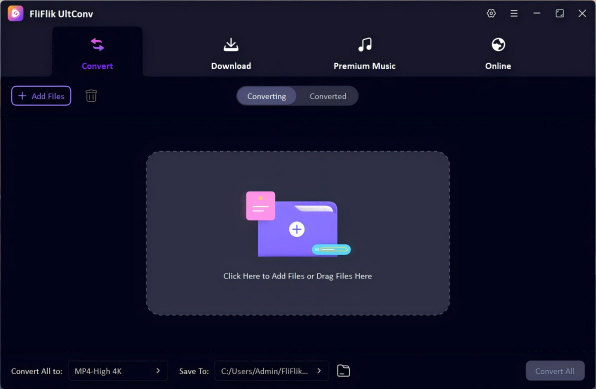
Open UltConv and go to the Convert section. Click Add File or simply drag and drop your VR video files (360°, SBS, or 3D clips). You can also add multiple files at once for batch conversion.
-
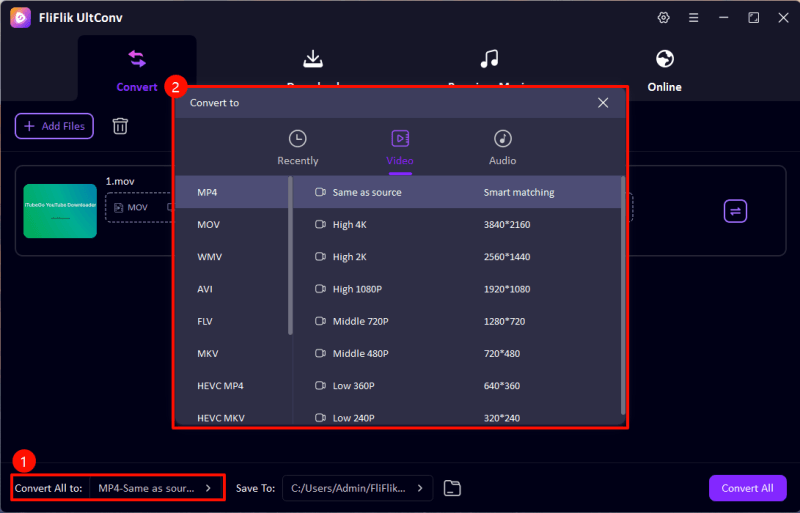
From the output format list, select MP4 (or any normal video format like MKV or MOV depending on your need).
-
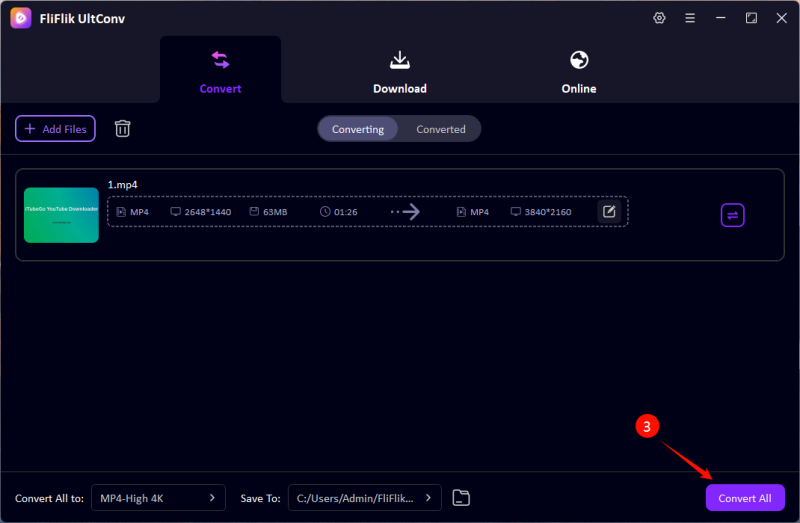
Choose the destination folder where you want to save the converted videos. Then click Convert All to start processing.
-
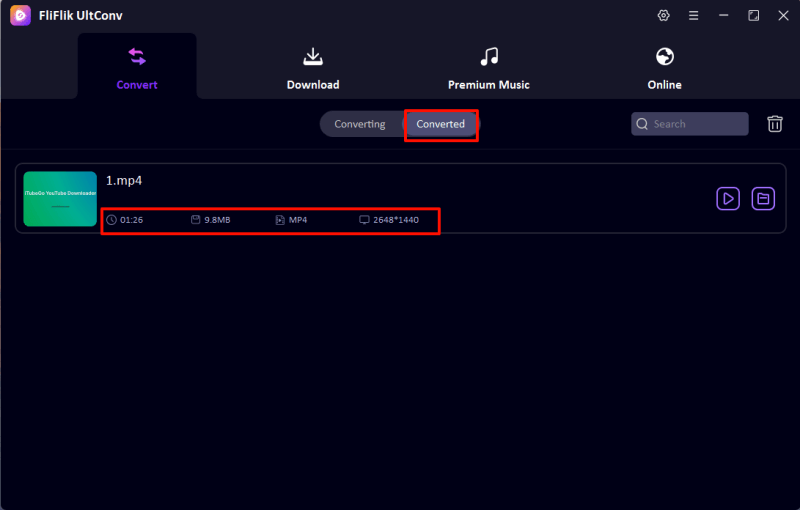
Once the conversion is complete, your VR videos will be saved in normal format and ready to play on any device without VR support.


FAQs
Q1. Can I convert video to VR?
Yes, you can. Normal videos can be converted into VR formats like 3D SBS or 360° using VR conversion tools. It won’t turn every video into true immersive content, but it can make it playable in virtual reality headsets with better depth and viewing angles.
Q2. Can I convert VR videos to normal?
Yes. VR videos like 360° or SBS can be converted back into standard formats such as MP4 or MOV. This helps when you want to watch them on normal screens without a VR headset.
Q3. What is the best VR video converter?
Desktop software is usually the most reliable. Tools like FliFlik UltConv Video Converter are often preferred because they handle large VR files smoothly and support multiple formats with stable output.
Conclusion
Whether you’re turning regular videos into VR or bringing VR clips back to standard formats, it all comes down to using the right VR video converter for the job. If you’re dealing with large VR files or want smoother results without trial and error, FliFlik UltConv Video Converter makes the process a lot easier. It keeps things fast, stable, and simple, especially when you’re working with VR, 360°, or high-resolution videos.
 Secure Download
Secure Download
Secure Download
