

 8 minutes read


Soundgasm keeps things refreshingly straightforward. It is a simple website for sharing voice clips, music, and spoken audio of all kinds. There are no apps to install and no cluttered menus to navigate; you simply open a link, press play, and start listening. The catch, however, is that there is no built-in way to download files, so offline listening is not an option.
Soundgasm audio downloader gives you a practical way to save audio files in formats like MP3 so you can listen whenever it suits you. In this article, we’ll break down how to stay safe, which PC tools and browser extensions actually work to download audio from Soundgasm.

Part 1. Is Soundgasm Safe?
Soundgasm itself is not a malicious platform. It’s a simple audio hosting site that relies on direct links and basic web playback. You don’t need to install software or create an account just to listen, which lowers the risk compared to many ad-heavy media sites. That said, “safe” depends on how you use it and what links you click. Here are the main risks to be aware of.
1. Unverified External Links
Soundgasm pages are often shared on forums or social platforms. Some links may redirect you to fake pages or unsafe sites, especially when shared outside trusted communities.
2. Malicious Ads On Third-Party Tools
Soundgasm itself has minimal ads, but many Soundgasm download tools do not. Online downloaders may show pop-ups, fake download buttons, or bundle unwanted software.
3. Privacy Concerns
Soundgasm does not require an account, but third-party downloaders might track IP addresses, cookies, or usage behavior, especially free web tools.
4. Content Reliability
Creators can delete audio at any time. Once a Soundgasm page is gone, the file is usually unrecoverable unless you’ve already downloaded it.
Used carefully, Soundgasm is generally safe. The real risks come from unsafe download methods, not the platform itself.
Part 2. Best Soundgasm Audio Downloader on PC
If you want a dependable way to handle Soundgasm downloads on a PC, FliFlik UltConv Video Downloader is a strong choice. It’s a standalone desktop application, which means you’re not relying on browser scripts or unstable online tools that often fail or disappear. This setup helps avoid common issues like broken downloads, intrusive ads, or unexpected drops in audio quality.
Its main advantage is versatility. UltConv Video Downloader supports downloads from platforms such as YouTube, Vimeo, Facebook, Instagram, Twitter, TikTok, Dailymotion, and Mixcloud, alongside Soundgasm. It also offers a clear range of output formats, including MP3, M4A, WAV, AAC, FLAC, MP4, MKV, AVI and more. Batch download support is especially useful for users saving multiple tracks, allowing consistent results with minimal manual effort.

- Supports downloads from 10,000+ sites, including Soundgasm
- Converts audio and video into 100+ formats, including MP3
- Lossless Soundgasm audio download with original bitrate preserved
- Batch download for multiple Soundgasm files
- Built-in browser for automatic audio detection
- Stable desktop tool with no ads or pop-ups
▼ How to Download Soundgams Videos with FliFlik UltConv Video Downloader?
-
To use, first download and install FliFlik UltConv Video Downloader.
FREE DOWNLOAD![secure download]() Secure Download
FREE DOWNLOAD
Secure Download
FREE DOWNLOAD![secure download]() Secure Download
Secure Download
-
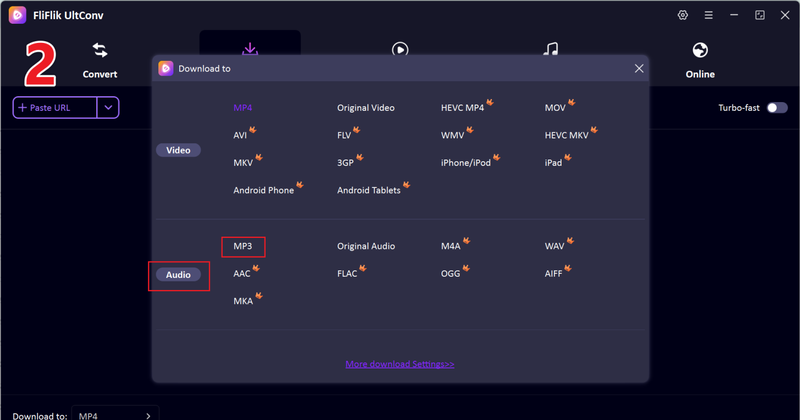
Next, open UltConv Video Downloader and go to the Download tab. Click the “Download to” button to choose format.

-
Select the output format, such as MP3, for audio downloads.
-
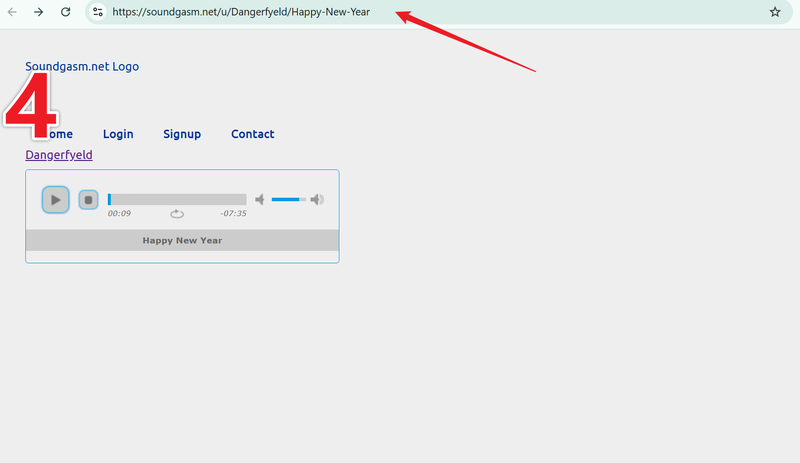
Open Soundgasm in your browser and copy the URL of the track you want to download.
-
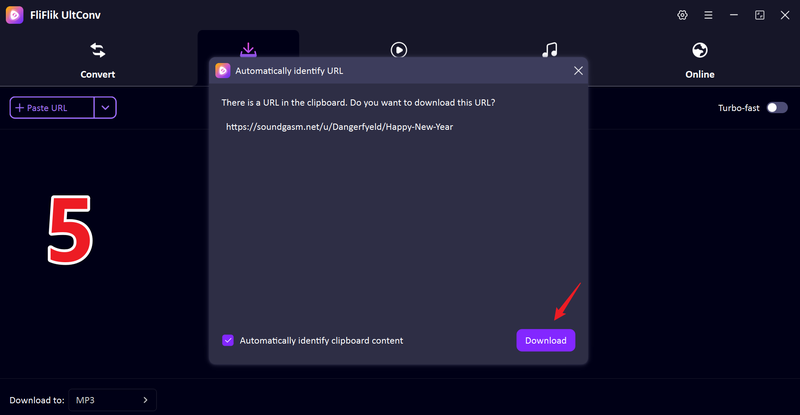
Return to UltConv. If the program detects the link automatically, click Download to save the audio.
-
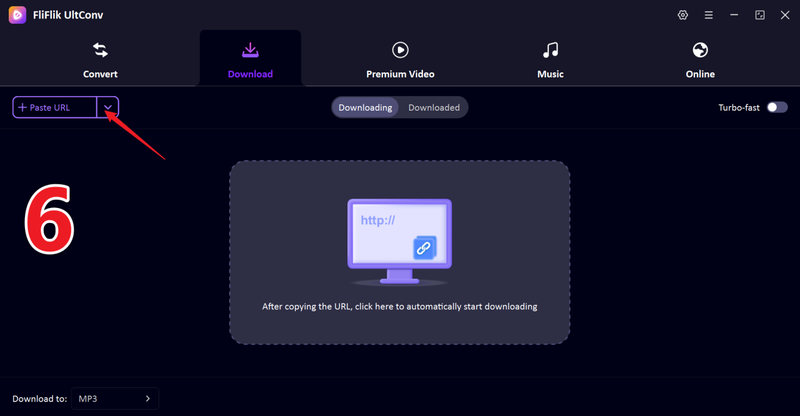
If the link isn’t detected, paste it manually into the search box and press Download.
-
The download will begin. Once it finishes, your video is saved directly to your computer, ready to watch offline anytime.
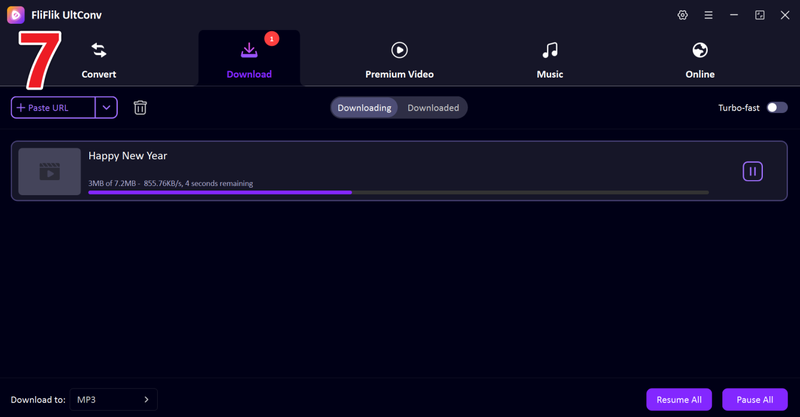


Once finished, your Soundgasm audio will be saved in the chosen format, ready to listen offline anytime, without buffering or restrictions.
Part 3. How to Download Soundgasm Audio Using Online Tools
If you don’t want to install software, online tools are an easy way to download Soundgasm audio. They work straight from your browser and are best for quick, one off downloads. While they don’t have the advanced features of desktop tools like FliFlik UltConv Video Downloader, they’re simple, fast, and convenient. Below are two reliable options that work well with Soundgasm.
1. PasteDownload

PasteDownload is an easy-to-use online downloader that supports multiple platforms, including Soundgasm. You just paste the audio URL, select your preferred format like MP3 and download the track in seconds. Its simplicity makes it ideal for users who want a fast solution without installing extra software. PasteDownload also supports other audio and video platforms, making it versatile for general media downloading.
- Supports multiple formats including MP3 and M4A
- No software installation needed; works entirely in your browser
- Free to use for single downloads
- Limited batch download support
- Download speed may vary depending on server load
2. FetchFile

FetchFile is another browser-based solution for downloading Soundgasm audio. It allows you to save high-quality MP3 files quickly by simply pasting the Soundgasm link. FetchFile also provides the option to download videos from other platforms, giving it flexibility beyond Soundgasm. The interface is clean and beginner-friendly, making it a practical choice for casual users who need a one-time or occasional download.
- Fast download for individual files
- Simple and easy-to-use interface
- Supports multiple platforms beyond Soundgasm
- No batch download or playlist support
- Ads on the website may be distracting for some users
Part 4. Top 2 Soundgasm Download Browser Extension
For users who prefer to stay in the browser without switching apps or websites, browser extensions can simplify the Soundgasm download. While convenient, extensions have limitations compared to desktop downloaders, but they are handy for occasional downloads. Here are two of the most popular options.
1. Soundgasm Download Button (Chrome Extension)

Soundgasm Download Button is a lightweight Chrome extension designed specifically for downloading Soundgasm audio. Once installed, it adds a download icon to the track page, making MP3 downloads just a click away. The extension works directly in the browser, so there’s no need to copy URLs or visit third-party sites. It’s ideal for users who want a fast and integrated download option while browsing Soundgasm.
- One-click download directly from Soundgasm pages
- Supports MP3 format and high-quality audio
- Lightweight and easy to install
- Only works with Chrome
- Batch downloading is not supported
2. Soundgasm Downloader (Firefox)

Soundgasm Downloader is a Firefox extension that allows users to save audio tracks from Soundgasm without leaving the site. The interface is straightforward, with a download button appearing on each audio post. This extension is perfect for Firefox users who want an integrated tool for saving tracks quickly. It supports most audio formats commonly used for playback on different devices.
- Seamlessly integrated with Firefox
- Simple interface; quick downloads
- Maintains high audio quality
- Limited to Firefox users
- Does not support bulk downloads or playlists
FAQs
Q1. How can I download Soundgasm audio on my computer?
You can download Soundgasm audio using different tools. Desktop software like FliFlik UltConv Video Downloader lets you save audio in MP3 or other formats directly from Soundgasm.
Q2. Is it legal to download Soundgasm files?
Downloading Soundgasm audio is legal only if you have permission from the creator or if the content is openly available for free download. Avoid redistributing copyrighted content without authorization, as that may violate copyright laws.
Q3. What is the best Soundgasm audio downloader?
For reliability, speed, and format options, FliFlik UltConv Video Downloader stands out. It supports thousands of websites, over 100 output formats, batch downloads, and preserves audio quality with ID3 tags intact.
Conclusion
Downloading Soundgasm audio doesn’t have to be complicated. While online tools and browser extensions offer convenience, they often come with limitations such as slow speed or the inability to batch download.
FliFlik UltConv Video Downloader offers a comprehensive solution, featuring fast downloads, high-quality MP3 output, and support for numerous websites. Whether you’re saving a single track or entire playlists, UltConv ensures a smooth, hassle-free experience to download Soundgasm audio
 Secure Download
Secure Download
Secure Download
Hello, I research and introduce useful solutions for AI videos, images, and audio tips in our daily life. If you learn these things, you can easily deal with the problems of the new era.

