

 8 minutes read


Honestly, finding a good Spotify downloader on Android is a challenge. There are just too many available, and all of them claim to have easy download processes, but most of them don’t deliver on their claims. Maybe you just want your favorite songs offline, or you need whole playlists and albums ready to go. Either way, having the right App changes everything. So, here’s a rundown of the top 12 Spotify Downloader Apps for Android in 2026. I’ll break down what each one offers, what works, and what doesn’t, so you can pick the one that actually suits you and keep your music just the way you like it.

Part 1. Top 12 Spotify Music Downloader Android Apps
Before we start looking at the Apps, here’s the thing: not every Spotify downloader for Android works the same. Some are fast, some keep the audio quality perfect, and some just make downloading simple and hassle-free. It really depends on what you need.
1. FliFlik UltConv for Android
Recommendation Star: ⭐⭐⭐⭐⭐
When it comes to downloading music on Android, FliFlik UltConv for Android stands out as one of the most versatile Spotify playlist downloader Android Apps available. It’s not just for Spotify; it works with over 10,000 streaming sites, from SoundCloud and YouTube to TikTok and Instagram. The App makes saving your favorite tracks, albums, or playlists effortless, while keeping audio quality intact at up to 320 kbps. Whether you want to grab a single song quickly or download an entire playlist in one go, FliFlik UltConv Video Downloader handles it smoothly. Its built-in browser, batch downloads, and fast conversion speeds make it ideal for music lovers on the go. By the way, FliFlik UltConv also provides Windows and Mac versions. The tool can help you build your Spotify music library on the computer. It can download Spotify playlist to MP3 320kbps with one click.

- Compatible with over 10,000 streaming sites, YouTube Music, Apple Music, SoundCloud, etc
- 320 kbps MP3/MP4 output for original audio quality
- Batch download videos and music to MP4, MP3, and over 100+ formats.
- Batch playlist download to grab whole playlists or albums in one tap
- 10× faster conversion using the built-in super-fast browser
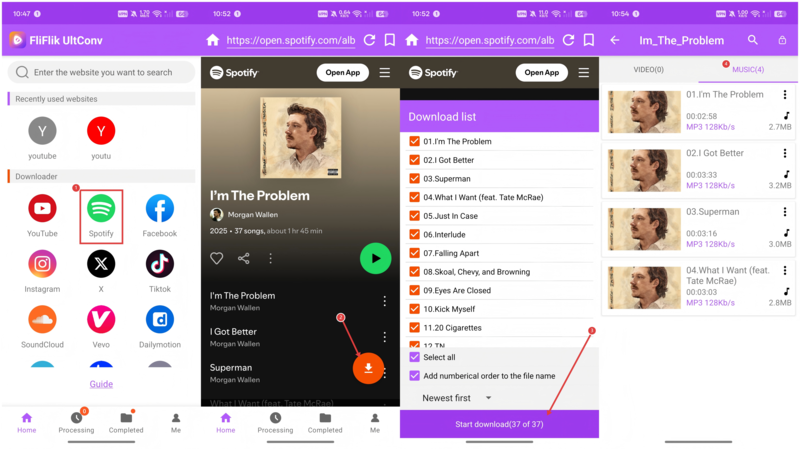
▼ Steps to Download Spotify with FliFlik UltConv for Android
-
Download and install the FliFlik UltConv App on your Android device. You can start with the free trial to test its features.
FREE DOWNLOAD![secure download]() Secure Download
FREE DOWNLOAD
Secure Download
FREE DOWNLOAD![secure download]() Secure Download
Secure Download
-
Open the App and sign in if prompted. Now you can use the built-in browser to find the Spotify playlist or track URL you want to download.
-
Tap the Download button. Choose your preferred format, such as MP4 for video or MP3 for audio, and select the quality.
-
Press Start Download. The video will be saved directly to your device, ready to watch offline anytime.

2. TuneCable Spotify Downloader
Recommendation Star: ⭐⭐⭐⭐☆

If you’re looking for a reliable way to download Spotify music on Android, TuneCable Spotify Downloader is a good option. It’s perfect for anyone who wants full control over playlists, albums, or podcasts while keeping original audio quality intact. TuneCable supports multiple formats like MP3, AAC, WAV, and FLAC, and preserves ID3 metadata so your music stays organized.
- Preserves bitrates and metadata
- Supports batch exports at up to 10× speed
- Downloads ad-free tracks from any Spotify account
- The Android App requires a TuneCable desktop license for full features
- Setup is more complex compared to simpler Android downloaders
3. NoteBurner Spotify Downloader
Recommendation Star: ⭐⭐⭐⭐⭐

NoteBurner supports multiple formats and keeps all your metadata intact, including titles, artists, albums, and lyrics. You can download individual tracks, full playlists, or podcasts quickly, and the App even auto-sorts your library to keep everything organized. While it requires sideloading the APK, once installed, it’s stable, ad-free, and efficient, making it ideal for anyone who wants their music ready wherever they go.
- Fast and reliable
- Works with both Spotify Free and Premium accounts
- Handles playlists, albums, and podcasts efficiently
- Ad-free and stable
- Free trial only converts the first minute of tracks
- Full access requires payment
- Must sideload APK; not available on Play Store
4. Sidify Music Converter
Recommendation Star: ⭐⭐⭐⭐☆

Sidify Music Converter is designed for Android users who want a smooth Spotify downloading experience. It is fast, allowing batch downloads up to 10× speed, and saves files directly to your device. Its interface is clean and safe, with no ads or unnecessary plugins. While the free trial limits downloads to 1 minute per track, the full version unlocks unlimited conversions. It’s ideal for users who prioritize quality and speed in a trusted Android Spotify downloader.
- Safe and ad-free
- Works on most Android versions
- Supports batch downloads of songs, playlists, and podcasts
- Clean and reliable interface
- Free trial limited to 1 minute per track
- Requires a Sidify desktop license for full Android functionality
- The full version is paid
5. YT Saver for Android
Recommendation Star: ⭐⭐⭐⭐

YT Saver for Android is a reliable downloader that works with Spotify and many other streaming platforms. The App handles batch downloads efficiently and supports thousands of sources beyond Spotify. YT Saver is perfect for users who value flexibility, multiple format support, and fast playlist conversion, all in a single tool.
- Flexible and versatile
- Fast batch conversion
- Maintains quality up to 320 kbps
- Handles playlists and albums efficiently
- Mobile version may require APK installation
- Some advanced features are more relevant on PC
- Requires purchase after free trial
6. SpotiFlyer
Recommendation Star: ⭐⭐⭐⭐☆

SpotiFlyer is a free, open-source Spotify music downloader Android App that allows users to download Spotify music quickly using links. You simply paste a track, album, or playlist URL, and it downloads the MP3 directly. The App delivers high-quality audio and keeps all downloads accessible in an offline library. Its interface is clean and easy to navigate, making it ideal for users who want a straightforward solution without logging in or dealing with ads. It also supports multiple services beyond Spotify, including YouTube and Gaana, making it a versatile tool for music lovers.
- No login or ads required
- Supports multiple streaming platforms
- Easy to use and quick downloads
- Occasional bugs due to unofficial development
- Quality depends on the source
- Some rare tracks may fail to download
7. Spowlo
Recommendation Star:⭐⭐⭐

Spowlo is an open-source Android downloader that uses YouTube as a source to fetch Spotify tracks. It supports multiple formats like MP3, FLAC, OGG, OPUS, and M4A while embedding album art and lyrics. Users can paste Spotify links or log in with credentials for faster search. While it’s free and versatile, audio quality is limited by YouTube sources, making it suitable for casual users who prioritize accessibility and playlist management over full Spotify bitrates.
- Free and open-source
- Handles playlist and album downloads
- Embeds metadata including lyrics
- No ads
- Maximum audio quality is limited (128 kbps)
- Relies on YouTube, so some tracks may fail
- Not true Spotify bitrate
8. Spotube
Recommendation Star: ⭐⭐⭐⭐

Spotube is a Spotify Downloader App that allows Android users to stream and download music directly via Spotify’s API. It is ad-free and lets you log in with your Spotify account to browse the library and download songs with one tap. The App stores MP3s offline in your chosen folder and offers multiple themes for customization. Spotube is perfect for users who want easy access to Spotify content with high-quality downloads while keeping their library organized and clean.
- Easy to use and integrates with the Spotify library
- Saves high-quality offline MP3s
- Cross-platform compatible
- Does not support podcasts
- Requires Spotify login
- Download quality is limited to Spotify’s stream
9. SpotDown
Recommendation Star: ⭐⭐☆☆☆

SpotDown is an Android App that allows users to preview and download Spotify songs, albums, and playlists. It offers high-quality MP3 downloads and a built-in Spotify search for easy browsing. While it has a clean and intuitive interface, the App’s reliability is inconsistent. It’s suitable for users looking for basic Spotify download features but comes with potential bugs, ads, and lower success rates for certain tracks.
- Clean and intuitive interface
- Let’s you preview tracks
- Feature-rich for basic downloading
- Low user rating
- Contains ads
- Unreliable for some tracks
10. Fildo
Recommendation Star:⭐⭐⭐⭐

Fildo is an Android Spotify Playlist downloader App that aggregates tracks from multiple web sources. It allows Spotify playlist imports for offline listening. Fildo supports MP3 and FLAC, often offering higher quality than Spotify’s free tier. While it provides a vast library and seamless Spotify integration, it isn’t on Google Play, and download reliability varies. It’s a powerful tool for users who prioritize access to rare tracks and high-quality streams.
- Vast library including rare tracks
- Offline mode built-in
- Seamless Spotify playlist import
- APK installation required
- Variable quality and reliability
- Ads common
11. SpotMate
Recommendation Star: ⭐⭐⭐⭐

SpotMate is a browser-based Spotify downloader with an optional Android App. Paste a Spotify URL to convert tracks, albums, or playlists to MP3 online. It provides 320 kbps downloads, doesn’t require login, and offers a paid tier for FLAC and faster downloads. It’s ideal for users who want a no-install solution for Android.
- Works on any Android device
- No installation needed
- Free tier available
- Free mode is limited to MP3 and queue wait
- Dependent on SpotMate servers
12. SpotifyPlaylistDownloader
Recommendation Star: ⭐⭐⭐

SpotifyPlaylistDownloader is an open-source Android App that fetches Spotify playlists via YouTube Music. It saves tracks as MP3 or M4A, allowing offline listening. While simple and free, the quality is limited by YouTube’s audio, and it may not match Spotify tracks perfectly. Ideal for DIY users who want free playlist downloads without relying on commercial Apps.
- Simple and straightforward
- Supports entire playlist downloads
- Free with no ads
- Quality capped (128~256 kbps)
- Relies on YouTube Music
- No official support or updates
Part 2. Comparison of the 12 Best Spotify Downloader for Android
Now, let’s compare these 12 Spotify downloader Android Apps to see which tool is perfect for your needs. We’ll look at audio quality, batch download capabilities, download speed, limits, success rate, and what each tool is best for. This side-by-side view makes it easier to pick the right App based on your needs, whether you want fast playlist grabs, lossless quality, or simple, hassle-free downloads.
| App | Max Output Quality | Batch Download | Download Speed | Download Limits | Success Rate | Best For |
|---|---|---|---|---|---|---|
| FliFlik UltConv | up to 320 kbps | Yes | 10× | Unlimited (10,000+ sites) | Very high | Multi-site high-quality downloads |
| TuneCable | up to 320 kbps | Yes | 3x | Only support Spotify | High | Premium-quality conversion |
| NoteBurner | up to 320 kbps | Yes | 10× | Only support Spotify | High | Safe, batch Spotify downloads |
| Sidify | Lossless | Yes | 10× | Only support music streaming | High | Lossless downloads |
| YT Saver | up to 320 kbps | Yes | 10× | 10,000 platforms | High | Versatile bulk downloading |
| SpotiFlyer | up to 256 kbps | Yes | 1x | Only support Spotify | Moderate–High | Easy link-based downloads |
| Spowlo | 128kbps | Yes | 1x | Only support Spotify | Moderate | Open-source YouTube-based Spotify downloads |
| Spotube | 256 kbps | No | 1x | Only support Spotify | High | Free Spotify client with downloads |
| SpotDown | 256 kbps | Yes | 1x | Only support Spotify | Low | Feature-rich but ad-heavy, unreliable |
| Fildo | up to Hi-Fi | Yes (playlist import) | Normal | Only support music streaming | Medium | Large library, Spotify playlist import |
| SpotMate | 320 kbps | Yes (via online) | Normal | Only support Spotify | Midium | For users who need convenience |
| Spotify Playlist Downloader | 128 kbps | Yes (playlist) | Normal | Only support Spotify | Moderate | Tech-savvy |
Final Words
When it comes to choosing a Spotify downloader Android, it really comes down to what you need. Free Apps like SpotiFlyer and Spotube work well for casual users who just want to save a few tracks. But if you’re serious about high-quality downloads, fast batch playlist grabs, and hassle-free use, FliFlik UltConv is tough to beat. It handles entire Spotify playlists at 320 kbps, keeps all metadata intact, and works across thousands of sites.
If you want the ultimate combination of speed, quality, and convenience, give FliFlik UltConv for Android a try. Download your favorite songs and playlists effortlessly, enjoy them offline anytime, and keep your Spotify library organized exactly how you like it. Your music, your way, no limits, no ads, just smooth listening.
 Secure Download
Secure Download
Secure Download
Hey there! I am Maxwell Clark. I'm always looking for new tech tools that make a difference, from making visuals and audio better to making workflows better. I'm going to share tips and tricks for using AI tools for videos, audio, and images. I'm excited to help you navigate the digital world more efficiently and creatively!

