

 8 minutes read


Spotify is huge when it comes to streaming music, but actually downloading songs, especially in high-quality MP3 format for all your devices, can get frustrating fast. With TunePat Spotify Converter, you can turn your Spotify tracks, albums, or playlists into MP3, AAC, WAV, or pretty much whatever you need without losing out on sound quality or song info.
In this article, we will explore exactly how TunePat Spotify Music Converter works, highlight its key features, and provide a balanced look at its pros and cons. We’ll also share real user feedback from Reddit, walk you through the process step-by-step, and even suggest a superior alternative for those looking for a different option.

Part 1. What is TunePat Spotify Music Converter?

TunePat Spotify Music Converter is a desktop tool built to help users download and convert Spotify content for offline use beyond the Spotify app. Instead of being tied to streaming restrictions, it allows you to save Spotify music as standard audio files that work on any device. This includes not only songs, but also albums, playlists, podcasts, audiobooks, radio stations, and even Spotify music and podcast videos.
It converts Spotify tracks into common audio formats without lowering sound quality, making it easier to store, transfer, or play music anywhere. For users who manage large libraries or prefer local playback, this makes a noticeable difference. TunePat also keeps all song details intact, supports lyric downloads, and processes multiple tracks at once, so even large playlists don’t take forever to convert.
- Download Spotify albums, playlists, podcasts, audiobooks, radio stations, and video content
- Convert Spotify music to MP3, AAC, WAV, FLAC, AIFF, and ALAC formats
- Preserve Spotify’s lossless audio quality after conversion
- Keep full ID3 tag information, including title, artist, album, artwork, track number, and year
- Save lyrics as LRC or TXT files for compatible music players
- Support batch conversion with up to 10X faster download speed
Pros and Cons of TunePat Spotify Music Converter
- Supports nearly all Spotify content types, not just music
- Wide range of output formats, including lossless options
- Maintains original audio quality
- Excellent metadata and lyric preservation
- Fast batch processing for large libraries
- Free version comes with usage limits
- Full features require a paid license
- Desktop-only software, no mobile version
Reddit User Reviews
On Reddit, TunePat Spotify Music Converter is frequently mentioned in comparison threads about Spotify downloaders. Many users highlight its stable performance and consistent audio quality, especially when converting large playlists. Metadata accuracy and lyric support are also commonly praised.
Some Reddit users point out that the interface can feel a bit overwhelming at first, and the free trial is fairly limited. Still, overall feedback is positive, with many recommending TunePat for users who want reliable conversions and high-quality local Spotify files rather than a flashy or overly simplified tool.
Part 2. How to Use TunePat Spotify Music Converter
TunePat is designed to be flexible without being confusing. Even though it offers many settings, the actual conversion process is straightforward. You only need to choose a source, adjust a few options, and start converting.
-
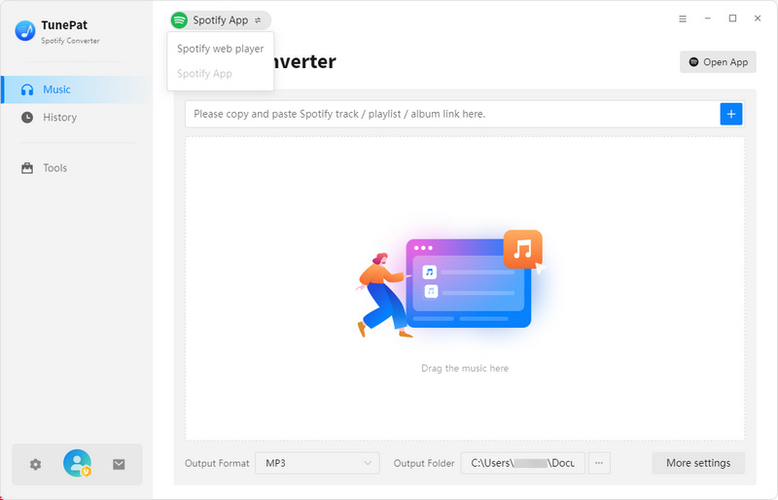
Step 1: Open TunePat and select whether you want to convert music from the Spotify desktop app or the Spotify web player. After choosing, log in to your Spotify account. Both Free and Premium accounts are supported.
-
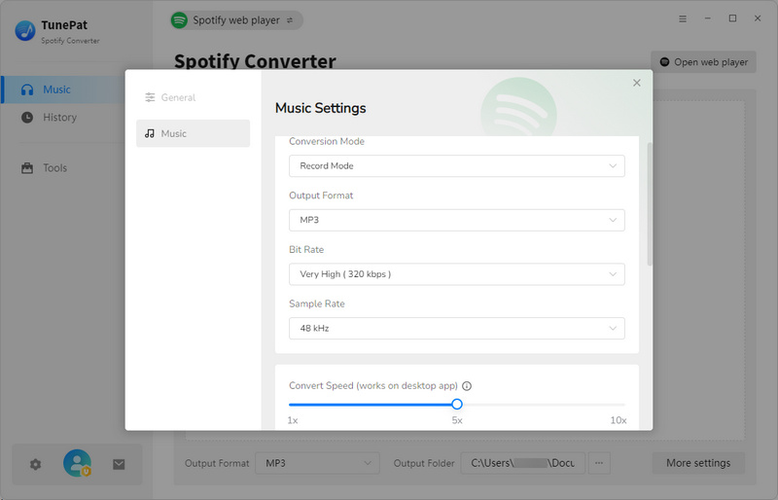
Step 2: Click the Settings icon to choose your output format like MP3, AAC, WAV, or FLAC. You can also adjust audio quality, output folder, file naming rules, and enable lyric saving if needed.
-
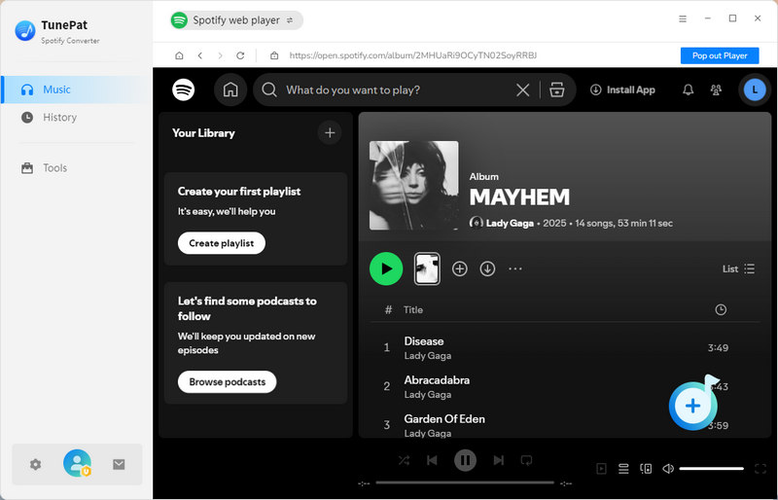
Step 3: Browse Spotify inside TunePat, select songs, playlists, or podcasts, and click Add. TunePat will automatically load the selected tracks and filter out duplicates if enabled.
-
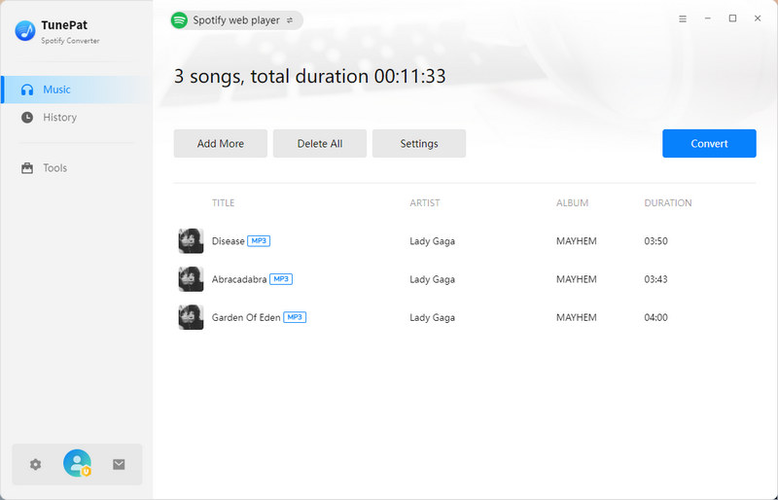
Step 4: Click Convert to start downloading your Spotify music. Once finished, all converted files will be saved locally and ready for offline use on any device.


Part 3. Better Alternative: FliFlik UltConv Music Converter
If TunePat feels limited or a bit heavy for what you need, FliFlik UltConv Music Converter offers a more balanced approach. It’s designed for users who want reliable Spotify downloads without dealing with account restrictions or complicated settings. One of its biggest strengths is format flexibility. UltConv lets you convert Spotify music to MP3, AAC, WAV, FLAC, or M4A, making it easy to play your files on phones, cars, smart speakers, or older devices.
UltConv Music Converter supports lossless conversion and MP3 output up to 320 kbps, so your downloaded tracks still sound close to the original stream. On top of Spotify, UltConv Music Converter supports over 10,000 streaming music sites, making it a solid long-term tool rather than a one-platform solution.

- Download Spotify songs, albums, playlists, artists, podcasts, and audiobooks
- Support 10, 000+ streaming sites like Spotify, Apple Music, Amazon Music, Tidal, etc.
- Convert Spotify music to MP3, AAC, WAV, FLAC, M4A, 100+ and more
- Enjoy lossless audio quality up to 320 kbps MP3
- Keep all ID3 tags and metadata automatically
- Batch download music without needing a Spotify Premium account
▼ How to Download Spotify to MP3 with UltConv Music Converter?
Here’s a simple way to convert Apple Music tracks into MP3 or other audio formats using UltConv Music Converter.
-
Open UltConv’s official website, download the Music Converter for Windows or Mac, and complete the installation on your computer.
FREE DOWNLOAD![secure download]() Secure Download
FREE DOWNLOAD
Secure Download
FREE DOWNLOAD![secure download]() Secure Download
Secure Download
-
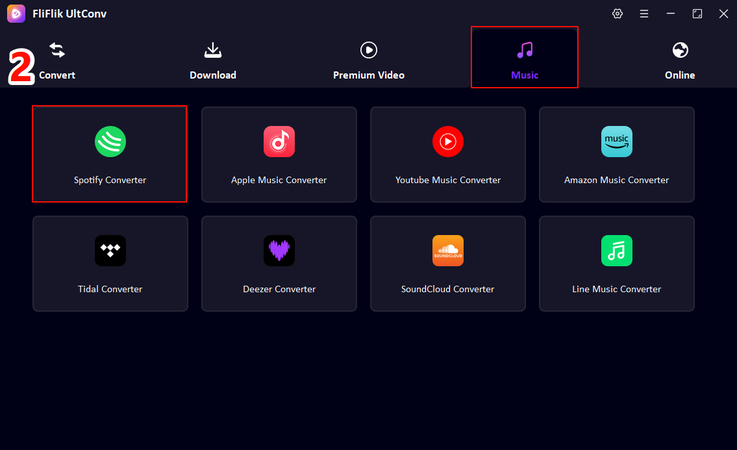
Start UltConv. From the home screen, switch to the Music section and select Apple Music Converter.
-
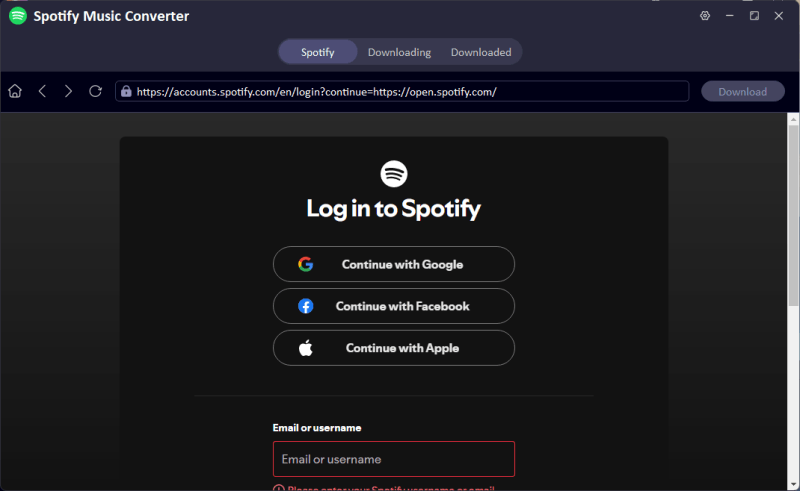
Log in using your Apple ID. Once signed in, UltConv will automatically load your Apple Music library.
-
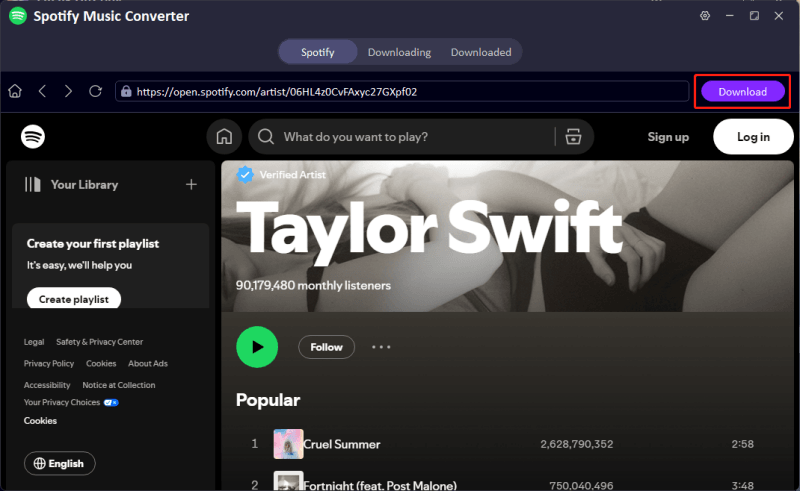
Now go through your library and choose the songs, albums, or playlists you want to save. Then click the Download button to continue.
-
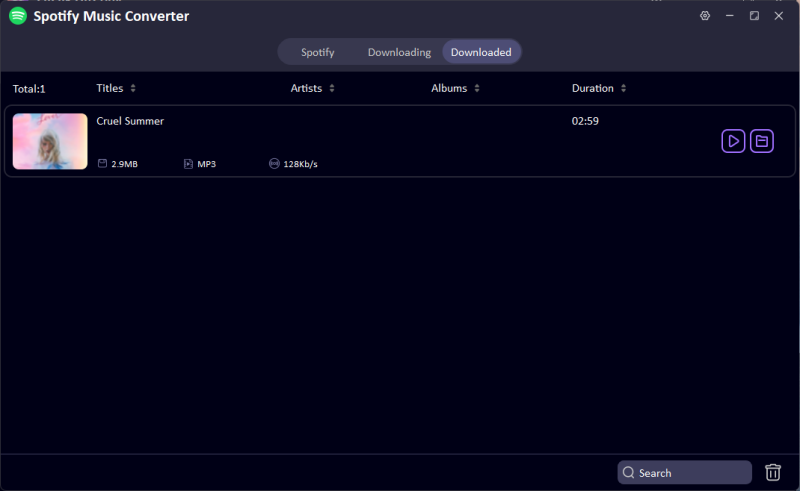
The download process will begin right away. You can monitor the status in the Downloading tab. When finished, your music will be stored as DRM-free MP3 files or in any other format you selected, ready to play offline anytime.


Quick comparison: TunePat vs. FliFlik UltConv
Both tools help you save streaming music as local files, but they target slightly different needs. TunePat is focused on converting content from a single platform with high fidelity and detailed metadata support. FliFlik UltConv Music Converter handles Spotify plus thousands of other sites and supports a wider range of formats. If you want one tool that can download music, playlists, and even video content from multiple services, not just Spotify, UltConv is the more versatile choice.
| Feature | FliFlik UltConv Music Converter | TunePat Spotify Music Converter |
|---|---|---|
| Price | Paid (free trial with limits) | Paid (free trial with limits) |
| Output Format | MP3, AAC, WAV, FLAC, M4A, AIFF, MKA, 100+ formats | MP3, AAC, WAV, FLAC, AIFF, ALAC |
| Audio Quality | Up to 320 kbps lossless-like quality | Preserves lossless quality |
| Batch Download | Yes | Yes |
| Stability | Stable for Spotify + many platforms | Stable for Spotify only |
| Free Trial | Yes (limited) | Yes (limited) |
| Platform Scope | Spotify + 10,000+ sites | Spotify only |
| Metadata & Tags | Strong ID3 support | Excellent ID3 and lyric support |
| Ease of Use | Flexible with broader use cases | Simple and focused |
FAQs
Q1. Is TunePat Spotify Music Converter free?
No, TunePat offers a free trial, but it comes with limitations such as time caps on converted tracks or restricted output length. To unlock full functionality, unlimited conversions, full-length songs, batch downloads, and all format options, you need to purchase a license. The trial lets you test performance and output quality before you buy.
Q2. What if TunePat Spotify Music Converter is not working?
If TunePat isn’t working properly, common fixes include updating the app to the latest version, making sure your Spotify account is logged in, and checking your internet connection. If problems persist, consider using a more flexible converter like FliFlik UltConv Music Converter, which tends to work across more platforms and handles large playlists more smoothly.
Conclusion
If you want a more powerful and flexible solution that works with Spotify and many other music sources, FliFlik UltConv Music Converter is worth considering. UltConv supports more output formats, handles broader use cases, and offers strong batch download performance, making it a better long-term tool for managing offline music libraries.
Whether you stick with TunePat or choose UltConv Music Converter, both tools give you more control over your music than Spotify alone.
 Secure Download
Secure Download
Secure Download
Hello, I research and introduce useful solutions for AI videos, images, and audio tips in our daily life. If you learn these things, you can easily deal with the problems of the new era.

