

 8 minutes read


YouTube Music ReVanced takes the regular YouTube Music app and gives it a serious upgrade. You can get premium features like an ad-free experience and unrestricted background playback, all without the cost of a subscription. If you’re tired of constant interruptions or not being able to play music offline, this version just makes life easier.
We’ll guide you through ReVanced’s core functionality, its standout features, and how it compares to both the free and premium versions of YouTube Music. We’ll also introduce a reliable tool for downloading music from YouTube as a backup in case ReVanced isn’t an option. By the end of this guide, you’ll know exactly how to enjoy your favorite tracks hassle-free, whenever and wherever you want.

Part 1. What is YouTube Music ReVanced?

YouTube Music ReVanced is a modified version of Google’s official YouTube Music app. It is designed to provide premium-like features for free, giving users an enhanced music streaming experience without ads or subscription limitations. While the official app restricts background playback, disables offline listening in the free version, and inserts ads between songs, ReVanced removes these obstacles, offering uninterrupted music.
It is an APK-based installation for Android devices, giving you more flexibility and control over your listening habits. The app also includes tweaks that allow video previews, background playback, and improved audio management, making it a powerful alternative for anyone looking to upgrade their music experience without paying for YouTube Music Premium.
- Ad-Free Experience: Blocks all audio and video ads, allowing continuous listening without interruptions.
- Background Playback: Lets you play songs even when the app is minimized or the screen is off.
- Offline Playback Support: Some ReVanced builds allow saving songs for offline use without Premium.
- Customization Options: Modify UI elements, skip certain prompts, or enable dark mode and audio enhancements.
- Playlist and Queue Management: Full access to playlists, queue reordering, and improved navigation.
Pros and Cons of YouTube Music ReVanced
- Free access to features normally reserved for Premium users
- Background playback allows multitasking while listening
- Ad-free streaming ensures uninterrupted listening sessions
- Can save data by disabling auto-play or autoplay previews
- APK installation requires manual updates; not available on Google Play
- Potential compatibility issues with certain Android devices
- Security risks if downloaded from unverified sources; must use trusted APK links
Free YouTube Music vs. YouTube Music Premium vs. YouTube Music ReVanced
| Feature | Free YouTube Music | YouTube Music Premium | YouTube Music ReVanced |
|---|---|---|---|
| Ads | Yes | No | No |
| Background Playback | No | Yes | Yes |
| Offline Listening | No | Yes | Yes |
| Audio Quality | Standard | High | High |
| Subscription Required | No | Yes | No |
| Playlist & Queue Management | Limited | Full | Full |
| Customization Options | Minimal | Minimal | Extensive |
Part 2. How to Install and Use YouTube Music ReVanced APK?
Installing YouTube Music ReVanced safely involves patching the official YouTube Music APK using the ReVanced Manager app. This method ensures you don’t download unsafe pre-patched APKs and keeps your device secure. Follow these steps to get ReVanced YouTube Music up and running on your Android device.
-
Step 1:
Get ReVanced Manager
Visit the official ReVanced website or their GitHub page to download the latest ReVanced Manager APK. Install it on your Android device and grant any necessary permissions.
-
Step 2:
Download YouTube Music APK
Head to a trusted source like APKMirror. Search for “YouTube Music” and download a version compatible with your device architecture. You can confirm your device architecture within the ReVanced Manager app under “Supported Archs.” Do not install the APK yet.
-
Step 3:
Install ReVanced MicroG (GmsCore)
Download ReVanced MicroG from the official ReVanced site or GitHub. This allows you to log in to your Google account on the patched app. Huawei users may need a special MicroG build.
-
Step 4:
Patch the YouTube Music APK
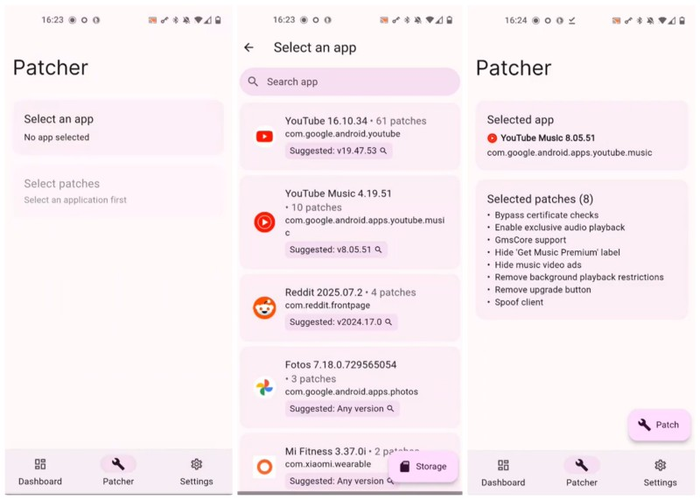
Open the ReVanced Manager and go to the “Patcher” tab. Locate your downloaded YouTube Music APK. Select the patches you want (such as ad-blocking or background playback), then tap “Patch.” Wait a few minutes while the app applies the modifications.
-
Step 5:
Install the Patched App
Once the patching is complete, tap “Install.” You may need to allow installation from unknown sources if prompted.
-
Step 6:
Set Up YouTube Music ReVanced
Open the patched app and log in with your Google account using the MicroG authentication. Check that ads are blocked, and that background playback and other premium features are working correctly.

Better Alternative: When YouTube Music ReVanced Not Working
Sometimes, even the most popular mods like YouTube Music ReVanced can run into issues with installation problems, app crashes, or limited device compatibility. If that happens, you still want a reliable way to save your favorite tracks and playlists for offline listening. With FliFlik UltConv Video Downloader, you can download YouTube Music songs, playlists, or entire channels directly to your computer in high-quality MP3 or other audio formats.
It’s designed to handle music and videos from over 10,000 sites, including YouTube, Spotify, Apple Music, and more. You can batch-download content, preserve metadata like ID3 tags, and even save live streams in real-time. It’s built-in browser makes finding and downloading tracks easy, while a private folder ensures your files stay secure.

- Convert files to MP3, MP4, WAV, FLAC, AAC, AIFF, and 100+ more
- Batch download playlists, albums, or multiple videos at once
- Save high-quality audio up to 320kbps without quality loss
- Remove DRM from Spotify and Apple Music for offline playback
- Built-in browser to search and download content seamlessly
- Private folder to securely store your downloaded files
▼ Steps to Download YouTube Music Using UltConv Video Downloader:
-
First of all, download and install FliFlik UltConv Video Downloader. Next, open UltConv Video Downloader. Click on the “Download tab,” and then click on the “Download to” button at the bottom.
FREE DOWNLOAD![secure download]() Secure Download
FREE DOWNLOAD
Secure Download
FREE DOWNLOAD![secure download]() Secure Download
Secure Download

-
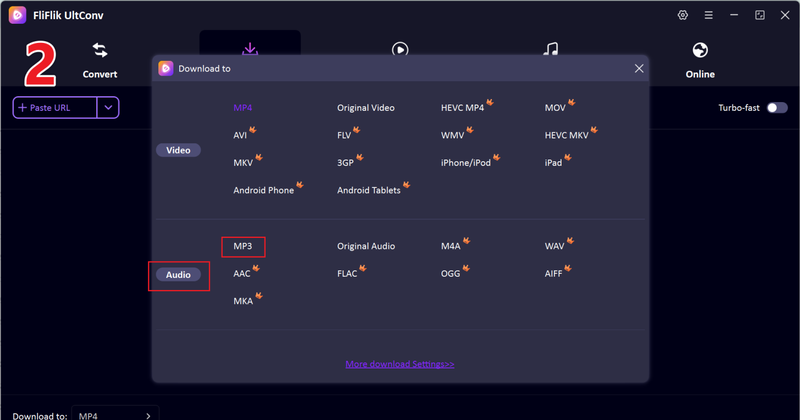
Choose your preferred output format. For audio, select MP3, or pick another format if needed.
-
Open YouTube in your browser, find the video or playlist you want, and copy its link. Return to UltConv.

-
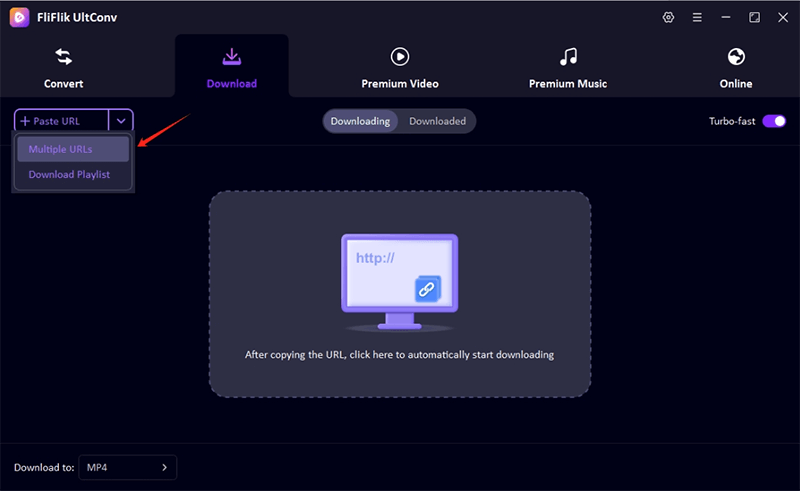
UltConv should detect the link automatically and show a pop-up window. Click Download to start saving the audio.

-
If the pop-up doesn’t appear, paste the copied YouTube link manually into the URL box and click Download to complete the process.
-
The download process will begin immediately and once done, you songs will be saved in your device.



FAQs
Q1. Is ReVanced YouTube Music Legal?
YouTube Music ReVanced itself is not an official app, so it exists in a legal gray area. It modifies the official YouTube Music APK without violating the copyright of the content itself. You can use it for personal offline listening, but distributing the app or using it to bypass paid content may be considered illegal.
Q2. Is YouTube Music ReVanced Safe to Use?
Yes, if you use the official ReVanced Manager to patch the app. Avoid downloading pre-patched APKs from unknown sources, as these may contain malware or harmful code. Using the manager ensures a secure installation.
Q3. How can I download YouTube songs for offline listening?
You can use YouTube Music ReVanced for offline playback within the app. Alternatively, tools like FliFlik UltConv Video Downloader allow you to save YouTube videos and convert them to MP3, supporting playlists, channels, and high-quality audio.
Conclusion
YouTube Music ReVanced is a solid choice for ad-free listening and background play without a premium subscription. However, if you want more flexibility, like downloading playlists or converting videos to MP3, FliFlik UltConv Video Downloader is a better alternative.
It supports downloads from over 10,000 sites, preserves high-quality audio, and offers batch downloads, making it perfect for building your offline music library safely and efficiently.
 Secure Download
Secure Download
Secure Download
Hello, I research and introduce useful solutions for AI videos, images, and audio tips in our daily life. If you learn these things, you can easily deal with the problems of the new era.

