

 By
By  8 minutes read


If you’ve ever tried saving online videos for offline viewing, you’ve probably come across tools like AhaSave. It’s a lightweight video downloader designed to help users download videos from social platforms using simple links or a built-in browser. Instead of complicated setups, it focuses on quick downloads from sites like Facebook, Instagram, Twitter, and many others. In this AhaSave review, we’ll break down what Ahasave actually offers, how users feel about it, and what Ahasave alternatives might work better depending on your needs.

- Part 1. What is AhaSave?
- Part 2. How to Use AhaSave to Download OnlyFans?
- Part 3. Real Customer Feedback on Using AhaSave
- Part 4. Best AhaSave Alternative to Download OnlyFans on Android
- Part 5. AhaSave vs. FliFlik UltConv: Which One is Best OnlyFans Downloader
- Conclusion
- FAQs about AhaSave
Content Table:
Part 1. What is AhaSave?
AhaSave is a lightweight video downloader app designed for Android that helps users save online videos, photos, and media from different social platforms directly to their device. It works through two simple methods: a built-in browser or by pasting a video link. Once the content is detected, users can download it in just a few taps and watch it offline anytime. On Android, it’s mainly used for quick saving, offline viewing, and managing downloaded media in one place without needing extra tools or complicated setup. One of its common versions is AhaSave All Video Downloader, which is designed to support multiple platforms and simplify the downloading process even further.
- Download videos using link paste or built-in browser
- Supports multiple social media platforms
- Batch download multiple videos at once
- Built-in download manager for organizing files
- Offline playback with in-app video player
- Supports HD-quality downloads depending on source
Part 2. How to Use AhaSave to Download OnlyFans?
Here’s a simple breakdown of how people use the AhaSave OnlyFans downloader on Android to save videos through the app’s built-in browser and download system.
- Step 1: Install AhaSave All Video Downloader from the Google Play Store on your Android device and open the app once installation is complete.
- Step 2: Open the app and use the in-app browser to search for OnlyFans, then log in to your account to access your feed.
- Step 3: Search or browse for the video you want to download and tap on the play button to load it.
-
Step 4:
The app will auto-detect the video link and show a download option, tap the orange download icon.
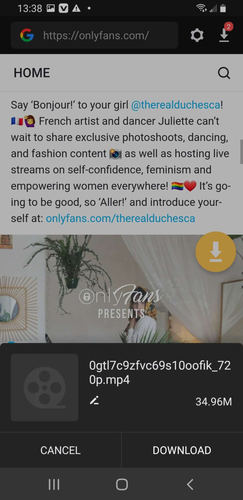
- Step 5: Choose your preferred quality or resolution from the options and confirm the download.
-
Step 6:
Once finished, the video will be saved in your device’s gallery and can be watched offline anytime.


Part 3. Real Customer Feedback on Using AhaSave
Looking at real user experiences helps you understand how AhaSave video downloader performs in everyday use. Reviews show a clear mix of strong convenience on one side and frustration on the other.
- Works well for basic video downloading and saving content quickly
- A simple interface that is easy to understand for beginners
- Supports downloading multiple videos without much setup
- Generally effective when it works smoothly for smaller downloads
- Useful for casual users who just want quick offline saving

 Negative Reviews
- Heavy and intrusive ads that interrupt usage and slow things down
- Sometimes downloads fail or get stuck during processing
- Performance issues when handling large numbers of files
- Navigation problems in the download history (hard to scroll and manage files)
- Premium upgrade feels expensive compared to similar tools
- Slow parsing and delays during video downloads even after payment
- Overall inconsistency in speed and reliability

Part 4. Best AhaSave Alternative to Download OnlyFans on Android
If you’ve used AhaSave, you know it works fine for the basics but struggles with speed, stability, and quality. Ads interrupt your flow, and managing multiple files can get frustrating. That is why many users search for a better alternative—and FliFlik UltConv OnlyFans Downloader is the superior choice for Android users, built to deliver a much smoother and more reliable downloading experience.”
UltConv handles everything in one place with better speed and organization. It lets you download OnlyFans videos in MP4 format up to 4K and batch-download multiple videos in one click. For extra flexibility, it also supports DRM removal for seamless offline playback, high-quality profile picture downloads, and works across platforms like OnlyFans, Fansly, YouTube, TikTok, and other mainstreaming sites.

- Works across Android, Windows & macOS
- Download OnlyFans videos to MP4 in 1080p
- Download OnlyFans DM videos in one click
- Bulk download multiple OnlyFans videos at once
- Remove DRM restrictions for unrestricted offline viewing
- Stream and download your favorite videos all in one place
▼ Steps to use UltConv to Download OnlyFans Videos on Android
-
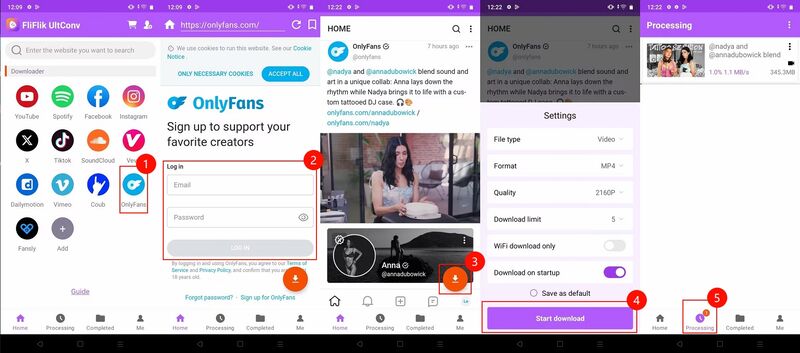
Tap the download button below to install FliFlik UltConv OnlyFans Downloader on your Android device, then launch the app to begin.
-
From the Home tab, tap the OnlyFans icon to access the platform via the built-in browser, then log into your OnlyFans account.
-
Browse your feed or purchased content normally. When you find a video you want to save, tap the Download button.
-
Select your preferred format and resolution to start the process. Once finished, find your video in the Completed tab for offline viewing anytime.

Discover the top-rated Fansly Downloader Android Apps with our comprehensive, step-by-step guide right here.
Part 5. AhaSave vs. FliFlik UltConv: Which One is Best OnlyFans Downloader
AhaSave is fine for basic mobile downloads, but it’s limited by ads, average speed, and inconsistent performance. FliFlik UltConv OnlyFans Downloader is a more advanced option that works on Windows, Mac, and Android, offering better speed, quality, and stability. AhaSave supports basic downloads with limited quality, no strong batch tools, and lower reliability under heavy use. UltConv OnlyFans downloader supports higher quality up to 4K, faster performance, bulk downloads, DRM removal, and a smoother, ad-free experience with a higher success rate overall.
| Feature | AhaSave | FliFlik UltConv |
|---|---|---|
| Support Sites | Basic social platforms | 10,000+ sites + multiple creator platforms |
| Max Quality | Up to HD (varies) | Up to 4K / 8K support |
| Speed | Moderate, ad-dependent | Faster optimized processing |
| Batch Download | Limited | Full bulk download support |
| DRM Removal | Not available | Yes |
| Ad-Free Experience | No | Yes |
| Success Rate | Inconsistent on heavy use | High and stable performance |
Conclusion
At the end of the day, AhaSave can be a quick option if you just want simple downloads on Android without much setup. It’s lightweight and easy to use, but it also comes with limits like ads, slower performance, and inconsistent results when things get heavier or more frequent. If you’re looking for something more stable, faster, and flexible, FliFlik UltConv OnlyFans Downloader is the stronger choice. It supports higher-quality downloads, bulk saving, and DRM-free playback and works across Android, making it a more complete long-term solution.
FAQs about AhaSave
Q1. Does AhaSave work on OnlyFans?
Yes, it can access and download content through its in-app browser, but performance may vary depending on updates and restrictions.
Q2. Is AhaSave free?
Yes, AhaSave has a free version, but it usually includes ads and may offer paid upgrades for better features and an ad-free experience.