

 By
By  5 minutes read


Many people ask, can you watch Hulu offline when they want to enjoy movies and TV shows without relying on an internet connection. Hulu is a popular streaming platform, but not all content is available for offline viewing on every device or plan. Because of this, users often look for ways to download their favorite shows in advance so they can watch them during travel, school breaks, or in areas with weak internet. In this guide, we’ll explain how Hulu offline viewing works and what options are available for downloading content.

Part 1. Can You Watch Hulu Offline? Hulu Offline Download Limits
Many users often wonder, “Can you watch offline on Hulu?” or “Can I watch Hulu offline?” when trying to save shows for later viewing. Hulu does allow offline downloads, but only for certain plans and supported devices, mainly through its mobile app. Not all movies and shows are available for download, and availability can change depending on licensing agreements. Because of these limits, offline viewing on Hulu is helpful but still restricted.
Hulu Offline Download Limits You Should Know
Hulu’s offline download feature comes with several important rules that users must follow. These limits are designed to control storage use and content licensing, so not everything can be saved permanently.
- Device Limit: You can store downloads on up to 5 supported devices at the same time.
- Title Limit: You can keep a maximum of 25 downloaded titles across all devices combined.
- Unplayed Expiration: Downloads expire after 30 days if you don’t start watching them.
- Watched Expiration: Once you begin playback, downloads expire within 48 hours.
These restrictions mean Hulu’s offline viewing is temporary and controlled, rather than permanent storage.
Part 2. How to Download Hulu Movies & Shows Officially (Ad-Free Plan Required)
Many users search “can you download Hulu shows to watch offline” or “download Hulu for offline” when they want to save movies for later viewing. Hulu does support offline downloads, but this feature is only available on select ad-free plans and works only inside the official mobile app. You cannot download content on every device, and availability depends on licensing. Once you meet the plan requirements, downloading becomes simple and allows you to watch supported titles without an internet connection.
For a more detailed walkthrough of the official Hulu app method, you can also read our guide on how to download Hulu shows. It explains supported devices, plan requirements, and common download issues in more detail.
How to Watch Hulu Offline on iPhone and iPad?
▼ Steps to Watch Hulu Offline on iPhone and iPad:
Step 1: Open the Hulu app on your iPhone or iPad and sign in to your account.
Step 2: Search for a movie or TV show that supports offline downloads.
Step 3: Tap the Download icon next to the title to start saving it to your device.
Step 4: Go to the Downloads tab to watch your saved content offline anytime.

How to Watch Hulu Offline on Android and Fire Tablet?
▼ Steps to Watch Hulu Offline on Android and Fire Tablet:
Step 1: Open the Hulu app on your Android device or Fire tablet and log in.
Step 2: Browse or search for a show or movie that is available for download.
Step 3: Tap the Download button to save the content for offline viewing.
Step 4: Once completed, open the Downloads section to watch without internet access.

Part 3. Best Way to Download Hulu Video Offline on Windows or Mac (No Limit)
Hulu offline downloads are helpful but very limited for Windows and Mac users, especially due to device restrictions and expiration rules. That’s why many users look for a more flexible way to save Hulu content permanently. FliFlik UltConv Hulu Downloader is a powerful tool designed for users who want full control over Hulu movies and shows without platform limitations.
Unlike the official Hulu app, it allows downloading and converting videos into widely supported formats like MP4 and MKV, making them playable on any device, including PCs, smart TVs, tablets, and mobile phones. It also supports high-resolution downloads up to 4K, fast processing speed, subtitle preservation, and multi-language audio tracks. With its built-in browser and batch download feature, users can easily save entire seasons of Hulu shows without worrying about expiration, internet connection, or device restrictions.

- Download videos from 10,000+ websites, including Hulu, Amazon Prime Video, Netflix, and more
- Convert Hulu videos to MP4 or MKV for playback on more devices
- Remove ads and playback limits for smoother offline viewing
- Save multi-language audio tracks with Dolby Atmos support
- Preserve subtitles in SRT and VTT formats
- Use the built-in browser for direct downloading from Hulu
How to Download Hulu Videos Offline with FliFlik UltConv?
If you want to download Hulu offline, FliFlik UltConv provides a simple way to save Hulu movies and shows directly on your computer. Follow the steps below to download and watch content without internet access.
▼ Steps to Download Hulu Videos Offline with FliFlik UltConv:
 Secure Download
Secure Download
Secure Download
-
Step 1: Visit the official UltConv website, download the Hulu Downloader for Windows or Mac, and install it by following the setup instructions.
-
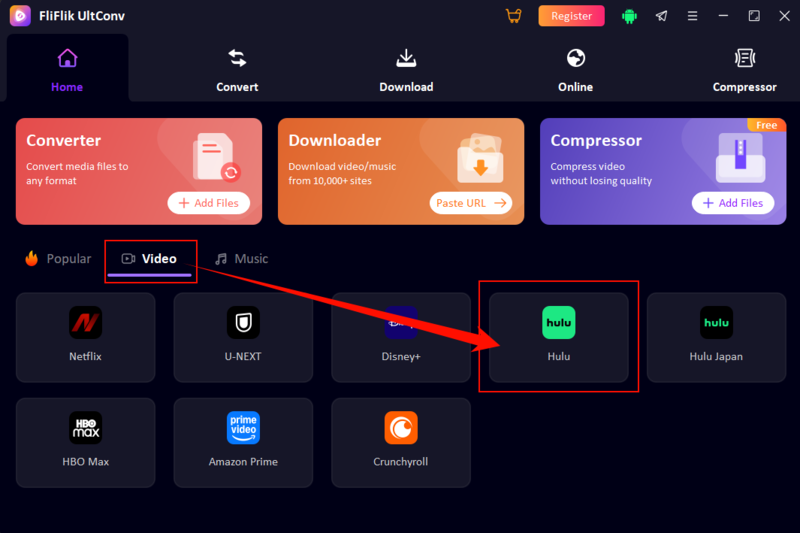
Step 2: Open UltConv and go to the Premium Video section on the home screen. Then select Hulu Converter from the available platforms.
-
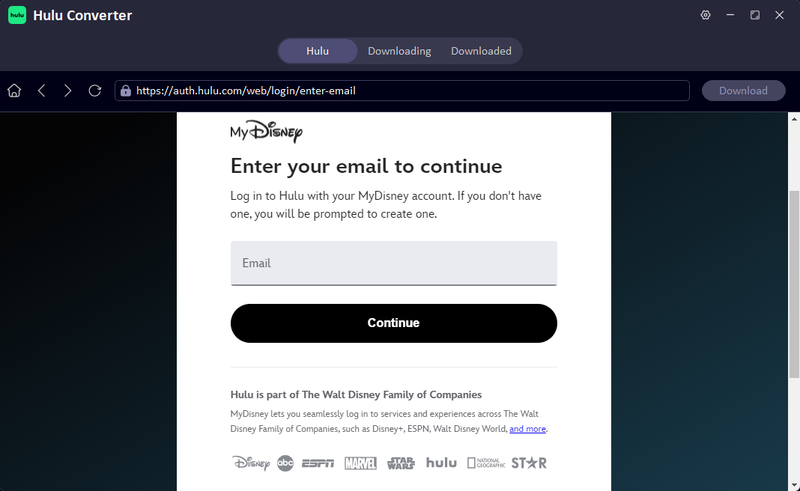
Step 3: Log in using your Hulu account inside the built-in login window to securely access your library and available content.
-
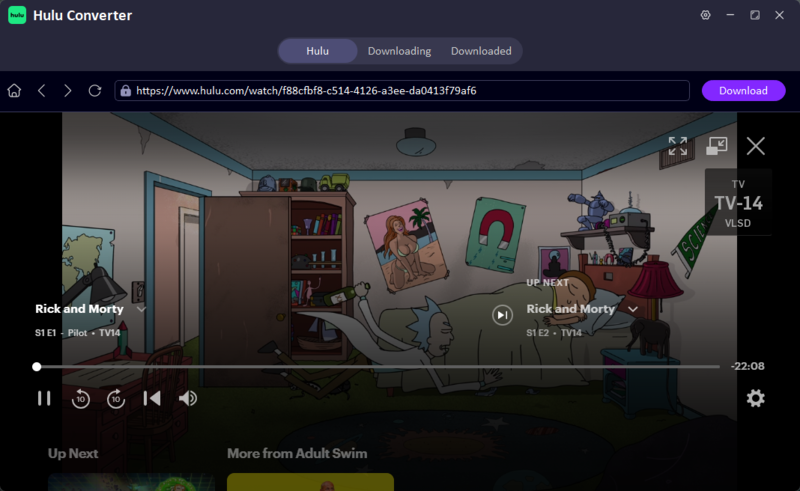
Step 4: Browse Hulu within UltConv, choose the movie, show, or episode you want, and click the Download button to start saving it.
-
Step 5: Once the download finishes, check the Downloading/Completed tab to locate your file and enjoy offline viewing anytime.



Part 4. FAQs about Watching Hulu Offline
Q1. Why Can’t I Download Hulu Shows or Movies?
Not all Hulu movies and shows are available for download because Hulu’s offline feature depends on your plan, device, and content licensing. If a title does not show the Download icon, you can first check whether it supports official offline viewing. For cases where downloading is unavailable and you only need to save a short clip for personal reference, our guide on how to screen record Hulu may also help.
Q2. Can I watch Hulu downloads after canceling my subscription?
No. Hulu downloads are tied to an active Hulu subscription, so downloaded movies and shows become unavailable after your subscription ends. To keep Hulu videos accessible for longer offline viewing, you need to save them with a desktop tool such as FliFlik UltConv Hulu Downloader before losing access.
Q3. Can I download Hulu content on a Mac?
Hulu does not officially support offline downloads on Mac or Windows desktops. The official download feature is mainly available through the Hulu mobile app on supported iOS, Android, and Fire Tablet devices. Mac users can only stream Hulu online unless they use an alternative downloader for offline playback.
Q4. What is the best way to watch Hulu offline without the app limit?
The most flexible way is using a tool like FliFlik UltConv Hulu Downloader. It lets you save Hulu movies and shows for offline viewing without the official app’s device limits, expiration rules, or mobile-only restrictions. You can also choose common formats, adjust quality, and store files locally for easier playback on different devices.
Conclusion
Watching Hulu offline is possible, but it still comes with several restrictions, such as limited downloads, device caps, expiration times, and plan requirements. These limitations can make it difficult for users who want flexible and permanent offline access to their favorite movies and shows. While the official Hulu app works well within its rules, it is not ideal for long-term storage or unrestricted viewing. A more convenient solution is using tools like FliFlik UltConv Hulu Downloader, which allows users to save Hulu content for offline playback with better control and format options. It helps users keep their favorite shows accessible anytime without worrying about app restrictions or internet connection, making offline viewing much easier and more reliable.
Secure Download
Secure Download