

 By
By  8 minutes read


Watching anime online is popular, but many users still want a way to download HiAnime videos so they can enjoy episodes offline without buffering, ads, or internet issues. Whether you’re traveling, studying, or just want smooth playback anytime, having anime saved on your device makes the experience much more convenient.
However, HiAnime does not always offer a direct or stable download option, which is why users often look for alternative methods and tools to save videos in good quality. In this article, we’ll explore 6 of the best and easiest ways to download HiAnime videos safely and efficiently, so you can watch your favorite anime episodes anytime, anywhere without interruptions.

Part 1. Can I Download Videos from HiAnime Directly?
No, HiAnime does not officially support a reliable way to download videos from HiAnime for offline viewing. HiAnime is popular among anime fans because it offers a wide collection of shows, fast streaming, and subtitle support. However, since there is no stable built-in download option, users often face limitations when trying to save episodes. That’s why, if you want to watch anime offline without buffering or internet issues, you will need to use a reliable third-party downloader tool.
Part 2. 6 Best Ways to Download HiAnime Video
HiAnime doesn’t provide a reliable download feature, so users usually turn to third-party tools and methods to save episodes offline. These options differ in speed, quality, and ease of use. Below, we’ll look at 6 simple and effective ways to download HiAnime videos.
1. FliFlik UltConv HiAnime Downloader
The best option for downloading HiAnime videos is FliFlik UltConv HiAnime Downloader, because it provides a smooth and reliable way to save anime episodes in high quality without depending on unstable streaming links or screen recording. It is especially useful for anime fans who want HD quality downloads, fast processing speed, and support for full-season or batch downloading, making it much easier to build a personal anime library.
The tool supports video downloads from 10,000+ websites, including anime platforms, and allows users to save content in resolutions up to 4K and even 8K for crystal-clear playback. With 10X faster speed, multiple format support, and built-in browser access, UltConv HiAnime Downloader ensures a stable and user-friendly experience for downloading anime without interruptions or quality loss.

- Download videos from 10,000+ websites, including anime platforms
- Save HiAnime videos in MP4, MP3, and 100+ formats
- Supports HD quality up to 4K and 8K resolution
- Batch download full episodes or entire series in one click
- 10X faster download speed for large files
- Built-in browser for direct site access and downloading
▼ Steps to Download Hianime Videos Downloader with UltConv HiAnime Downloader
-
Download and install FliFlik UltConv Hianime Downloader on your Windows or Mac computer. After installation, open the program to begin.
FREE DOWNLOAD![secure download]() Secure Download
FREE DOWNLOAD
Secure Download
FREE DOWNLOAD![secure download]() Secure Download
Secure Download
-
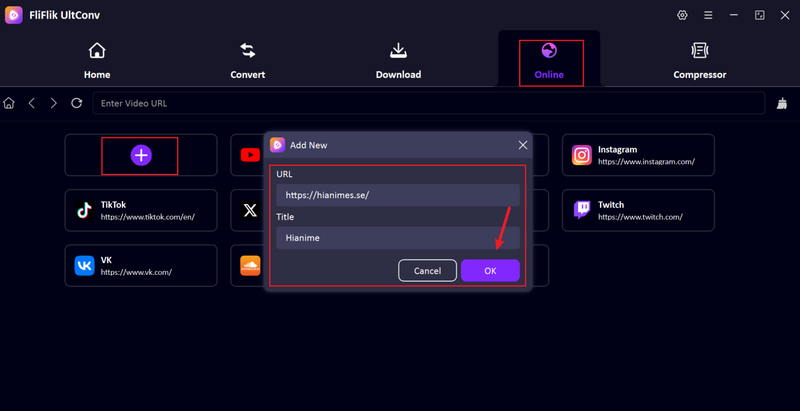
Open UltConv and click the + tab. Paste the HiAnime video link into the pop-up window, add a title, then click OK.
-
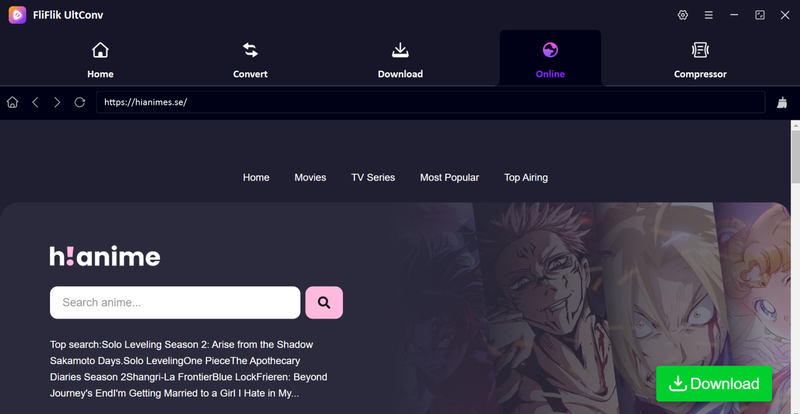
The HiAnime page will open inside UltConv’s built-in browser, allowing you to browse anime episodes directly within the software.
-
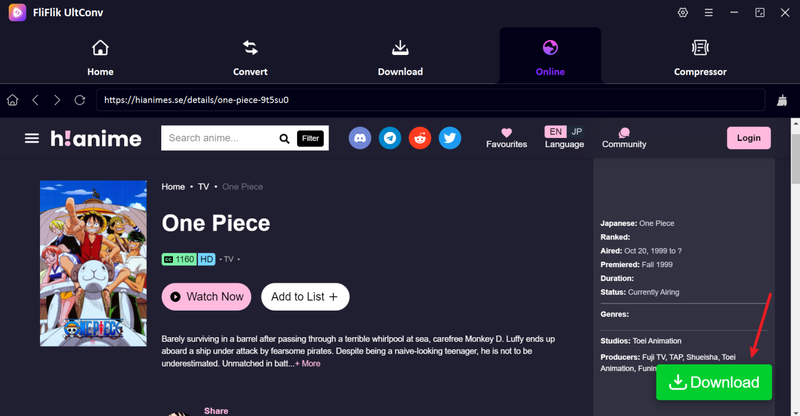
Find and play the anime episode you want to download, then click the Download button.
-
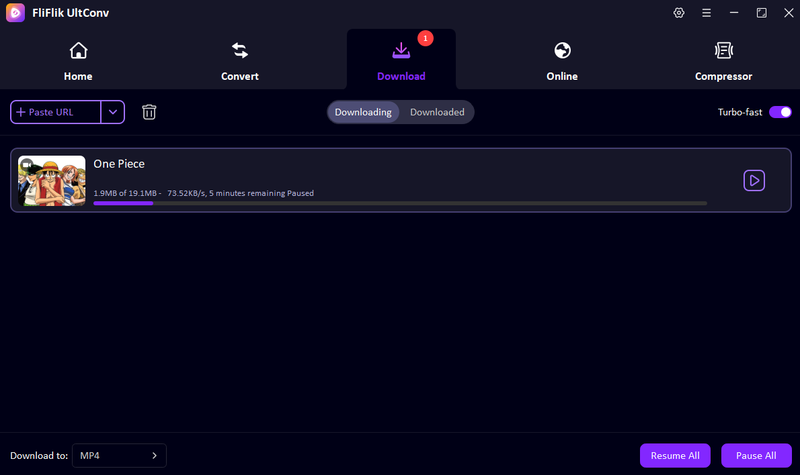
UltConv will start downloading the anime automatically. Once finished, go to the Downloaded section to watch your episode offline anytime.


2. Cococut (Browser Extension)
Cococut is a browser extension that helps users capture and download streaming videos directly from websites like HiAnime. It works inside your browser and detects playable video streams automatically, making it a simple option for quick anime downloads without installing heavy software.
- Easy browser-based installation
- Automatically detects video streams
- No separate software required
- Works on most modern browsers
- Not always stable with anime sites
- Fail on protected streams
- Limited format and quality control
- Can be blocked by some websites
- Not ideal for full-season downloads
▼ Steps to Download HiAnime Videos with Cococut
-
Step 1:
Install Cococut extension on your Chrome or supported browser.

- Step 2: Open HiAnime and play the anime episode you want to download.
- Step 3: Click the Cococut icon in your browser toolbar to detect the video stream.
-
Step 4:
Select the detected file and choose the download quality.
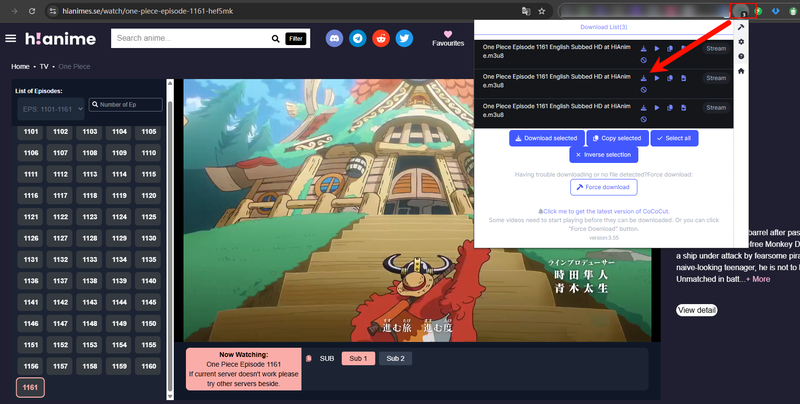
- Step 5: Save the video to your device and watch offline anytime.


3. Locoloader
Locoloader is an online downloader tool that lets users paste a video link and download anime directly from the browser. It is designed for users who want a simple, no-install solution for saving anime episodes quickly.
- No installation required
- Works directly in browser
- Simple copy-paste system
- Can be slow during peak traffic
- Limited video quality options
- Ads appear on site
- Not always stable for long videos
▼ Steps to Download HiAnime Videos with Locoloader
- Step 1: Open the Locoloader website in your browser.
-
Step 2:
Copy the HiAnime video link and paste it into the input box.

- Step 3: Click the download or generate button.
- Step 4: Wait for the tool to process the video.
- Step 5: Select quality and download the anime file to your device.

3. Pastedownload
Pastedownload is a web-based downloader that allows users to save videos from streaming sites by pasting a URL. It focuses on fast processing and simple downloading, making it useful for basic HiAnime video downloads.
- Simple paste-and-download method
- No software installation
- Works on multiple devices
- Free access
- Limited anime site compatibility
- Not reliable for full episodes
- Low control over video quality
- Ads interrupt usage
- Not ideal for batch downloads
▼ Steps to Download HiAnime Videos with Pastedownload
-
Step 1:
Open Pastedownload website in your browser.
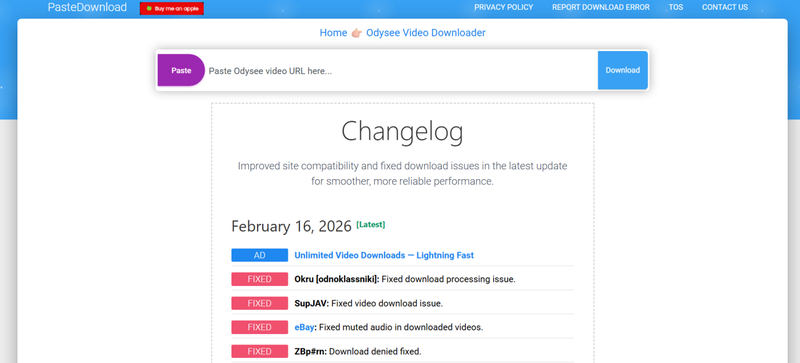
- Step 2: Copy HiAnime episode link and paste it into the box.
- Step 3: Click the download or fetch button.
- Step 4: Wait for processing to complete.
- Step 5: Choose the format and save the video to your device.

4. yt-dlp-hianime
yt-dlp-hianime GitHub is an advanced command-line tool based on yt-dlp that allows users to download HiAnime videos with high control over quality and format. It is mainly used by advanced users who are comfortable with technical setup.
- Highly customizable settings
- Supports batch downloads via scripts
- No ads or web restrictions
- Requires command-line knowledge
- Difficult for beginners
- Setup can be complicated
- No graphical interface
- Needs manual configuration
▼ Steps to Download HiAnime Videos with yt-dlp-hianime
-
Step 1:
Install Python and yt-dlp on your system.
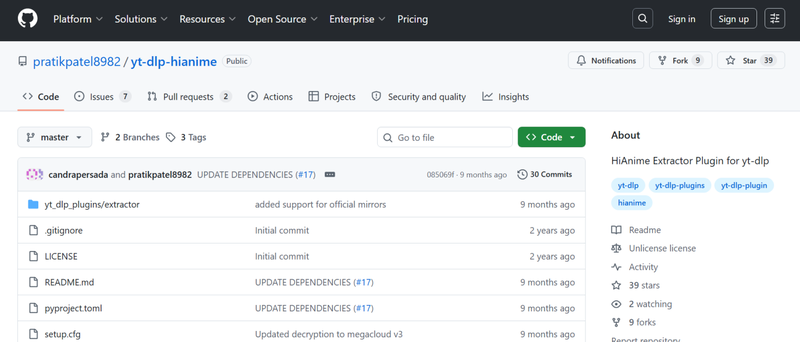
- Step 2: Download and set up yt-dlp-hianime from GitHub.
- Step 3: Open terminal or command prompt on your device.
- Step 4: Paste the HiAnime video URL in the command format provided in the repo.
- Step 5: Run the command to start downloading the episode.

5. AceThinker
AceThinker is an online video downloader tool that helps users save anime videos from streaming sites like HiAnime. It offers a simple interface where users can paste a link and download videos without installing software.
- Easy-to-use interface
- No installation required
- Works on browser
- Supports multiple video sites
- Quick basic downloads
- Limited free features
- Show ads
- Not always stable for anime sites
- Quality options can be limited
- Slow for large files
▼ Steps to Download HiAnime Videos with AceThinker
-
Step 1:
Open AceThinker Anime Downloader in your browser.
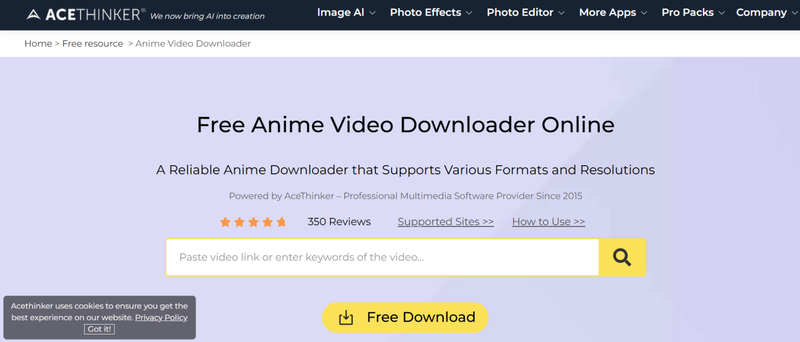
- Step 2: Copy and paste the HiAnime video link into the input field.
- Step 3: Click the search or download button.
- Step 4: Wait for the tool to process the video.
- Step 5: Select quality and download the anime episode to your device.

Part 3. Quick Comparison Among the 6 Best HiAnime Downloaders
Different HiAnime downloaders vary mainly in their type, supported sites, download speed, quality control, and subtitle handling. Browser extensions are usually easier but less stable, while command-line tools offer more power but require technical knowledge. Online tools are simple but often limited in quality and batch features. Overall, users choose based on whether they want convenience or advanced control. Below is a quick comparison of the 6 most popular HiAnime downloaders:
| Feature | FliFlik UltConv | Cococut | Locoloader | Pastedownload | AceThinker | yt-dlp-hianime |
|---|---|---|---|---|---|---|
| Type | Desktop software | Browser extension | Online tool | Online tool | Online tool | Command-line tool |
| Supported Sites | 10,000+ sites | Limited streaming sites | General video sites | General video sites | General video sites | HiAnime (plugin-based) |
| Max Quality | Up to 4K/8K | HD | HD | HD | HD | High (source-based) |
| Download Speed | Very fast (10X) | Moderate | Medium | Medium | Medium | High |
| Batch Download | ✔️ | ❌ | ❌ | ❌ | ❌ | ✔️ (via scripts) |
| Subtitle Support | ✔️ | Limited | Limited | ❌ | Limited | ✔️ (advanced setup) |
Final Words
If you want to download Hianime videos safely and in good quality, using the right tool makes a big difference. While HiAnime itself is mainly built for streaming, the methods and downloaders covered in this guide show that saving anime episodes for offline viewing is still possible with the right approach. Some tools are simple and quick, while others offer advanced features like batch downloads and subtitle support, so your choice depends on how you prefer to watch anime. For the most stable and all-in-one experience, FliFlik UltConv Hianime Downloader is a strong option. It combines fast downloading, high-quality output, and easy batch saving in one tool, making it ideal for anime fans who want a smooth offline viewing experience without hassle.
 Secure Download
Secure Download
Secure Download
