

 By
By  8 minutes read


Tired of YouTube ads interrupting your videos at the worst moments? You’re not alone. Millions of viewers want to enjoy their favorite content without constant interruptions — but a full YouTube Premium subscription isn’t always easy to justify financially.
The good news is you don’t have to pay full price right away, as there are multiple legitimate, effective ways to claim a YouTube Premium free trial, from the official one-month offer to exclusive partner promotions that extend the trial period up to six months. In this guide, we’ll share 7+ working and legitimate methods to get YouTube Premium for free and help you pick the opt.

Part 1: What Is YouTube Premium? Is It Worth It in 2026?
YouTube Premium is a paid subscription that removes ads and unlocks a suite of extra features across YouTube and YouTube Music. Here’s what you get:
- Ad-free viewing across all videos
- Background play (audio continues when your screen is off)
- Offline downloads for watching without Wi-Fi
- YouTube Music Premium included
- Picture-in-Picture mode
- Smart Downloads for automatic offline content
YouTube offers three plan tiers:
- Individual: $15.99/month
- Family (up to 6 members): $26.99/month
- Student (verified enrollment required): $8.99/month
Is YouTube Premium worth getting? If you use the platform daily for your commute, workouts or long-form video content, the ad-free experience alone will greatly improve your everyday usage. Casual users may not find the subscription cost justified, so it’s best to test the service with a free trial first.
Part 2: 7 Ways to Get a YouTube Premium Free Trial (Up to 6 Months)
Looking to try out YouTube Premium features before committing to a monthly subscription? You’re in the right place. Here are simple ways to enjoy Premium benefits for free.
Method 1: Official 1-Month Free Trial (Available to All New Users)
The simplest and most secure starting point is YouTube’s own free trial. New users who have never subscribed to YouTube Premium can claim one free month, no charge until the trial ends.
You’ll need a Google account and a valid credit or debit card (for verification only — you won’t be charged during the trial). Just remember to cancel before the 30 days are up if you don’t want to continue.
▼ How to Claim the 1-Month Trial:
-
Step 1: Go to youtube.com/premium in your browser and sign in to your Google account.
-
Step 2: Click “Try 1 month for $0” and select your preferred plan (Individual, Family, or Student).
![youtube-official-1-month-free-trial]()
-
Step 3: Enter your payment details and click Buy. Once verified, your free trial begins immediately.
![youtube-add-payment-details]()


Method 2: : 6-Month Free Trial via Google Fi Unlimited Plus
Google Fi subscribers on the Unlimited Plus plan are eligible for six months of YouTube Premium at no extra cost. After signing up, you’ll receive an activation link by Email. This is the longest free trial currently available.
 Notes
Notes
Cancel auto-renewal before the six months are up to avoid being charged.
▼ How to Activate via Google Fi:
-
Step 1: Open the Google Fi account page and tap your member profile.
-
Step 2: Navigate to Subscription > Members List and select YouTube Premium.
-
Step 3: Tap Get Started and follow the on-screen instructions to activate.
![how-to-active-via-google-fi]()

Method 3: Get 3-Month Free Trial via Best Buy
Best Buy members can receive a complimentary 90-day YouTube Premium subscription when purchasing eligible products. The offer is automatically linked to your Gmail account at checkout, no separate activation code needed.

Method 4: YouTube Music Premium Free Trial — Up to 12 Months Free
If you’re primarily a music listener, YouTube Music Premium offers a free trial of up to 12 months for first-time subscribers. During this period, you get ad-free listening, background play, full lyrics, and seamless audio/video switching.
This offer is open to users who have never previously subscribed to YouTube Music Premium or YouTube Premium.
▼ How to Get a YouTube Music Premium Subscription:
-
Step 1: Go to https://music.youtube.com/music_premium
-
Step 2: Choose your plan (Individual, Family, or Student) and click the free trial button.
-
Step 3: Sign in to your Google Account and add a payment method.
-
Step 4: Confirm your subscription. Your free trial starts immediately, and you can enjoy ad free YouTube Premium.
Method 5: 3-Month Free Trial for Walmart+ Members
Active Walmart+ subscribers can claim three months of YouTube Premium at no additional cost. Walmart+ costs $12.95/month or $98/year, and also offers a 30-day free trial — meaning you could potentially access YouTube Premium without spending anything upfront.
▼ Steps to Claim the Walmart+ Offer:
-
Step 1: Open the Walmart app or website, go to your account, and navigate to the Walmart+ Benefits Hub.
-
Step 2: Find the YouTube Premium offer under the perks section.
-
Step 3: Tap the offer, sign in to your Google account on the redirect page, and confirm the $0.00 charge.
![walmart-members]()

Method 6: Save More with Student or Family Plans
While these aren’t free trials, they’re among the most affordable ways to access YouTube Premium long-term.

-
Student Plan ($8.99/month):
Available to enrolled students verified through SheerID (a third-party service). This plan saves roughly 44% compared to the individual rate and is valid for up to four years of continuous enrollment. -
Family Plan ($26.99/month):
Share the plan across up to six household members. At full capacity, each person pays roughly $4.50/month — less than any other plan. All members must share the same household location, hold their own Google account, and be at least 13 years old.
Method 7: 50% Off for Google One Subscribers (Limited-Time Offer – Now Expired)
If you subscribe to Google One at the 2TB+ tier, you may be eligible for 50% off YouTube Premium for one full year. This offer is currently available in the US, Brazil, Canada, France, Germany, and Japan.

▼ How to Redeem the Google One Discount:
-
Step 1: Open a web browser and go to one.google.com/explore-plan/youtube-premium
-
Step 2: Ensure you are logged in to the Google Account with your eligible 2TB+ Google One plan.
-
Step 3: Look for the YouTube Premium benefit card (usually under the “Benefits” tab). Click “Redeem offer” or “Add to plan”.
-
Step 4: Review the terms and conditions and confirm your subscription.
This is a limited-time offer you can take advantage of before April 29, 2026.
Part 3: Bonus: Download YouTube Videos for Offline Viewing Without a Subscription
If your main reason for considering YouTube Premium is offline access, you don’t necessarily need a subscription to get there. A dedicated download tool can give you the same freedom — without the monthly commitment.
That’s where UltConv YouTube video downloader comes in. It saves videos, playlists, and music from over 10,000 websites, including YouTube, Twitch, TikTok, Netflix, Spotify, and more. Whether you need 4K quality, batch downloads, or audio conversion to MP3 and FLAC, UltConv handles it effortlessly. Its built-in browser, private folder, and DRM removal features make it a complete offline solution — and you can even save live streams in real time and preserve metadata for music tracks.

- Download from 10,000+ sites — YouTube, TikTok, Instagram, and beyond
- Save videos in your preferred quality: HD, 2K, 4K, or 8K
- Convert to MP3, WAV, AAC, FLAC, and 100+ other audio formats
- Strip DRM from Spotify, Apple Music, and YouTube Music with ease
- Batch-download entire playlists or multiple videos in one go
- Browse and grab content directly with the built-in browser
- Keep your downloads secure in a dedicated private folder
▼ How to Download YouTube Video with UltConv Video Downloader:
Open UltConv Video Downloader, select the “Download” panel and choose the output format and video resolution you want.

Search for the videos you want to download from YouTube, then copy the video URL from the address bar one by one.

Go back to UltConv. If the software automatically detects the link in your clipboard, click Download to start saving the video.

If the link isn’t detected automatically, manually paste it into the search box and press Download.

Once the process finishes, your YouTube video will be saved. You can watch it anytime — offline, without streaming issues, ads, or a subscription fee.
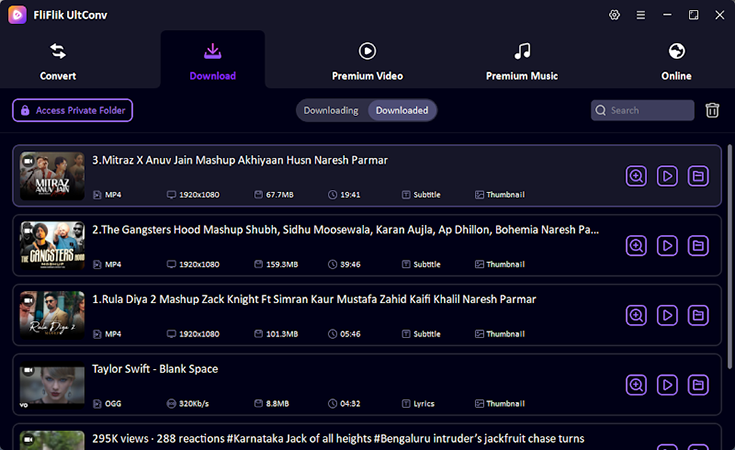
To Download YouTube videos to your local device, first download and install FliFlik UltConv Video Downloader on your computer. Once the installation is complete, follow these simple steps.
 Secure Download
Secure Download
Secure Download


Part 4: FAQs
Q1. Does YouTube Premium auto-renew after the free trial?
Yes. All free trials automatically convert to a paid subscription once the trial period ends. Set a calendar reminder and cancel at least 24 hours before your trial expires if you don’t want to be charged.
Q2. Can I get more than one free trial?
The official YouTube free trial is a one-time offer per account. However, partner offers (Best Buy, Walmart+, Google Fi) are separate promotions and can be claimed independently, even if you’ve already used the official trial.
Q3. Is YouTube Premium available in my country?
YouTube Premium is available in over 100 countries, though pricing and partner offers vary by region. Check youtube.com/premium to confirm availability in your area.
Part 5: Conclusion
YouTube Premium suits users who watch videos often or rely on YouTube Music each day. Ads are removed, background play is enabled, and offline downloads are supported. These functions make viewing and listening more smooth and easy to manage.
The seven methods above show clear ways to get Youtube Premium at no cost. Access is offered for one to six months through official plans or partner offers. You can pick the plan that fits your situation. The subscription should be canceled before the auto-renewal date if you do not plan to continue.
If a full subscription still feels too expensive, some users choose tools like UltConv YouTube video downloader. This type of tool lets people save videos and watch them offline without any ongoing payment.

Your post just became my go-to resource for this topic! I love how you explained everything in a way that’s easy to understand without dumbing it down. The balance you struck between being informative and being engaging is perfect. I also want to give you kudos for the excellent formatting – the headers, bullet points where appropriate, and visual breaks made this such a pleasant reading experience. Content and presentation both get an A+ from me!