

 By
By  8 minutes read


Looking for a good free YouTube video downloader for Mac can honestly get frustrating pretty fast. Some tools are packed with ads, some limit download quality, and others simply stop working after a few videos. If you just want an easy way to save YouTube videos on your Mac for offline watching, choosing the right downloader really matters.
In this article, we’ve rounded up the 10 best free YouTube video downloaders for Mac in 2026. Whether you want to download videos in HD, save music as MP3s, grab playlists, or simply watch videos offline, these tools can make the process much easier.
🔥Looking for a Safe Android App to download videos or leaks? Feel free to try this Video Download Tool!

Part 1. What is the Best Free YouTube Video Downloader for Mac?

Not every free YouTube downloader for Mac is actually worth using. Some are slow, some add watermarks, and others are filled with annoying ads or hidden limitations. Here are some important things you need to consider when you choose the best free YouTube video downloader for Mac:
- Easy-to-use interface: The software should feel simple and beginner-friendly, even for users downloading videos for the first time.
- High-quality downloads: A good downloader should support HD, 1080p, 4K, or even higher resolutions without heavily reducing video quality.
- Fast download speed: Nobody wants to wait forever for a single video. Good tools should download videos quickly and smoothly.
- Support for multiple formats: It should allow users to save videos in MP4, MP3, MOV, or other common formats as needed.
- Playlist and batch downloads: Downloading multiple videos together can save a huge amount of time, especially for playlists or channels.
- Safe and clean installation: The software should not contain malware, fake buttons, or suspicious bundled programs.
- Works well on macOS: Compatibility matters. A good downloader should run smoothly on newer Mac systems without crashes or performance issues.
- Free without heavy restrictions: Some “free” tools only allow short downloads or limit features too much. The best ones give users enough freedom to actually use the software properly.
Part 2. Quick Overview of the 10 Best YouTube Free Video Downloaders for Mac
Before choosing a free YouTube video downloader for Mac, it helps to compare the most important things side by side. The table below gives you a quick overview of the 10 best YouTube downloaders for Mac in 2026, including their supported formats, maximum quality, download speed, and batch download support.
| Tool | Type | Supported Platforms | Max Quality | Output Formats | Download Speed | Batch Download |
|---|---|---|---|---|---|---|
| FliFlik UltConv YouTubeDownloader | Desktop Software | 10,000+ Platforms | 4K, 2K, 1080p | MP4, MP3, WAV, FLAC, AAC & 100+ formats | 10x faster than normal downloader | ✅ |
| ClipGrab | Desktop Software | YouTube | Up to 1080p | MP4, MP3, WMV, OGG | Medium | ❌ |
| Freemake Video Downloader | Desktop Software | YouTube | Up to 4K | MP4, MP3, AVI, MKV | Medium | ✅ |
| YTD Video Downloader | Desktop Software | YouTube | Up to 1080p | MP4, MOV, MP3 | Medium | ❌ |
| MacX YouTube Downloader | Desktop Software | 1,000+ Sites | Up to HD | MP4, FLV, WebM | Fast | ✅ |
| Downie for Mac | Desktop Software | YouTube | Up to 4K | MP4, MP3 | Fast | ✅ |
| Video DownloadHelper | Browser Extension | Normal Streaming Sites | Up to 1080p | MP4, WEBM | Medium | ❌ |
| Y2Mate | Online Tool | YouTube | Up to 1080p | MP4, MP3 | Medium | ❌ |
| SSYouTube | Online Tool | YouTube | Up to 1080p | MP4, MP3 | Medium | ❌ |
| KeepVid | Online Tool | YouTube | Up to 1080p | MP4, MP3 | Medium | ❌ |
Part 3. 10 Best Free YouTube Free Video Downloader for Mac
In this section, we’ll go through 10 of the best free YouTube video downloaders for Mac in 2026, including their main features, strengths, and what kind of users they are best suited for.
🔥Searching for the safest Android APP to download videos without risks? Try this Video Download app to save any video you want to!
Top 1: FliFlik UltConv YouTube Downloader
If you want a YouTube downloader for Mac that feels modern, fast, and actually easy to use, FliFlik UltConv YouTube Downloader is honestly one of the strongest options right now. Instead of focusing only on YouTube, it works more like a complete media downloading tool that supports videos, music, playlists, live streams, and even streaming websites in one place.
The software also performs really well when it comes to quality and speed. It supports downloading videos in HD, 1080p, 2K, 4K, and even 8K resolution while keeping audio quality clear. Batch downloading is another big advantage, especially if you want to save entire playlists or multiple videos together instead of downloading one file at a time. Beyond YouTube, UltConv YouTube Downloader also supports thousands of websites, including TikTok, Twitch, Facebook, Instagram, Vimeo, Spotify, Apple Music, and more. So, for Mac users who regularly download online videos or music, it feels much more flexible than a basic YouTube-only downloader.

- Download videos from 10,000+ websites, including YouTube, TikTok, Facebook, and more
- Save videos in 1080p, 2K, 4K, and even 8K quality
- Convert YouTube videos to MP4, MP3, FLAC, AAC, and 100+ other formats
- Batch download playlists, channels, and albums in one click
- Download live streams directly to MP4 in real time
- 10x faster download speed with GPU acceleration
▼ Steps to Download YouTube Videos to MP4 with FliFlik UltConv
Before getting started, download and install FliFlik UltConv Video Downloader on your Mac computer. Once the installation finishes, open the software.
 Secure Download
Secure Download
Secure Download
-
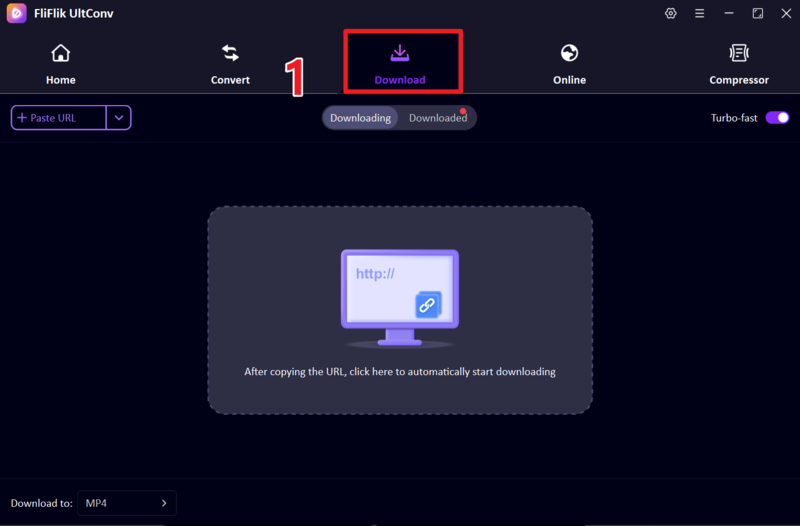
Go to the Download section inside UltConv, then click the ” Download To ” option to customize your download settings.
-
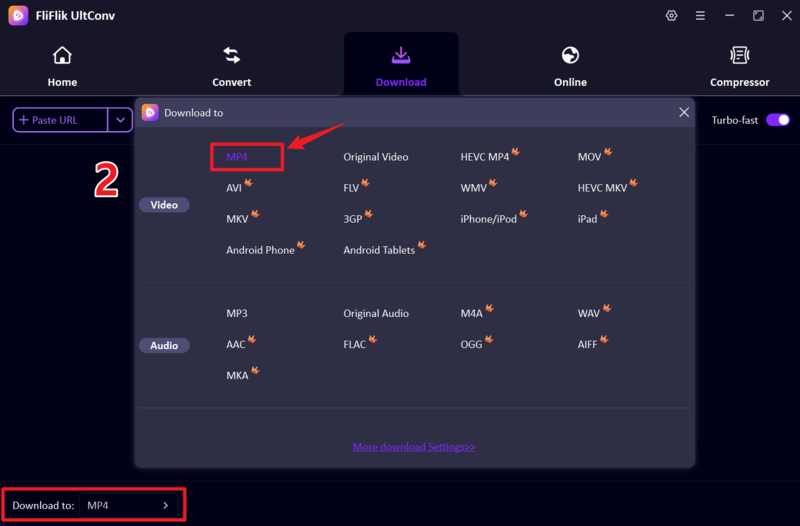
Select MP4 as the output format for your video. If you only want the audio, you can switch to formats like MP3 instead.
-
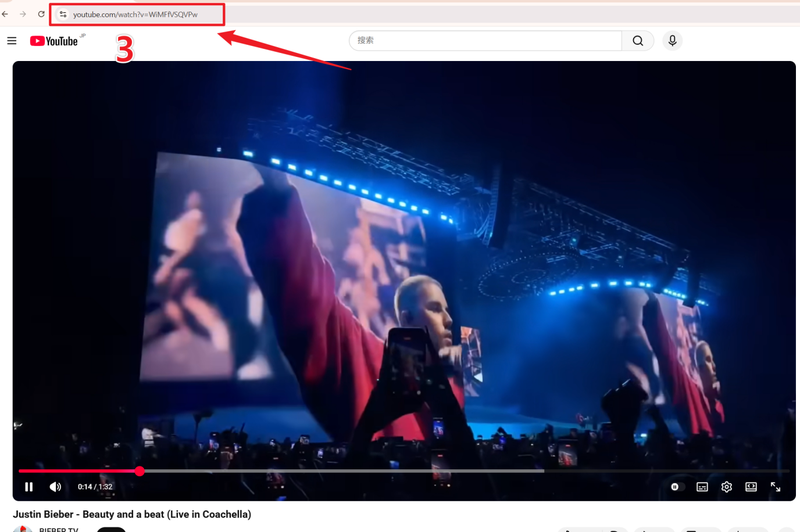
Open YouTube in your web browser, find the video you want to save, and copy the video link from the address bar.
-
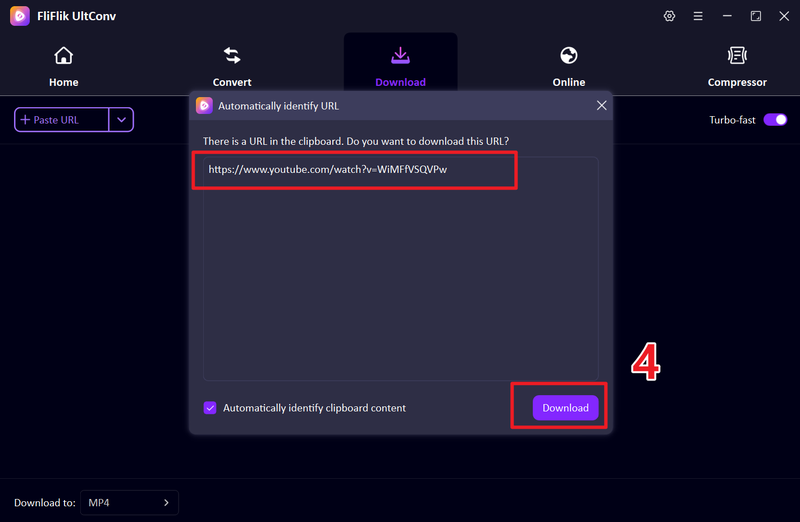
Head back to UltConv and paste the copied link into the downloader. In many cases, the software can detect the copied URL automatically. Click the Download button to continue.
-
The download process will begin immediately. Wait a few moments while UltConv saves the video to your device.
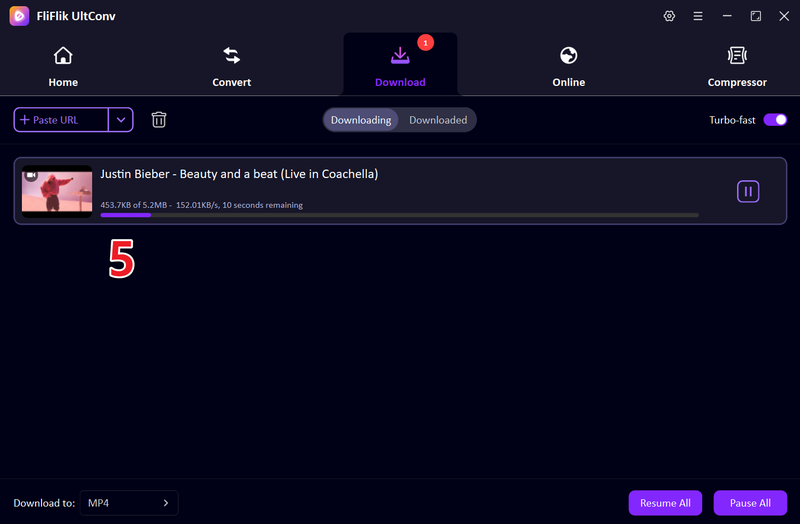


After the download is complete, open the output folder to watch your YouTube video offline anytime in MP4 format.
Top 2: ClipGrab

ClipGrab is a lightweight and beginner-friendly YouTube downloader for Mac that focuses on simplicity. It allows users to download videos from YouTube and convert them into formats like MP4 or MP3 without complicated settings. The software feels straightforward, which makes it a popular choice for casual users who only need basic downloading features.
- Simple and easy-to-use interface
- Supports MP4, MP3, and other common formats
- Built-in video search feature
- Lightweight software with quick installation
- Completely free to use
- Interface feels outdated compared to newer tools
- Limited advanced download options
- Download speed can feel slower on large videos
- Occasional issues with YouTube updates
Top 3: Freemake Video Downloader

Freemake Video Downloader has been around for years and is known for its simple downloading process. It supports downloading videos from YouTube and several other websites while also offering format conversion options. The software is mostly designed for users who want quick downloads without dealing with technical settings.
- Easy for beginners to use
- Can convert videos into different formats
- Supports HD video downloads
- Playlist download support available
- Free version comes with limitationse
- Mac support is more limited than Windows
- Interface feels slightly old-fashioned
- Download speed is not always consistent
Top 4: YTD Video Downloader for Mac

YTD Video Downloader for Mac is one of the older YouTube downloading tools still used today. It allows Mac users to save videos from YouTube and convert them into formats like MP4, MOV, and MP3. The software focuses mainly on basic downloading and conversion rather than advanced features.
- Simple download and conversion process
- Supports common video and audio formats
- Beginner-friendly interface
- Works on both Mac and Windows
- Free version has speed limitations and ads
- Limited support for modern streaming platforms
- Fewer advanced features compared to newer tools
Top 5: MacX YouTube Downloader

MacX YouTube Downloader is a Mac-focused video downloader designed mainly for YouTube downloads and HD video saving. It supports downloading videos in higher resolutions and works fairly well for users who want a lightweight downloader built specifically for macOS.
- Fast video analysis and downloading
- Simple interface for beginners
- Supports multiple video websites
- Interface looks slightly outdated
- Fewer supported platforms compared to newer tools
- Batch downloading features are basic
Top 6: Downie for Mac

Downie for Mac is a premium-style video downloader built specifically for macOS users. It supports a huge number of websites and is known for its clean design and reliable download performance. Downie feels more polished than many free downloaders, especially for users deeply connected to the Apple ecosystem.
- Clean and modern macOS interface
- Supports thousands of websites
- Reliable download detection
- Regular updates for compatibility fixes
- Not fully free after the trial period
- Advanced features require a paid version
- Fewer format conversion tools
- Mostly focused on Mac only
Top 7: Video DownloadHelper

Video DownloadHelper is a browser-based video downloader available mainly as an extension for Chrome, Firefox, and Edge. It’s popular among users who prefer downloading videos directly from their browser instead of installing full desktop software. One important thing to know is that the Chrome version has limitations for YouTube downloads because of Google’s extension policies, so most users rely on the Firefox or Edge version instead.
- Works directly inside the browser
- Supports many websites besides YouTube
- Simple download process
- Chrome version cannot properly download YouTube videos
- Some features require a companion app installation
- Not ideal for large batch downloads
Top 8: Y2Mate

Y2Mate is one of the most commonly used online downloaders for users searching for a free YouTube video downloader for Mac online. Since it runs entirely in a browser, Mac users do not need to install any software. Users simply paste a YouTube link and download videos in different formats and resolutions.
- No installation required
- Works directly in Safari or Chrome on Mac
- Simple copy-and-paste download process
- Convenient for quick downloads
- The website contains ads and pop-ups
- Download quality may be inconsistent
- Limited advanced features
- Online tools can stop working unexpectedly
- Less secure compared to dedicated software
Top 9: SSYouTube

SSYouTube is another browser-based YouTube downloader that allows users to save videos without installing software. It’s mainly known for its shortcut-style downloading method where users can quickly generate download links directly from YouTube URLs.
- Very easy to use
- No software installation needed
- Fast access for quick downloads
- Works on Mac browsers
- Heavy ads and redirects can feel annoying
- Download stability is inconsistent
- Limited support for playlists or batch downloads
- Quality options are sometimes restricted
Top 10: KeepVid

KeepVid is a long-running online video downloader that supports YouTube and several other video-sharing websites. It offers a simple browser-based experience for Mac users who want to download videos without installing extra software.
- Easy browser-based downloading
- Supports multiple video websites
- MP4 and MP3 conversion available
- No installation required
- Ads and pop-ups can interrupt downloads
- Online service stability varies over time
- Slower speeds compared to desktop software
- Limited advanced download controls
Final Words
Finding a reliable free YouTube video downloader for Mac isn’t as simple as it looks. Some tools are fast but limited; others are feature-rich but complicated, and a few online options can be unstable or ad-heavy. That’s why choosing the right downloader really depends on what you need: speed, quality, or ease of use. If you want something that feels simple but is still powerful, FliFlik UltConv YouTube Downloader is worth trying. It brings everything into one place: fast downloads, high-quality output, batch support, and wide platform compatibility without making the process complicated.
Secure Download
Secure Download
FAQs about YouTube Downloader for Mac
Q1. Can I download YouTube on my Mac?
Yes, you can download YouTube videos on a Mac using third-party tools like FliFlik UltConv YouTube Downloader or online downloaders, depending on the method you prefer and the video source’s permissions.
Q2. What is the easy YouTube downloader for Mac?
The easiest option is a simple one-click tool like FliFlik UltConv YouTube Downloader, which lets you paste a link and download videos in high quality without complex settings.
Q3. How to download YouTube videos free without software on a Mac or PC?
You can use online downloader websites by copying the YouTube video link, pasting it into the site, and selecting your preferred format before downloading directly through your browser.
