

 By
By  5 minutes read


HBO Max ad blocker tools can help reduce or skip ads when you are watching HBO Max on an ad-supported plan. Ads on the HBO Max Basic plan are a real pain. To be honest, it’s much more enjoyable to watch your favorite HBO Max shows without ads. But if you’re on an ad-supported plan, then your plan already includes ads.
Well, the good news is that there are many HBO Max ad blockers that you can use to skip ads and reduce interruptions. You can also upgrade to the ad-free plan if you want to go with the official option. In this article, we will share different ad blocker for HBO Max, whether you’re watching on your web browser, desktop, or mobile phone, so you can enjoy HBO Max without ads.

- Part 1. Does HBO Max Have Ads?
- Part 2. Official Way to Remove HBO Max Ads: Upgrade Your Plan
- Part 3. 2 Best HBO Max Ad Blocker Extensions for Browsers
- Part 4. 2 Best HBO Max Ad Blocker Apps for Mobile
- Part 5. Block or Skip HBO Max Ads with VPN
- Part 6. Convert HBO Max to MP4 and Watch without Ads
- FAQs about HBO Max Ad Blocker
- Conclusion
Content Table:
Part 1. Does HBO Max Have Ads?
Yes, you will see ads on the HBO Max Basic with Ads subscription plan. If you’re a user on this plan, then you will usually see ads before, during, and at the end of your movies and TV shows. And that could be quite disruptive. This is the reason why many people look for an ad blocker for HBO Max.
The HBO Max Standard and Premium plans are the best options to watch your favorite content ad-free. But here you need to remember that, even on these plans, you will still see new releases and promotional trailers, and ads during some live events like sports, no matter what your subscription is.
Part 2. Official Way to Remove HBO Max Ads: Upgrade Your Plan
As we discussed above, the best way to remove HBO Max ads is to upgrade your plan. There are basically three plans that HBO Max is offering right now. Let’s have a look at these plans, their prices, ads, and other features in the table below.
| Plan | Monthly Price | Annual Price | Ads | 4K UHD | Simultaneous Devices |
|---|---|---|---|---|---|
| Basic with Ads | $10.99 | $109.99 | Yes | No | 2 |
| Standard | $18.49 | $184.99 | No (for most content) | No | 2 |
| Premium | $22.99 | $229.99 | No | Yes | 4 |
So, if you just want to get rid of ads, you can switch to the Standard plan. But if you want to get rid of ads and also want better quality, then the Premium plan is your best option.
Part 3. 2 Best HBO Max Ad Blocker Extensions for Browsers
If you’re watching HBO Max on your computer, then HBO Max ad blocker Chrome extensions are one of the best options to try. Below are two of the best Chrome extensions that you can use.
3-1. HBO Max Skipper

The first option is HBO Max Skipper. It’s a browser extension specifically made for HBO Max. This extension works in a way that it does not just block ads, but it detects and skips ad breaks. This means you don’t have to click the Skip button manually every time an ad appears.
- Specifically built for HBO Max
- It can automatically skip ads
- Easy to install and lightweight
- Works directly in your web browser
- Only supports HBO Max
- It does not guarantee that every ad will be skipped
3-2. Total Adblock

The next option we have is Total Adblock. This extension is not specifically built for HBO Max, but it can also remove pop-ups and ads on many websites, including HBO Max. It works really well, and you can also use it as an all-in-one ad blocker on your desktop or computer.
- An all-in-one extension to block ads on many websites
- Very simple to use and install
- Also helps block some trackers and pop-ups
- Not specifically for HBO Max ads
- Sometimes it is unable to detect ads
- Some features of this extension require a paid subscription
Part 4. 2 Best HBO Max Ad Blocker Apps for Mobile
Moving on, if you are a mobile user, then browser extensions will not help you. So, you need to try mobile ad blocker apps. Below are the two best options that you can use to block HBO Max ads on your mobile phone.
4-1. AdGuard (Android)

One of the most popular apps for Android users is AdGuard. This app blocks trackers, pop-ups, and ads, and also helps improve your privacy. On Android, it works by using a local VPN to block ads from many apps, and there is no need to have root access.
- It can block ads, pop-ups, and trackers from many of your websites and apps
- It’s very easy to install and use
- It can reduce data usage by preventing ad downloads
- It improves privacy
- Advanced features require a subscription
- It may not be able to block all ads on every app
4-2. AdLock (iPhone)

The next option that you can use is AdLock. This option works for both Android and iPhone users. But it works especially well for iOS users because it blocks ads and trackers in Safari by using URL filtering and DNS filtering. Not only does it block ads, but it also helps protect your privacy from malicious domains.
- User-friendly interface
- Can block ads and trackers while you browse
- Supports both Android and iPhones
- Requires a paid subscription for premium features
- On iPhone, its ad-blocking capability is limited to Safari only
- It does not 100% guarantee that all ads will be removed
Part 5. Block or Skip HBO Max Ads with VPN
If you are not interested in using ad blockers and want to use a VPN instead, then we have an option for that. Just remember, a VPN will not block ads directly. It will only change your virtual location. This change in location will also update your content library, and it may show fewer ads because it will connect you to a region that has fewer ads.
NordVPN

NordVPN is one of the best VPNs. It is popular, offers good speed, has a large server network, and also has better privacy features. So, it can help you change your virtual location and keep your browsing secure.
- Very stable streaming speed
- Large server network
- Better privacy and security
- Easy to use
- It will not directly block HBO Max ads
- Requires a subscription
- Some streaming sites may detect the VPN
Part 6. Convert and Download HBO Max to MP4 and Watch without Ads
From the above discussion, it’s very clear that mobile ad blockers and browser extensions to block HBO Max ads are not very reliable options. Streaming services change and update their websites and apps regularly. So, many times, these ad blockers stop working. So, if you want a more reliable solution, then the best option for you is to download HBO Max videos for offline viewing. This is useful for travel, slow networks, or users who want smoother playback with subtitles and audio tracks.
The download process is super simple with UltConv HBO Max Downloader. With the help of this tool, you can save all your favorite HBO Max movies and TV shows to your computer to watch offline. You can download your videos in MP4 or MKV format in 4K, 2K, 1080p quality. Also, you can download your videos with subtitles and audio tracks, which are very helpful for smoother playback.
During the download process, the tool will automatically skip the ads, so your final file will not have even a single ad. Not only can you download from HBO Max videos with this tool, but you can also download from 10,000+ video and music websites. Also, you can batch download complete seasons with a single click. So, for someone who wants a stable and reliable option than an HBO Max ad blocker, UltConv HBO Max Downloader is a very good option.

- Download HBO Max videos in MP4 or MKV for ad‑free offline playback.
- Save HBO Max videos in up to 4K quality when available.
- Batch download multiple movies, episodes, or complete seasons.
- Preserve available subtitles and audio tracks.
- Built-in browser for easier HBO Max access and downloads.
- Enjoy super-fast speed to convert or download files in seconds.
▼ Steps to Download HBO Max Videos with UltConv Video Downloader:
Below, I will show you step by step how you can use UltConv HBO Max Downloader to download your movies or TV shows from HBO Max for offline watching.
-
Step 1: First of all, download and install UltConv HBO Max Downloader on your Windows or Mac. After that, open the program.
-
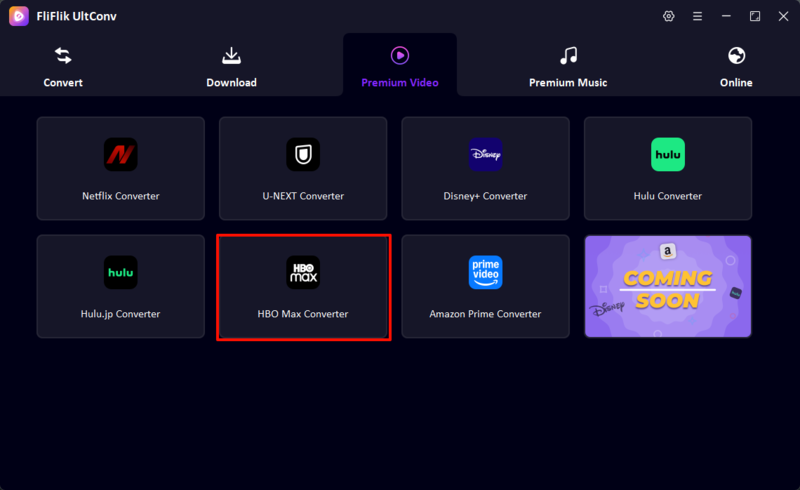
Step 2: Now, go to the Premium Video tab and select the HBO Max Converter.
-
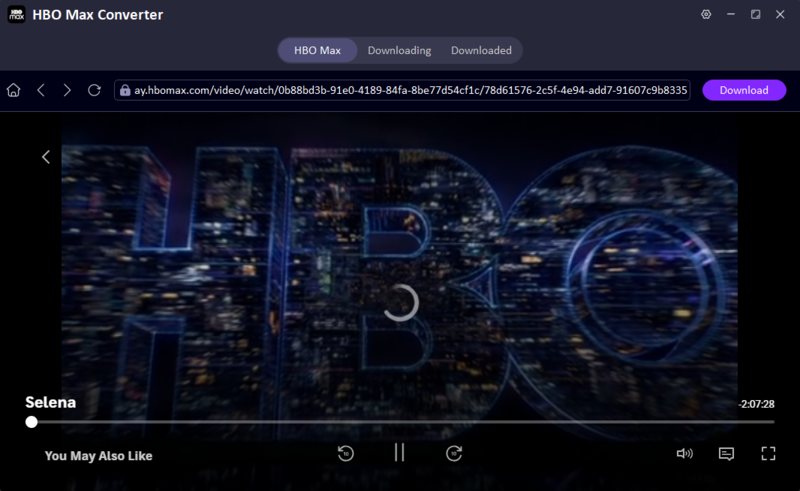
Step 3: Next, go ahead and sign in to your HBO Max account using your email and password in the built-in browser. Then, open the movie or TV show you want to download.
-
Step 4: When you find the show or movie you want to download, you will see a Download button. Just click the Download button, choose your preferred video quality, subtitles, and audio options, and confirm your download. You will see that the tool has started the downloading process. Once the download is done, you can find all your downloaded videos in the Downloaded tab to watch offline.



FAQs about HBO Max Ad Blocker
Conclusion
Now, we know that it is not very easy to find a reliable HBO Max ad blocker. It’s especially difficult because streaming services frequently update their platforms. But you still have some options that you can try, like browser extensions, mobile ad blocker apps, or VPNs. The official way is to upgrade to the Standard or Premium plan.
But if you just want to get rid of all these issues, then I suggest downloading your favorite movies or TV shows for offline watching and getting rid of all the ads and streaming interruption issues at once. UltConv HBO Max Downloader is one of the best options that you can use for this. It’s super easy to use. Just click the Download button under your favorite show or movie, and you will be able to watch your content without any interruption.
 Secure Download
Secure Download
Secure Download