

 By
By  6 minutes read


Looking for a way to download Patreon videos? Here’s the direct answer: Patreon has no built-in download option. Most videos stream through embedded players, and there’s no save button — by design.
The good news: it’s easier to get around than you’d think. This guide covers four tested methods — a desktop downloader, a browser extension, an online tool, and mobile apps for Android and iOS. All working in 2026. Scroll to the method that fits your device.
- Part 1. What is Patreon? Can You Download Patreon Videos?
- Part 2. Download Patreon Videos with Best Patreon Downloader
- Part 3. How to Save Patreon Videos Using Chrome/Firefox Extensions
- Part 4. How to Download Videos from Patreon with Online Patreon Downloader
- Part 5. How to Download Patreon Videos on Android/iOS
- Conclusion
Content Table:
Part 1. What is Patreon? Can You Download Patreon Videos?

Patreon is a membership platform where creators share exclusive content with their supporters, including videos, podcasts, tutorials, behind-the-scenes clips, and early releases.
So, can you download Patreon videos? In most cases, Patreon does not provide a universal download button for streamed videos. Some creators may offer downloadable files or attachments, but many videos are played through Patreon Video, YouTube, Vimeo, or other embedded players.
Because of this, how to download videos from Patreon depends on the video source, your access permission, and the creator’s settings. In this guide, we’ll show you several practical ways to download Patreon videos on desktop, online, and mobile.
Part 2. Download Videos from Patreon with Best Patreon Downloader
If you’re looking for the most reliable way to download Patreon videos, using a dedicated downloader tool is often your best bet. Unlike browser extensions or mobile apps, which can sometimes struggle with compatibility issues or limited functionality, specialized tools are built for efficiency and reliability.
One of the standout options is FliFlik UltConv Video Downloader, a dedicated tool that supports Patreon and 10,000+ other video or music streaming sites. It lets you download free and accessible Patreon videos in up to 1080p, save content from your favorite creators with just a few clicks, and process multiple video links more efficiently than most browser extensions. Besides downloading, UltConv also includes private mode for better file privacy and a built-in video converter, making it easier to store, manage, and play Patreon videos on different devices.

- Download free and public Patreon videos to MP4 with HD quality.
- Remove DRM from Patreon videos to play anywhere, anytime.
- One-click to save multiple Patreon videos at the same time.
- Save all videos in a private folder with 100% security.
- Support to convert video from 10,000+ sites, like YouTube, OnlyFans, TikTok, etc.
▼ Steps to Save Patreon Videos with FliFlik UltConv Video Downloader
-
Download and install FliFlik UltConv Video Downloader on your PC or Mac and launch it after installation. Make sure to select the operating system you are using — Windows or Mac.
-
Go to the settings panel, select your preferred video resolution (e.g., 1080p, 720p) and format (e.g., MP4). Define the folder where the file will be saved.
![ultconv setting panel]()
-
Go to the Online section and log in to your Patreon account. Locate the video you’d like to download.
![ultconv patreon login]()
-
Click on the Download button, and the video will be automatically downloaded.
![ultconv download]()
-
Once the download completes, navigate to the designated folder to find your offline video.
![ultconv downloaded]()


For a fuller comparison of different tools, see also: Top 6 Patreon Downloaders for PC, Online, and Browser Extensions.
Part 3. How to Save Patreon Videos Using Chrome/Firefox Extensions
Browser extensions are a lightweight option if you don’t want to install desktop software. For Patreon, it’s better to use Patreon-specific tools because they are designed to detect media files and attachments from Patreon posts you can access.
Two options are Patreon Easy Downloader for Firefox and Patreon Downloader for Chrome. They can help with quick downloads, but may not work with every streamed or embedded video, such as videos from YouTube, Vimeo, or Patreon Video.
- No desktop software installation required.
- Easy to use directly in Chrome or Firefox.
- Good for quick downloads of Patreon media and attachments.
- May not detect every streamed or embedded Patreon video.
- Video quality and format options can be limited.
- Less stable than desktop software for batch downloads.
1. Patreon Easy Downloader for Firefox
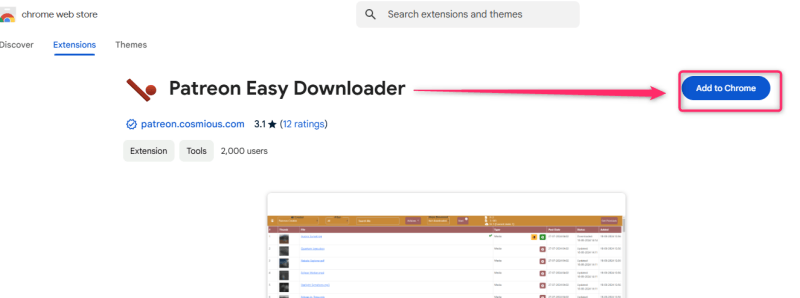
Patreon Easy Downloader is a Firefox extension designed to help users organize and download Patreon content more efficiently. It can scan creator pages, display available files, filter content, and manage downloads in one place. While it is particularly useful for downloadable files and attachments, some advanced features may require payment, and support for protected or embedded videos can be limited.
▼ Steps to Use Patreon Easy Downloader:
-
Step 1: Visit the Firefox Add-ons marketplace and install Patreon Easy Downloader in your browser.
-
Step 2: Open the creator’s Patreon page, click the extension icon, and allow it to scan for available files and media.
-
Step 3: Select the files you want from the extension’s download panel and save them to your device.


2. Patreon Downloader for Chrome
Patreon Downloader is a lightweight Chrome extension that helps users download media and attachments directly from Patreon posts. Its simple interface makes it suitable for quickly saving files from individual posts. However, streamed videos are not always supported, so it is generally more effective for images, audio files, downloadable attachments, and other accessible media.
▼ Steps to Use Patreon Downloader for Chrome:
-
Step 1: Open the Chrome Web Store and install Patreon Downloader in Chrome.
-
Step 2: Sign in to Patreon and navigate to the post containing the media or attachment you want to download.
-
Step 3: Click the extension icon. If supported content is detected, the extension will generate available download options.
-
Step 4: Select the desired file and save it to your computer. If the video cannot be detected, consider using a dedicated desktop downloader instead.

- Browser extensions are convenient for quick and occasional Patreon downloads, but compatibility with streamed or embedded videos is not guaranteed.
- They typically perform best when downloading attachments, images, audio files, and other directly accessible media.
- If you need higher download success rates, batch downloading capabilities, or more format options, FliFlik UltConv Video Downloader is usually the better choice.
 Secure Download
Secure Download
Secure Download
Part 4. How to Download Videos from Patreon with Online Patreon Downloader

In addition to browser extensions, many online Patreon video downloaders exist. Whether you are using Chrome or Firefox, Pastedownload Patreon Downloader works well for downloading Patreon videos and also supports downloading videos on mobile (with a browser). It is easy to use with a simple interface — you only need to copy the Patreon video’s URL and paste it into Pastedownload to start downloading.
▼ Steps to Download Patreon Videos with Online Downloader
- Step 1: Go to the Patreon official site and find the video you want to download. Copy the video’s link from the browser address bar.
- Step 2: Open pastedownload.com and paste the copied link into the search box. Click the Download button to start the process.
Part 5. How to Download Patreon Videos on Android/iOS
Downloading Patreon videos to your mobile device can be incredibly convenient, especially for offline viewing on the go. Whether you use Android or iOS, there are effective solutions for both platforms.
▼ Steps to Save Patreon Videos with UltConv for Android:
-
Step 1: Download and install FliFlik UltConv for Android from the official website. If your phone shows an “Unknown sources” or “Installation blocked” message, go to Settings > Security and allow installation from trusted sources.
-
Step 2: Open Patreon on your Android browser or app, then find the video you want to download. Copy the Patreon video link.
-
Step 3: Open UltConv for Android. The app will automatically detect the copied Patreon link. If it does not appear automatically, paste the link manually into the download box.
-
Step 4: Tap the Download button, then choose your preferred format and quality, such as MP4 or HD quality.
-
Step 5: Wait for the download to begin. After the download is complete, open the built-in Download Manager to check, pause, resume, or manage your saved Patreon videos.
![paste url in ultconv app]()

▼ Steps to Save Patreon Videos for iOS:
-
Step 1: Download Apple’s Shortcuts app from the App Store. Install a shortcut designed for video downloads, such as Media Grabber. Copy the Patreon video link, run the shortcut, and save the video to your Photos app.
-
Step 2: Download the Documents app from the App Store. Use its built-in browser to visit Patreon, then enter the video link in a downloader website like SaveFrom.net and save the file directly.

Android apps offer more flexibility, while iOS solutions often require workarounds due to stricter app policies. Always use reputable apps to avoid malware or privacy concerns.
Conclusion
Patreon is a fantastic platform for exclusive and engaging content, but its lack of native video downloading can be inconvenient for users who prefer offline access. Whether you’re using tools like FliFlik UltConv Video Downloader, browser extensions, or mobile-friendly apps, there are multiple ways to save Patreon videos easily. By following the methods outlined in this guide, you can download and enjoy your favorite Patreon videos wherever and whenever you want. Remember, it’s essential to respect the intellectual property of creators and use the downloaded content for personal purposes only.
Secure Download
Secure Download
