

 By
By  6 minutes read


OnlyFans is a well-known creator subscription platform, but many users still feel unsure before signing up, paying for a subscription, or uploading identity information. Questions like is OnlyFans safe, is OnlyFans ID verification safe, and is it safe to use a credit card on OnlyFans are all common for new users.
The short answer is that the official OnlyFans website is a legitimate platform, but using it is not completely risk-free. Most problems come from fake login pages, weak passwords, phishing links, privacy exposure, fake creators, unsafe third-party tools, or payment confusion. In this guide, we will explain the main safety concerns, how to use OnlyFans more safely, and how to save accessible OnlyFans videos for offline viewing with a more controlled desktop workflow.

Part 1. Is OnlyFans Safe to Use?
Overall, OnlyFans is a legitimate creator subscription platform, but it is not completely risk-free. The official website itself is safer than random free viewer pages, leaked-content sites, or fake login pages. Most safety problems happen when users click suspicious links, reuse weak passwords, pay outside the platform, or share too much personal information.
Is OnlyFans a Safe Website?
Yes, OnlyFans is a legitimate subscription-based creator platform, so the official website itself is generally safer than fake OnlyFans login pages, free viewer sites, or leaked-content websites. Users can follow creators, pay for subscriptions, send tips, and access content through the official website. However, fake OnlyFans-style pages may copy the login screen and steal passwords, payment details, or verification codes. To stay safe, open OnlyFans directly from the official domain instead of clicking unknown links from ads, emails, or social media messages.
Is OnlyFans ID and Age Verification Safe?
OnlyFans may ask for age or identity verification depending on the account type, location, or user role, so many users wonder: is OnlyFans verification safe, and is OnlyFans age verification safe? Submitting ID through the official verification flow is generally safer than sending documents by email, chat, or third-party websites. Still, ID cards, selfies, and birth dates are sensitive personal data, so users should always check the domain and privacy notice before uploading anything.
Is OnlyFans Safe for Credit Cards and Debit Cards?
Paying through the official OnlyFans checkout is usually safer than using outside payment links. The main things to watch are subscription renewals, unfamiliar charges, fake payment pages, and off-platform payment requests. Never send your card number, security code, banking password, or one-time verification code in chat. It is also a good idea to enable bank alerts and review your statement regularly.
Is OnlyFans Safe for Subscribers and Creators?
For subscribers, the biggest risk is assuming a display name means full anonymity. Reused usernames, profile photos, emails, or personal details in messages can still reveal identity. For creators, risks include content leaks, impersonation, doxxing, phishing emails, fake agencies, and account theft. Both sides should use strong passwords, avoid oversharing private details, and keep payments or verification inside the official platform.
Part 2. How to Use OnlyFans Safely
Using OnlyFans safely is not complicated, but you do need to be careful with login links, payments, passwords, and personal details. Here are a few practical steps that are worth checking before you subscribe, chat, or upload content.
- Use the official website: Open OnlyFans directly from your browser instead of clicking links from ads, emails, comments, or private messages.
- Use a separate email and strong password: Avoid using the same email and password you use for banking, shopping, or social media accounts.
- Turn on two-factor authentication: This can help protect your account even if your password is leaked or guessed.
- Pay only through the official checkout: Do not send gift cards, crypto, bank transfers, or card details through private messages.
- Check renewals and PPV charges: Review your active subscriptions, renewal dates, tips, and pay-per-view purchases regularly.
- Do not trust “free viewer” tools: Most free OnlyFans viewer pages, hack tools, and random extensions are risky and may collect your login details.
- Keep personal details private: Avoid sharing your real name, address, workplace, school, phone number, or real-time location in chats.
Creators should also check their content before posting. Small details like mirrors, delivery labels, street signs, tattoos, background locations, or reused usernames can reveal more than expected. If you find impersonation, leaks, or suspicious messages, keep screenshots and report them as soon as possible.
After covering the basic safety rules, it is also useful to look at platforms similar to OnlyFans. Fansly and LoyalFans are two common alternatives, but the same rule still applies: use the official site, check billing terms, and avoid off-platform payments.
Part 3. 2 Popular OnlyFans Alternatives Similar to OnlyFans
If you want to compare sites like OnlyFans, Fansly and LoyalFans are two popular creator subscription platforms worth checking. They both support paid content, subscriptions, and creator-fan interaction, but users should still review billing rules and privacy settings before using them. For more options, you can also read our full guide to OnlyFans alternatives.
1. Fansly

Fansly is one of the closest OnlyFans alternatives, offering creator subscriptions, paid posts, locked media, tips, and fan interaction tools.
- Very similar creator subscription model to OnlyFans.
- Supports subscription tiers, paid posts, and locked content.
- Useful for creators who want flexible monetization options.
- Still requires users to check billing and privacy settings carefully.
- Some creators may be available only on specific platforms.
- Users should avoid fake Fansly links or off-platform payment requests.
2. LoyalFans

LoyalFans is another creator-focused platform with subscriptions, paid content, messaging, and direct fan support features.
- Designed for creator subscriptions and fan interaction.
- Supports paid content, messages, and direct creator support.
- Closer to OnlyFans than broad membership platforms like Patreon.
- May have a smaller creator selection than OnlyFans.
- Users still need to review subscription and renewal terms.
- External links and off-platform payment requests should be avoided.
Whether you use OnlyFans, Fansly, or LoyalFans, the same safety rules still apply: use the official website, protect your login details, check billing terms, and avoid suspicious third-party tools.
Another safety detail that many users overlook is account access consistency. Creator platforms may review login activity such as IP history, device information, browser environment, and location changes to help detect unusual account behavior. If you often switch between different devices, networks, browsers, or locations, you may be asked to complete extra verification before accessing your account again.
This matters when you want to watch purchased or subscribed content across different devices. Repeated logins from unfamiliar environments can create extra friction, while random online downloaders or free viewer tools may expose you to fake buttons, redirects, copied login pages, or unsafe credential handling. A more controlled desktop workflow can reduce unnecessary sign-ins across unknown tools and keep the process on a device you trust.
Part 4. Best OnlyFans Downloader for Offline Viewing for PC, Mac or Android
When it comes to saving videos from OnlyFans or similar platforms for offline viewing on PC, Mac, or Android, safety and account consistency both matter. If you move between multiple devices, public networks, browser extensions, or unknown online downloaders, you may run into extra verification steps or expose your login details to unsafe pages. Screen recording can also lower video quality and still requires you to stay logged in while playing the content.
With its built-in browser, FliFlik UltConv OnlyFans Downloader lets you log in, find subscribed or purchased videos, and download them in a more controlled desktop workflow on a device you trust. It supports single video downloads, batch saving, private or message videos, MP4 output, audio-only options, and high-quality downloads up to 4K when available. You can also use it with similar creator platforms like Fansly, LoyalFans, ManyVids, MyFans, and more, making it easier to organize accessible videos for personal offline playback without repeatedly relying on unknown online tools.

- Download OnlyFans videos in MP4 with original quality, up to 4K.
- Save private videos, message videos, and paid content you can access.
- Batch download multiple videos from OnlyFans at once.
- Browse OnlyFans securely with the built-in browser.
- Protect downloads with Privacy Mode or Private Folder.
- Save photos and images from accessible creator posts.
- Supports 10,000+ video sites, including Fansly, LoyalFans, MyFans, ManyVids and Patreon.
▼ Steps to Download Accessible OnlyFans Videos with FliFlik UltConv OnlyFans Downloader
-
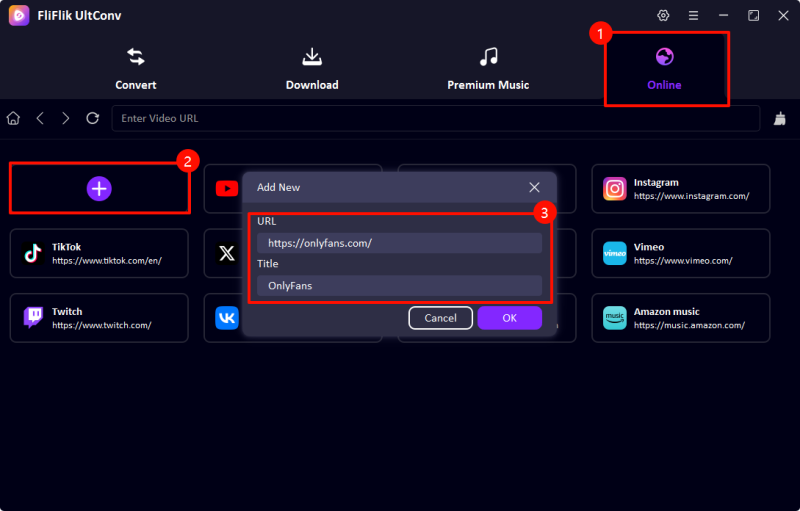
Go to the official FliFlik UltConv website, download, and install FliFlik UltConv OnlyFans Downloader on your computer. Open the program, enter the Online section, click the + button, then paste the OnlyFans page link and title into the pop-up window.
-
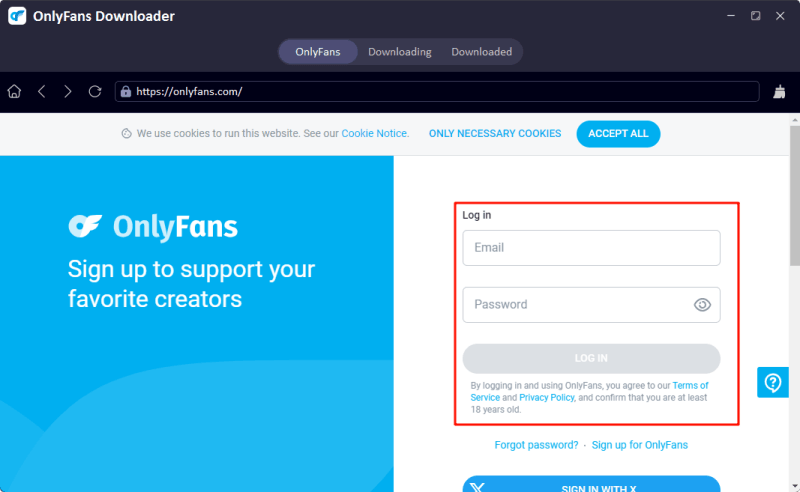
Log in to your OnlyFans account directly inside UltConv. This allows the downloader to detect videos from your subscribed, purchased, private, or message content that your account is authorized to access.
-
Browse your feed, messages, or creator page to find the OnlyFans video you want to save. Click the download option, then choose the output format and available resolution, such as 720p, 1080p, 2K, or 4K.

-
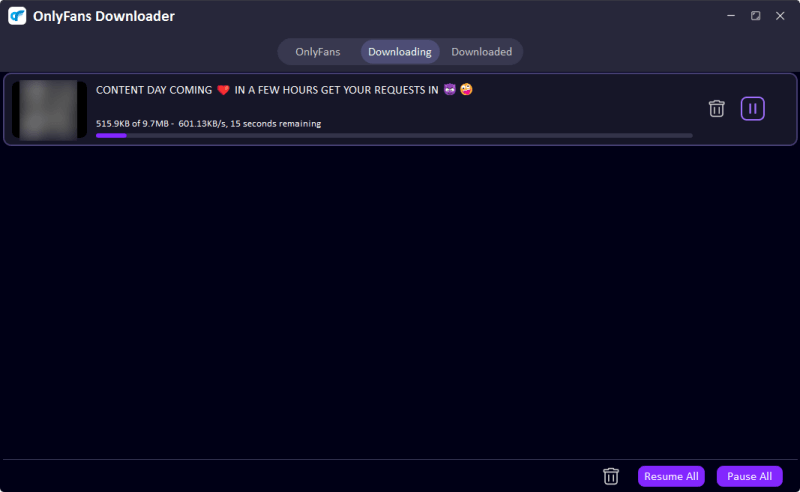
UltConv will start downloading and processing the video automatically. Once finished, the OnlyFans video will be saved locally on your device, so you can watch it offline anytime without losing quality.


Note: Download only content that you have purchased or are authorized to access. Do not redistribute, sell, publish, or share creators’ content without permission.
FAQs About OnlyFans Safety
Conclusion
So, is OnlyFans safe? The official platform can be used relatively safely, but it is not completely free from privacy, payment, account, and verification risks. The biggest problems usually come from fake websites, phishing links, weak passwords, off-platform payments, free viewer scams, and oversharing personal information.
To stay safer, use the official website, enable two-factor authentication, check payment renewals, be careful with ID verification, and avoid tools that promise hacked or free premium access. For videos you have purchased or are authorized to access, a desktop tool like FliFlik UltConv OnlyFans Video Downloader can provide a cleaner way to save content for personal offline viewing.
 Secure Download
Secure Download
Secure Download