

 By
By  8 minutes read


VK has a lot of videos you probably come across while scrolling, and sometimes you just want to save one instead of searching for it again later. That’s exactly where a VK video downloader helps you out. It lets you download videos straight to your device so you can watch them offline, whenever you want, without worrying about internet speed or buffering.
But not every tool you’ll find to download is actually worth using. Some are slow, some throw ads everywhere, and some just stop working after a while. So picking the right one matters more than users usually think. In this article, we will show you 13 of the best VK video downloaders in 2026 that are free, safe, and actually reliable in real use.

Part 1. Quick Overview of 12 VK Video Downloader
Before going into each tool in detail, it helps to see everything side by side. Different tools focus on different things; some are fast but basic, and others support more formats or higher quality. Here’s a quick comparison of the most popular VK video downloaders based on type, quality, formats, and overall usability.
| Tool | Type | Max Quality | Output Format | Batch Download | Download Speed | Ad-Free |
|---|---|---|---|---|---|---|
| FliFlik UltConv | Desktop (Win/Mac) | 8K | MP4, MP3, 100+ formats | ✅ | 10x Faster | ✅ |
| yt-dlp | Command-line | 1080p | MP4, MKV, MP3, more | ✅ | Medium | ✅ |
| JDownloader | Desktop | 1080p | Multiple formats | ✅ | Medium | ✅ |
| Videoder | Android App | 1080p | MP4, MP3 | ❌ | Medium | ❌ |
| VK Video Downloader app | Android App | 1080p | MP4 | ❌ | Medium | ❌ |
| Video Downloader for Vkontakte | Android App | 1080p | MP4 | ❌ | Medium | ❌ |
| Documents by Readdle | iOS App | Depends on tool | MP4, MP3 | ❌ | Slow | ✅ |
| SaveFrom.net | Online Tool | 1080p | MP4, MP3 | ❌ | Slow | ❌ |
| PasteDownload | Online Tool | HD (1080p+) | MP4 | ❌ | Slow | ❌ |
| Vidomon | Online Tool | HD / Full HD | MP4, MP3 | ❌ | Medium | ❌ |
| SnapWC | Online Tool | HD | MP4, MP3 | ❌ | Slow | ❌ |
| Video Downloader Professional | Extension | HD | MP4, FLV, more | ❌ | Medium | ✅ |
Part 2. 3 Best VK Video Downloaders on Windows & Mac
Now, let’s get into detail of 3 options to download VK videos for Windows and Mac users.
1. FliFlik UltConv VK Downloader
Our top recommendation is the FliFlik UltConv VK Downloader. If you want something that doesn’t feel limited to just one platform, this is the kind of tool that makes things easier from the start. What stands out first is its extensive website support, which works with over 10,000 sites, ensuring you’re not stuck when a video comes from a different platform.
Then there’s quality control, where you can download videos in up to 8K resolution or save audio at 320kbps, which matters if you care about clear playback. It also handles format flexibility, letting you convert files into MP4, MP3, and 100+ formats, so you don’t need extra converters later. On top of that, it supports batch downloading, which means you can grab multiple videos or even full playlists at once instead of doing it one by one. That alone saves a lot of time if you deal with content regularly. In short, it’s built around three things: wide site compatibility, high-quality downloads, and flexible formats with batch support.

- Supports 10,000+ websites for video and music, YouTube, TikTok, Instagram, etc
- Batch download videos, playlists, and channels in one click
- Convert videos to MP4, MP3, and 100+ formats
- Download videos up to 8K quality and audio up to 320kbps
- Built-in tools for quick downloading and media conversion
▼ Steps to Download VK video with FliFlik UltConv VK Downloader
If you want an easier way to download VK videos, the process with UltConv VK Downloader is simple and only takes a few steps.
-
Download and install UltConv on your Windows or Mac computer. After the installation finishes, open the program.
FREE DOWNLOAD![secure download]() Secure Download
FREE DOWNLOAD
Secure Download
FREE DOWNLOAD![secure download]() Secure Download
Secure Download
-
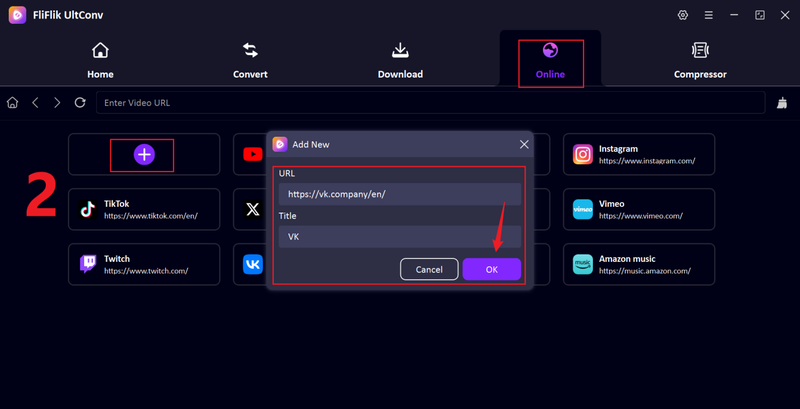
Open UltConv and launch the Online section, then click the + tab. Paste the VK link into the pop-up window, add a title, and click OK.
-
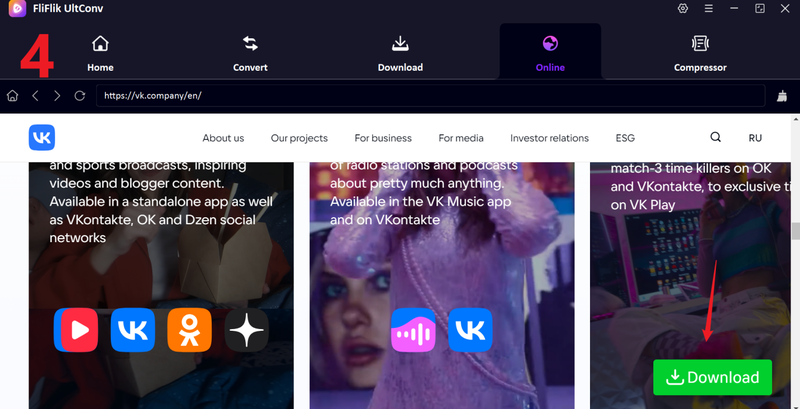
The VK page will open inside UltConv’s built-in browser, so you can browse videos directly within the software.

-
Find and play the VK video you want to save, then click the Download button.
-
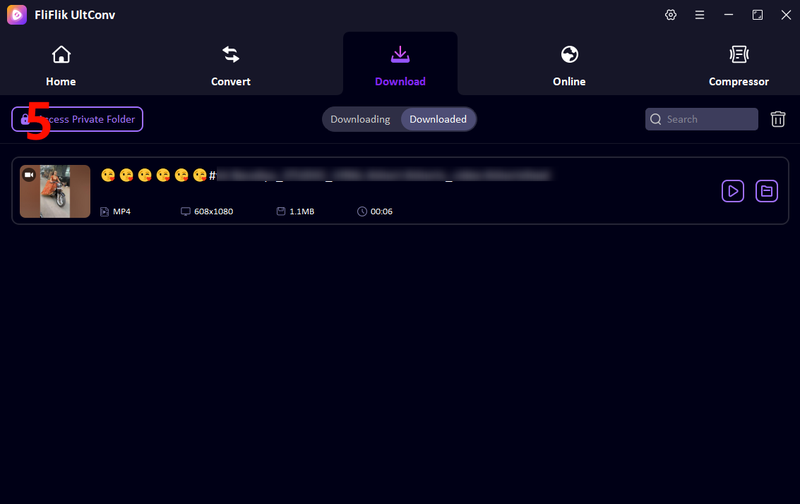
UltConv will analyze the video and begin downloading the video immediately. Once it finishes, go to the Downloaded section and watch your VK video offline anytime.
This tool is the top recommendation to download VK videos in high quality without downloading errors and ads.


2. yt-dlp

If you’re okay with a more technical tool, yt-dlp is one of the most powerful options out there. It’s an open-source command-line downloader, which basically means you don’t get a visual interface, but you get a lot more control over how downloads work.
- Free and open-source
- Supports a large number of websites
- Advanced control over formats, quality, and subtitles
- Regular updates and active development
- No graphical interface (command-line only)
- Not beginner-friendly
- Setup and usage can feel complicated
3. JDownloader

JDownloader is more user-friendly compared to yt-dlp. It’s a full download manager with a clean interface, so you don’t have to deal with commands. You just paste a link, and it automatically detects downloadable content. It works well with many video platforms, including VK, and can handle multiple downloads at once.
- Easy to use with a graphical interface
- Supports batch downloads
- Automatically detects downloadable links
- Works with many websites, including VK
- Interface can feel a bit outdated
- Requires Java to run
- Can be slower compared to some dedicated tools
Part 3. 4 Best VK Video Downloader Apps on Android & iPhone
If you mostly use your phone, having a dedicated app makes things easier. You don’t need to switch between websites or tools; just open the app and download directly. Here are some of 3 best VK video downloader apps for both Android and iPhone.
1. Videoder (Android)

Videoder is one of the more feature-packed downloader apps available on Android. It works as an all-in-one solution where you can browse websites, find videos, and download them without leaving the app. It supports multiple platforms, so VK is just one of many sources you can use.
- Download videos in HD,
- Built-in browser for easy browsing and downloading
- Easy to use
- Not available on Google Play Store (APK required)
- May feel heavy due to many features
- Can be inconsistent and unreliable
2. VK Video Downloader (Android)

VK Video Downloader is a simple app focused specifically on downloading videos from VK. It doesn’t try to do too much, which actually makes it easier for beginners. The process is straightforward. You copy a VK video link, open the app, and download it in your preferred quality. The app then saves the video directly to your device storage.
- Simple and beginner-friendly
- Direct VK integration with easy download process
- Allows choosing video quality
- Saves videos directly to gallery
- Limited to VK only
- Contains ads
- Fewer advanced features compared to other apps
3. Video Downloader for Vkontakte

Video Downloader for Vkontakte is another dedicated VK downloader app with a clean and focused approach. It’s designed specifically for VK users, so you don’t have to deal with extra features that you might not need. You can log in or paste links, browse VK content, and download videos directly.
- Built specifically for VK downloads
- Easy to use with direct browsing or link pasting
- Supports multiple video qualities
- Lightweight and quick
- Limited to VK platform
- Ads can interrupt usage
- Lacks advanced format conversion options
4. Documents by Readdle (iPhone)

For iPhone users, Documents by Readdle is one of the most practical options. It’s not a dedicated VK downloader, but it works as a file manager with a built-in browser that lets you download videos from online tools. The idea is simple. You use the browser inside the app, open a VK downloader website, paste your video link, and save the file. It’s a bit indirect, but it works well within iOS limitations.
- Available on iPhone and iPad
- Works with multiple online downloader sites
- Clean and reliable interface
- Not a direct VK downloader
- Requires extra steps compared to Android apps
- Depends on third-party websites for downloads
Part 4. 6 Best VK Video Downloader Online Tools
If you don’t want to install anything, online tools are the quickest way to download VK videos. Here are some of the most commonly used VK video downloader tools you can try:
1. SaveFrom

SaveFrom.net is one of the most widely used online downloaders, and it works well with VK videos. The tool keeps things simple: you paste the link, and it quickly generates download options. It also supports multiple platforms, so you’re not limited to VK only. It’s especially useful if you want a fast solution without installing software. The interface is straightforward, which makes it easy even for first-time users.
- Easy to use with quick link pasting
- Supports multiple platforms including VK
- No installation required
- Ads can be distracting
- Sometimes limited resolution options
- Not available in America as the US copyright
- May not work consistently on all videos
2. PasteDownload

PasteDownload is a clean and minimal tool focused on quick downloads. You just paste your VK link, and it processes the video without adding extra steps. The layout is simple, so you won’t get confused while using it. It’s a good option if you prefer something lightweight that works directly in your browser. While it doesn’t have advanced features, it covers basic downloading well.
- Clean and simple interface
- Supports multiple formats
- Works directly in browser
- No signup needed
- Limited advanced features
- Speed can vary
- Ads present on the site
3. Vidomon

Vidomon is another browser-based VK downloader that focuses on ease of use. It allows you to paste links and choose from different download options without much effort. The tool is designed to be beginner-friendly. It works with multiple platforms and provides basic quality choices.
- Simple layout, easy for beginners
- Supports VK and other sites
- Offers multiple download options
- No installation required
- Not always stable with every link
- Ads and pop-ups can appear
- Slower compared to desktop tools
4. VidSaver

VidSaver works slightly differently since it’s a browser extension instead of a website. Once installed, it detects videos on pages and gives you a direct download option. This removes the need to copy and paste links.
- One-click download from browser
- Convenient for frequent use
- Works across multiple sites
- No need to copy-paste links
- Requires browser installation
- Does not detect all videos
- Depends on browser compatibility
5. SnapWC

SnapWC is another extension-based tool that supports downloading videos, audio, and images. It integrates directly into your browser, making the process faster once it’s set up. It’s useful if you want more than just video downloads, especially for mixed media content.
- Supports video, audio, and images
- Easy to use after installation
- Works directly inside browser
- Good for frequent downloads
- Requires extension setup
- Not support all formats
- Performance depends on browser
6. Video Downloader Professional

Video Downloader Professional is a popular extension that automatically detects videos on web pages. Once it finds a video, it gives you the option to download it in a few clicks. It’s designed for simplicity and works across many platforms. However, it may not always detect VK videos perfectly.
- Easy to use with simple interface
- Detects videos automatically
- Works on multiple platforms
- Quick download process
- Limited support for some sites
- Not always reliable for VK
- Basic features compared to advanced tools
Conclusion
Choosing the right VK video downloader really comes down to how you prefer to download videos. Some people want a quick online tool, others prefer mobile apps, and some need a full desktop solution with better quality and control. If you want the most complete option, FliFlik UltConv VK downloader stands out for its wide website support, high-quality downloads, and batch features. It saves time and handles almost everything in one place. If you’re tired of slow tools or limited options, it’s worth trying FliFlik UltConv VK Downloader and seeing how much easier downloading can feel.
 Secure Download
Secure Download
Secure Download
FAQs about VK Downloader
Q1. What’s the best VK video downloader?
The best VK video downloader depends on your needs. For full features and high-quality downloads, FliFlik UltConv VK video downloader is a strong choice.
Q2. Is it safe to use a VK video downloader?
Yes, but only if you use trusted tools. Avoid unknown websites with too many ads or pop-ups, and stick to reliable software like FliFlik UltConv VK video downloader.
Q3. How to download VK videos in Chrome?
You can use browser extensions like Video Downloader Professional or simply use an online tool. Just copy the VK video link, paste it into the downloader, and save the file.
