

 By
By  6 minutes read


SoundCloud is a popular platform where artists share music, podcasts, and audio tracks. One thing many users notice is the unique cover image, also known as artwork, that comes with each track. Sometimes, people want to save these images for personal use, inspiration, or collection purposes.
That’s where a SoundCloud artwork downloader becomes useful. It helps you easily download and save cover images from SoundCloud tracks in good quality. In this guide, we will look at the top 10 tools you can use on PC, Mac, and online to quickly download SoundCloud artwork without any hassle.

- Part 1. Best SoundCloud Downloaders with Artwork – Download Music & Cover Art
- Part 2. 4 Working SoundCloud Artwork Downloader Online Tools
- Part 3. 5 SoundCloud Artwork Downloader Extensions
- Part 4. Directly Download Artwork from the SoundCloud Website
- Part 5. Comparison – Top 11 SoundCloud Artwork Downloaders
- Conclusion
Content Table:
Part 1: Best SoundCloud Downloaders with Artwork – Download Music & Cover Art
If you’ve ever downloaded a SoundCloud track only to find missing artwork or incorrect details, you already know how frustrating it can be. Most basic downloaders focus only on the audio and ignore important information like cover art and metadata, which can leave your music library disorganized. FliFlik UltConv SoundCloud Downloader handles SoundCloud downloads properly by saving not just the audio, but also the cover artwork, track title, artist name, and album information automatically. It preserves full ID3 tags with each file, ensuring your music library stays clean, accurate, and well-organized from the moment you download it.
Quality-wise, it goes up to 320kbps, and you can choose your format like MP3 or FLAC, depending on what you’re playing it on. Batch downloading is in there too, so if you want to save a full playlist or an artist’s entire catalogue, you don’t have to sit there clicking track by track. Just point it at what you want and let it run. It’s not limited to SoundCloud either, which is a bonus if you pull music from multiple platforms and don’t want a different tool for each one.

- Download SoundCloud songs, albums, artists, podcasts, and playlists easily
- Convert audio to multiple formats like MP3, AAC, WAV, FLAC, M4A, and more
- Supports high-quality audio up to 320 Kbps MP3 for lossless listening
- Keeps original ID3 tags and metadata, including cover artwork
- Batch download full playlists, albums, and tracks at up to 10X faster speed
- Download music and videos from 10,000+ websites, including SoundCloud
▼ Steps to Download SoundCloud Songs with Artwork via FliFlik UltConv:
Step 1: Download and install FliFlik UltConv Video Downloader on your computer. After installation, open the program.
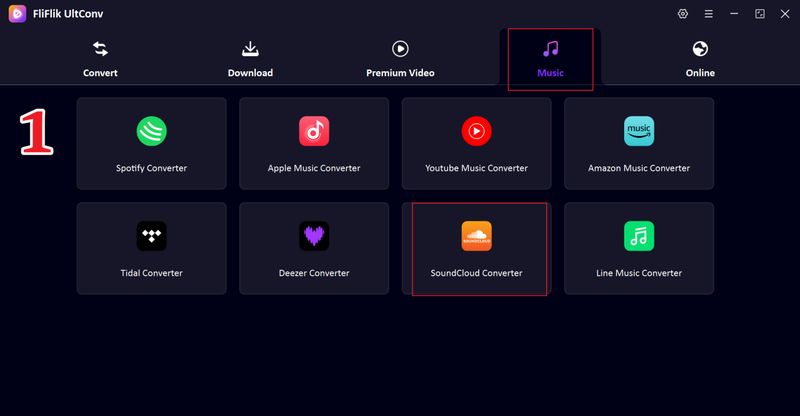
Step 2: Launch the software and go to the Music section. From the supported platforms list, choose SoundCloud.
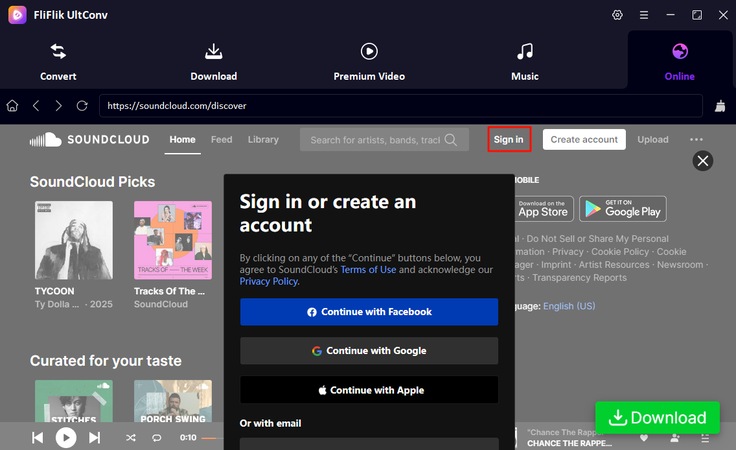
Step 3: Log in to your SoundCloud account inside the built-in browser to access your liked songs, playlists, and full library.
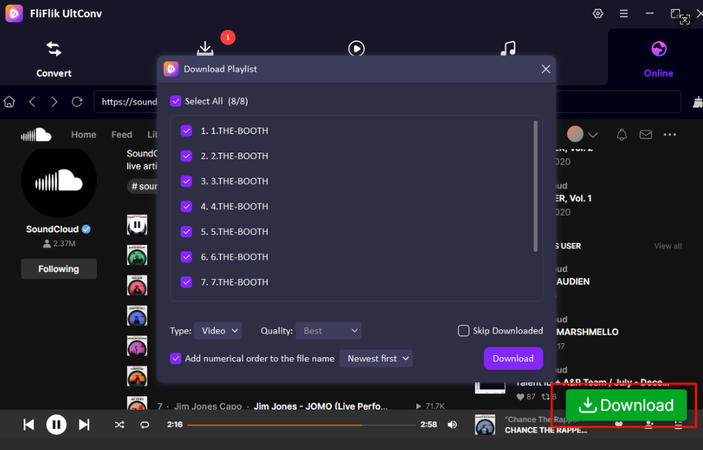
Step 4: Browse your SoundCloud library, select the playlist or tracks you want, and click the Download button.
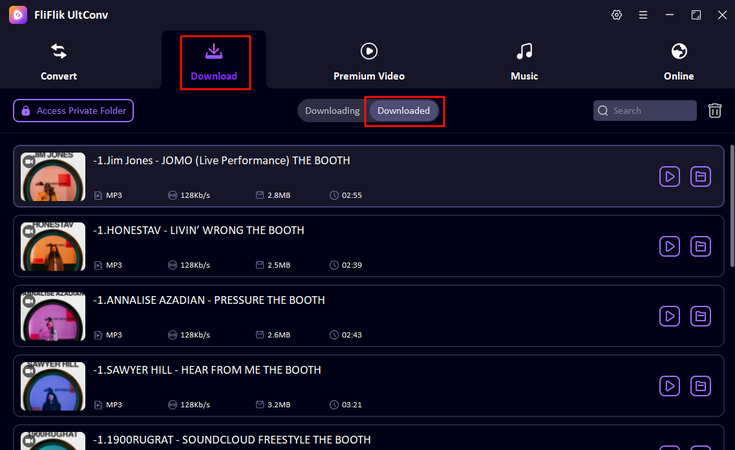
Step 5: Once the download is complete, go to the Downloaded section to view and play your saved songs with artwork and full metadata.


How to Extract Cover Art from Downloaded SoundCloud Music Files?
▼ Steps to Extract SoundCloud Cover Art on Mac:
-
Step 1: Drag and drop the converted SoundCloud files into the Music app on your Mac.
-
Step 2: Right-click the song and select Get Info / Properties.
-
Step 3: Go to the Artwork tab to view the embedded cover image.
-
Step 4: Right-click the artwork and choose Save Artwork / Export to save it on your computer.
-
Step 5: You can also change album art in iTunes / Music app by replacing the existing image if needed.
▼ Steps to Extract SoundCloud Cover Art on Windows:
-
Step 1: Open foobar2000 and drag your SoundCloud audio files into the interface.
-
Step 2: Right-click the track and select Properties.
-
Step 3: Go to the Artwork tab.
-
Step 4: Right-click the artwork and choose Export to file.
-
Step 5: Save the extracted SoundCloud cover art to your computer in high quality.

Related Reading 👉
5 Free Ways to Download SoundCloud to MP3 320kbps
Part 2: 4 Working SoundCloud Artwork Downloader Online Tools
If you don’t want to install any software, a SoundCloud artwork downloader online tool is one of the easiest ways to quickly grab cover images from SoundCloud tracks. These tools work directly in your browser and usually only require a track or playlist link. Below are four popular options you can try.
2-1. SoundCloud Artwork Downloader (scloudplaylistdownloader)

The SoundCloud Artwork Downloader online tool is designed specifically to extract artwork from SoundCloud tracks in a fast and simple way. It works by pulling the cover image directly from the SoundCloud track link, so users don’t need any technical skills or software installation. It’s a convenient option for people who just want to quickly save album art in a few clicks.
- Very simple and beginner-friendly
- No installation required
- Works directly in the browser
- Limited advanced features
- Show ads on the page
▼ Steps to Use SoundCloud Artwork Downloader:
Step 1: Open SoundCloud and copy the track URL.
Step 2: Visit the SoundCloud Artwork Downloader website.
Step 3: Paste the copied link into the input box.
Step 4: Click the Download Cover Art button and save the artwork.
![use soundcloud artwork downloader]()

2-2. KlickAud SoundCloud Artwork Downloader

KlickAud is a popular online SoundCloud tool that is widely used for downloading both audio and artwork from SoundCloud tracks. It is known for its clean layout and fast processing, making it easy for users to extract cover images without any complicated steps. The tool works directly in the browser and supports quick link-based processing, which makes it suitable for casual users who want instant results.
- Clean and easy interface
- Fast processing speed
- No software needed
- Limited customization options
- Ads appear
▼ Steps to Use KlickAud SoundCloud Artwork Downloader:
Step 1: Open SoundCloud and copy the track URL whose artwork you want to download.
Step 2: Visit KlickAud, paste the copied SoundCloud link into the input box, and start processing.
Step 3: When the track information appears, choose the artwork download option and save the cover image.

2-3. SoundLoadMate

SoundLoadMate is another web-based SoundCloud tool that allows users to download music and extract artwork using just a URL. It is designed for simplicity, so even beginners can use it without confusion. The platform focuses on quick processing and supports different types of SoundCloud content, making it a handy option for users who want both speed and convenience.
- Supports quick link-based extraction
- Works on mobile and desktop
- Free to use
- Sometimes slow during peak usage
- Basic features only
▼ Steps to Use SoundLoadMate:
Step 1: Go to SoundCloud and copy the URL of the track, playlist, or audio page you want to process.
Step 2: Open SoundLoadMate, paste the SoundCloud link into the search box, and start the extraction.
Step 3: Select the available download option and save the artwork or audio file to your device.

2-4. MusicFetcher SoundCloud Artwork Downloader

MusicFetcher SoundCloud Artwork Downloader is a browser-based tool that helps users extract high-quality cover art from SoundCloud tracks in just a few steps. It is designed to maintain good image quality while keeping the process simple and accessible. You can use it without installing anything, making it a flexible option for both desktop and mobile devices.
- Supports high-quality artwork extraction
- No installation required
- Works on most devices
- Performance may vary
- Limited extra features
▼ Steps to Use MusicFetcher SoundCloud Artwork Downloader:
Step 1: Open SoundCloud and copy the link of the track with the cover art you want to save.
Step 2: Visit MusicFetcher, paste the SoundCloud track URL, and click the search or download button.
Step 3: Preview the detected artwork, then download the image in high quality.

Part 3: 5 SoundCloud Artwork Downloader Extensions
If you prefer working directly in your browser, using a SoundCloud downloader with an artwork extension can be a very convenient option. These SoundCloud Artwork Downloader extensions integrate with Chrome or Firefox and let you quickly grab music and cover art while browsing SoundCloud.
3-1. Addoncrop SoundCloud Music Downloader (Chrome Extension)

Addoncrop SoundCloud Music Downloader is a popular Chrome extension that enhances the SoundCloud experience by adding download options directly into the player. It allows users to save tracks along with additional data, making it a useful option for those who want a simple way to manage downloads and artwork without leaving the SoundCloud page.
- Easy integration with the SoundCloud interface
- Supports quick track downloading
- No need for external software
- Require additional setup steps
- Browser compatibility can vary
▼ Steps to Use Addoncrop SoundCloud Music Downloader:
Step 1: Install the Addoncrop SoundCloud Music Downloader extension in your Chrome browser.
Step 2: Open SoundCloud and go to the track or playlist you want to download.
Step 3: Click the download button added by the extension and save the track. If artwork or metadata is available, it may be included with the file.
3-2. Open SoundCloud Coverart (Chrome Extension)

Open SoundCloud Coverart is a lightweight Chrome extension designed specifically to help users view and access high-quality cover images from SoundCloud tracks. It focuses mainly on artwork extraction, making it a simple and fast solution for users who only need album art.
- Simple and lightweight
- Fast access to cover art
- No complex settings required
- Limited to artwork only
- No advanced download features
▼ Steps to Use Open SoundCloud Coverart:
Step 1: Install the Open SoundCloud Coverart extension from the Chrome Web Store.
Step 2: Open SoundCloud and play the track whose cover image you want to view.
Step 3: Click the extension icon to open the artwork, then right-click the image and choose Save image as.
3-3. SoundCloud Artwork Getter (Chrome Extension)

SoundCloud Artwork Getter is a Chrome extension that allows users to quickly extract and download cover art from SoundCloud tracks. It adds a small option inside the browser that makes it easy to grab artwork while browsing music.
- Quick one-click artwork extraction
- Easy to use for beginners
- Works directly inside SoundCloud
- Limited functionality beyond artwork
- Does not support all tracks
▼ Steps to Use SoundCloud Artwork Getter Extension:
Step 1: Install the SoundCloud Artwork Getter extension from the Chrome Web Store.
Step 2: Open SoundCloud and play a track.
Step 3: Click the extension icon to extract artwork.
![extract soundcloud artwork using extension]()
Step 4: Save the image to your device.

3-4. SCDL SoundCloud Downloader (Firefox Extension)

SCDL SoundCloud Downloader is a Firefox extension that adds download functionality directly to SoundCloud. It allows users to save audio and sometimes metadata, making it a flexible option for Firefox users who want quick access to downloaded content.
- Works directly in Firefox browser
- Simple and fast download process
- No external software required
- Limited control over output quality
- Does not always support artwork extraction
▼ Steps to Use SCDL SoundCloud Downloader:
Step 1: Install the SCDL SoundCloud Downloader extension in Firefox.
Step 2: Open SoundCloud in Firefox, find the track you want to download, and play or refresh the page.
Step 3: Click the download option added by the extension and save the SoundCloud file to your computer.
3-5. SoundCloud Artwork Downloader (Firefox Extension)

The SoundCloud Artwork Downloader Firefox extension is designed specifically for extracting cover images from SoundCloud tracks. It focuses on simplicity, allowing users to quickly grab artwork while browsing without needing extra tools or websites.
- Dedicated to artwork extraction
- Lightweight and easy to use
- Works inside Firefox
- Limited to Firefox only
- Basic features with no advanced options
▼ Steps to Use SoundCloud Artwork Downloader Firefox Extension:
Step 1: Install the SoundCloud Artwork Downloader extension in your Firefox browser.
Step 2: Open SoundCloud and go to the track page with the artwork you want to download.
Step 3: Click the extension icon to detect or open the cover image, then save it to your device.
Part 4: Directly Download Artwork from the SoundCloud Website
If you are familiar with browser tools or have some technical experience, using Developer Tools is one of the most direct ways to extract cover art from SoundCloud.
4-1. Download SoundCloud Artwork with Developer Tools
This method works because SoundCloud loads artwork as image files inside the page code, which can be accessed manually. It can also act as a simple SoundCloud artwork downloader without needing any external tools.
- No third-party tools or extensions required
- Can extract original high-quality image files
- Works directly inside any modern browser
- Slightly technical for beginners
- Manual process can take more time
▼ Steps to Download SoundCloud Artwork with Developer Tools:
Step 1: Open SoundCloud and go to the track whose cover art you want to download. Right-click anywhere on the page and select Inspect.
Step 2: Click the element selector icon in the developer tools. Hover over the cover image on the page until you see the image file, usually a JPG or PNG link, highlighted in the code.
Step 3: Copy the full image URL from the highlighted code.
Step 4: Open a new browser tab, paste the copied link, and press Enter.
Step 5: Right-click the image and choose Save image as to download it to your device.
![download soundcloud artwork image with developer tools]()

Part 5: Comparison – Top 11 SoundCloud Artwork Downloaders
Too many options? Don’t know which one is best? Here’s a quick comparison of the top SoundCloud artwork downloaders. The table below will help you easily see which tools support songs, HD artwork, playlists, and metadata features.
| Tool | Songs Download | Lyrics Download | Compatible Platforms | Batch Support | Playlist / Channel / Album Download | Keep all ID3 Tags | Best For |
|---|---|---|---|---|---|---|---|
| FliFlik UltConv | Yes✅️ | Yes✅️ | Windows / Mac / Android | Yes✅️ | Yes✅️ | Yes✅️ | Best all-in-one downloader with high quality audio + artwork |
| Online Tools | Limited | No | Any browser (PC, mobile) | No | Limited | No | Quick one-time downloads without installation |
| Browser Extensions | Yes | No | Chrome / Firefox | Limited | Limited | Partial | Easy in-browser downloading while using SoundCloud |
| Developer Tools | No (manual extraction only) | No | browser | No | No | No | Manual extraction of original high-quality artwork |
Conclusion
Most SoundCloud artwork downloaders grab the audio and drop everything else: no artwork, no track info, nothing. If you care about keeping your music library actually organized, that gets old fast. FliFlik UltConv SoundCloud Downloader does it properly. It saves the audio along with the cover art, title, artist name, and all the metadata in one go. Quality goes up to 320kbps, format options cover MP3, FLAC, WAV, AAC, and M4A, and batch downloading means you can pull a full playlist or album without babysitting each track. Solid tool if SoundCloud is somewhere you regularly grab music from.
 Secure DownloadSecure Download