

 By
By  6 minutes read


Thinking about switching from Spotify to TIDAL but afraid of losing your playlists? That fear is understandable. Playlists you’ve spent months — even years — curating aren’t something you want to rebuild from scratch.
The good news is you don’t have to. The right Spotify to Tidal playlist converter can move your entire library in just a few simple steps.
In this guide, we’ll walk you through three practical methods: a free online tool, desktop software for advanced control, and mobile apps for fast, on-the-go migration.

- Part 1. Spotify Vs Tidal: Which Platform is More Valuable for You in 2026?
- Part 2. Method 1: Use a Free Online Spotify to Tidal Playlist Converter (No Installation)
- Part 3. Method 2: The Best Solution: Move Spotify to Tidal and Preserve Full Music Library
- Part 4. Method 3: Transfer Spotify To Tidal Through Apps (Free And High Accuracy)
- Part 5: Conclusion
Content Table:
Part 1. Spotify Vs Tidal: Which Platform is More Valuable for You in 2026?
Spotify is often the first choice of music lovers, thanks to its robust playlists, personalized recommendations and relaxed daily listening experience.Tidal, by contrast, appeals more to users who prioritize high-fidelity sound quality, artist-centric content and an authentic music-focused atmosphere.
However, it does not mean that the same one is right for everybody. And it depends on how you listen. If you prefer fresh daily playlists and easy discovery, Spotify will feel right at home. If you value premium audio quality above all else, TIDAL is a much better fit.
Key Differences at a Glance:
| Feature | Spotify | TIDAL |
|---|---|---|
| Price | Starting at $11.99/month | Starting at $10.99/month |
| Free Tier | ✅ Yes (with ads) | ❌ No |
| Audio Quality | Up to 320 kbps | Up to Hi-Res FLAC / Dolby Atmos |
| Library Size | ~100 million tracks | ~100 million tracks |
| Offline Downloads | ✅ Premium only | ✅ All paid plans |
| Discovery & Playlists | ⭐⭐⭐⭐⭐ (Excellent) | ⭐⭐⭐⭐ (Great) |
| Artist Payout | Standard | Higher per-stream rate |
| Best For | Everyday casual listening | Audiophiles and artist supporters |
What You Will Lose and Keep When You Switch
You will usually keep playlist names, most song matches, and the general structure of your saved lists. That is the part most users care about first, and thankfully, it is often manageable.
You may still lose a few tracks. Some songs do not match well across services. Rare versions, remixes, and local files can be the first to slip through. That is why choosing the right Spotify to TIDAL playlist converter matters.
Part 2. Method 1: Use a Free Online Spotify to Tidal Playlist Converter (No Installation)
If you prefer not to install anything, start with a browser tool. It is the quickest method available. You load a website, link both services, select your playlist, and the tool will perform matching in the background.
This method works well to transfer from a Spotify playlist to TIDAL only once. It is simple, quick and helpful for first time users.
Nonetheless, it works best when your playlists are made up of well-known songs rather than hard to find edits or rare recordings.
TuneMyMusic

TuneMyMusic is a browser-based service that allows you to transfer your playlists, favorite songs, albums and artists from Spotify to Tidal after linking both accounts and allowing access to the transfer. For users who want to easily transfer Spotify to Tidal playlist without needing to install additional software, this is a simple choice.
- Official and most reliable way to recover deleted playlists within 90 days.
- Works on both desktop and mobile browsers without extra tools.
- Simple process with one-click restore functionality.
- Only available for playlists deleted within the last 90 days.
- Does not work if the playlist was permanently removed after the time limit.
▼ Steps to Convert Spotify Playlist to Tidal via TuneMyMusic:
-
Step 1: Open TuneMyMusic in your browser.
-
Step 2: Choose Spotify as the source.
-
Step 3: Sign in and allow access.
-
Step 4: Select the playlist you want to move.
-
Step 5: Choose TIDAL as the destination.
-
Step 6: Start the transfer and review unmatched tracks.
![convert-spotify-playlist-tidal-using-tunemymusic]()

Part 3. Method 2: The Best Solution: Move Spotify to Tidal and Preserve Full Music Library
Simply moving playlists from Spotify to Tidal only addresses part of your needs. Most users expect more than basic syncing—they want permanent ownership of their music collection. This requires saving songs in universal audio formats, retaining original sound quality, and enjoying unrestricted playback across all devices.
UltConv Spotify Music Converteris a reliable desktop tool to move Spotify to Tidal seamlessly. It does more than basic playlist transfer, converting Spotify music into standard, long-lasting audio files for permanent saving, simple management, and unrestricted playback on any device.
This powerful converter supports 10,000+ streaming sites, over 100 output formats, and up to 320kbps high-quality sound. It keeps all original metadata and song details untouched, offering much better flexibility than regular online playlist movers. Easily migrate Spotify playlist to Tidal and take full control of your local music collection with zero quality loss.

- Download Spotify songs, albums and playlists and export them as MP3 files
- Preserve original audio quality and complete ID3 tag information for Spotify tracks
- Bypass Spotify DRM restrictions with unlimited removal capabilities.
- Get audio quality up to 320 kbps for a better listening experience.
- Convert Spotify music into 10+ popular, widely compatible audio formats
- Download audio from 10,000+ streaming platforms: Spotify, Tidal, Apple Music, SoundCloud and more
▼ How to Move Spotify Playlists to Tidal via UltConv Music Converter:
-
Open UltConv Music Converter and go to the Popular or Music section. Then select Spotify Music Converter.
 FREE DOWNLOAD
![secure download]() Secure Download
FREE DOWNLOAD
Secure Download
FREE DOWNLOAD![secure download]() Secure Download
Secure Download
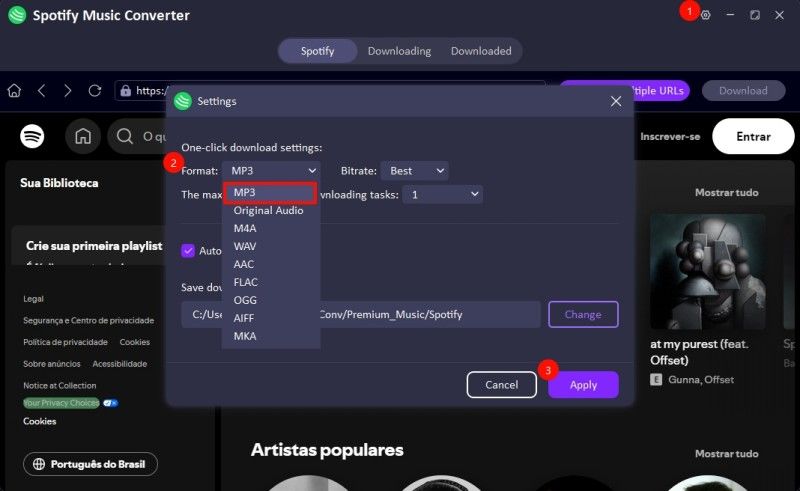
Choose MP3, FLAC, or another output format. After that, set the quality and save location.
-
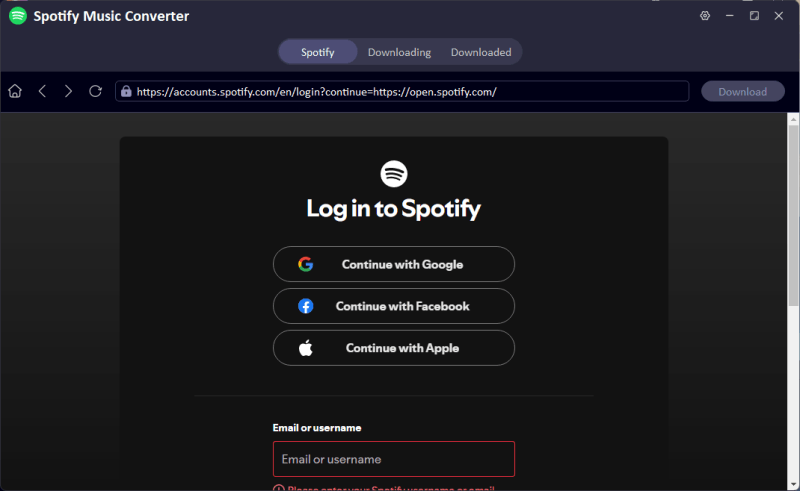
Sign in to your Spotify account and open the playlist you want to download.
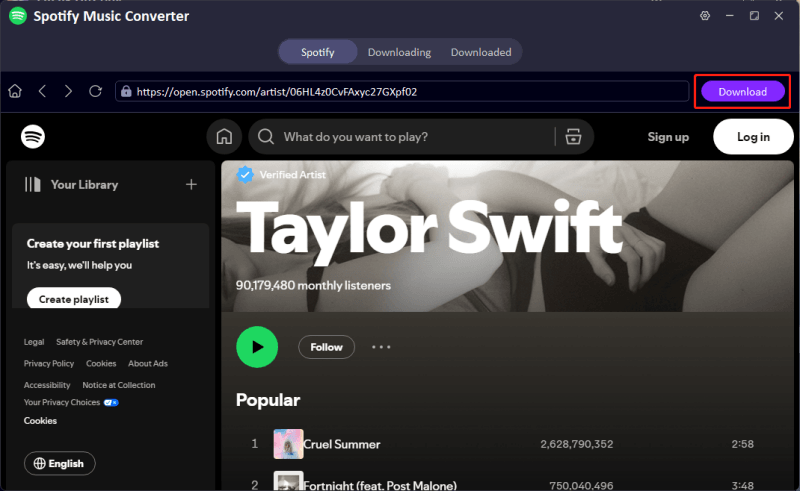
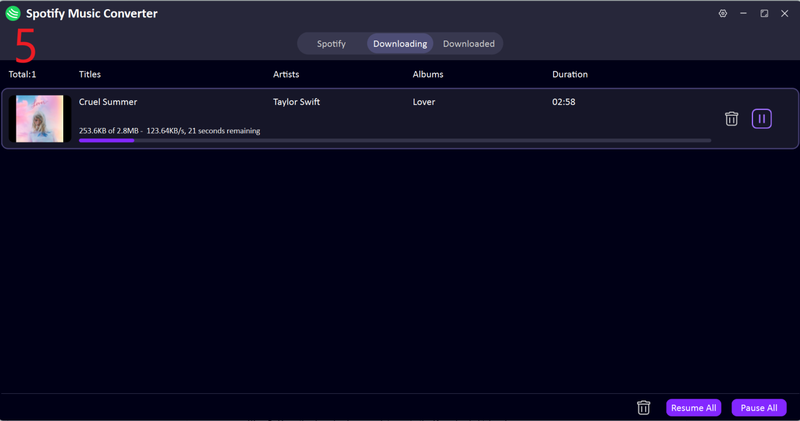
Click Download and let UltConv save the files to your device.
-
Move the converted files to your Tidal folder using a USB or another local transfer option.
-
Open Tidal, head to Your Library, and check Local Files to find your music.
![import-playlist-into-tidal]()


Part 4. Method 3: Transfer Spotify To Tidal Through Apps (Free And High Accuracy)
App-based tools can seem more natural if you perform most actions on your phone. Simply log in, pick the playlist, and let the app do all the heavy lifting. So, it’s much easier than opening your laptop to hassle with migrating files.
This method works well when convenience matters most. It is also a good fit for casual users who want a clean setup and quick results. If you are not dealing with a huge library, mobile apps can be more than enough.
FreeYourMusic For Android

FreeYourMusic says you can select Spotify as the source, and Tidal as the destination, and then move playlists between the two services. Its Google Play listing also says the app supports converting playlists from Spotify to Tidal and other music platforms.
- Privacy-safe — no user data stored on servers.
- Fast transfers with automatic 15-minute cross-platform sync.
- Available on iOS, Android, Windows, macOS & Linux.
- Limited free access; 600-song total transfer limit for the free version.
- Song matching is inconsistent — wrong versions and remixes are common.
- Free plan limits aren’t disclosed upfront, paywall hits mid-transfer.
- Large libraries (10,000+ songs) frequently crash or stall.
▼ Steps to Use FreeYourMusic:
-
Step 1: Download and install FreeYourMusic on your phone.
-
Step 2: Open the app and tap Spotify as the source platform.
-
Step 3: Tap Tidal as the destination platform.
-
Step 4: Log in to both accounts when prompted.
-
Step 5: Select the playlists or songs you want to transfer.
-
Step 6: Tap Transfer and wait for the process to complete.
-
Step 7: Open Tidal — your Spotify playlists are ready to play.
SongShift For iOS

SongShift describes itself as an app that moves your music between services and helps keep your library intact. That makes it a clean option for iPhone users who want a straightforward Spotify to Tidal Converter on mobile.
- Best free tier song limit among competitors — 200 songs per shift vs. 20–50 on most rivals.
- Playlist sharing via SongShare lets friends on different platforms receive your playlists directly.
- Actively supports Spotify, Apple Music, Tidal, YouTube, Amazon Music, Deezer, Pandora, and more.
- iOS only
- Full features require a Pro subscription, ongoing cost for what many users only need once.
- Transfers above 100 songs are more prone to errors and incomplete results.
▼ Steps to Use SongShift:
-
Step 1: Download and install SongShift on your iPhone or iPad.
-
Step 2: Open the app, tap “+” and connect your Spotify account as the source.
-
Step 3: Select the playlists you want to move.
-
Step 4: Connect your Tidal account as the destination.
-
Step 5: Review any mismatched tracks, then tap “Shift” — done.
Part 5: Conclusion
Transferring your playlists from Spotify to Tidal doesn’t have to feel like starting over. If you want the quickest route, TuneMyMusic is a simple way to get the job done. If you prefer using your phone, FreeYourMusic and SongShift make the process feel more convenient and familiar.
But if you want more control over your music, better flexibility, and a saved copy of your tracks, UltConv Spotify Music Converter stands out as the strongest option. That is really what sets it apart. It does not just help you move from one service to another; it gives you more freedom over your library. Thus, you can switch with much more confidence than worrying about losing playlists you’d built over the years, and once you make the switch, your music will be with you wherever you go.
