

 By
By  8 minutes read


Have you ever hit the download button on Tidal, expecting to enjoy high-fidelity music offline, only to have it fail? Due to complex app restrictions, playback limitations, and encrypted FLAC formats, many users are turning to reliable Tidal FLAC downloaders. A top-tier downloader helps you bypass these app constraints and save high-quality lossless music as local files.
In this article, we’ll first walk you through a quick troubleshooting guide for Tidal’s native download feature, followed by a curated list of exceptional download tools for both Mac and Windows.

Part 1. How to Quickly Solve Tidal Not Downloading?
Before moving to advanced Tidal downloader tools, try these quick fixes. They solve most download problems without much effort.
Fix 1. Clearing Your Cache
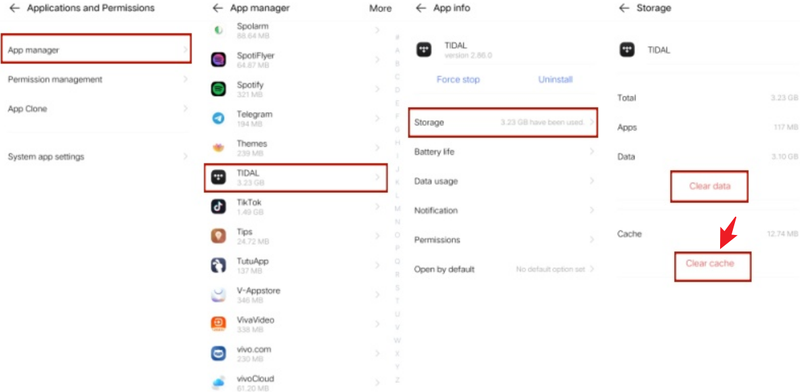
When Tidal downloads get stuck or fail, the app’s cache is often the hidden reason. It stores temporary data to help the app run faster, but over time, that data can become outdated or corrupted. Clearing it refreshes the app and often fixes download glitches instantly.
▼ Steps to Fix:
- Step 1: Open the Tidal app on your device.
- Step 2: Go to Settings.
- Step 3: Find Storage or Data & Cache options.
-
Step 4:
Tap on
Clear Cache.
Restart the app and try downloading again.

Fix 2. Check Your Internet & Subscription Status
A weak connection or an inactive subscription can easily stop downloads without any clear warning. Even if streaming works, downloads may still fail if the connection drops or your plan doesn’t support offline mode.
▼ Steps to Fix:
- Step 1: Check if your internet is stable (try opening a website or streaming a song).
- Step 2: Switch between Wi-Fi and mobile data if needed.
- Step 3: Restart your router if the connection feels slow.
- Step 4: Open your Tidal account settings.
- Step 5: Confirm your subscription is active and supports offline downloads.
Fix 3. Restart/Reinstall Your Tidal App
Also, sometimes the app just gets stuck due to minor bugs or background issues. Restarting gives it a quick refresh, while reinstalling completely resets everything and fixes deeper problems.
▼ Steps to Fix:
- Step 1: Close the Tidal app completely (not just minimize it).
- Step 2: Restart your device.
- Step 3: Open Tidal again and test downloads.
- Step 4: If the issue continues, uninstall the app.
-
Step 5:
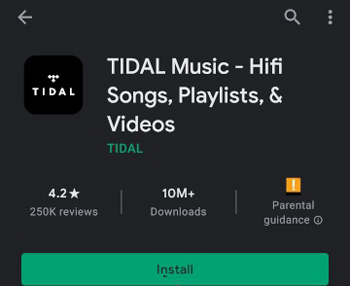
Download and install the latest version from the official store. Log back in and try downloading your music again.

Part 2. Top 4 Tidal FLAC/Playlist Downloader for Windows & Mac Desktop
If Tidal still isn’t downloading the way you want, these below 3 Tidal FLAC downloaders can help you save music more easily, often with better control over formats like FLAC and playlists.
1. FliFlik UltConv Tidal Downloader
FliFlik UltConv Tidal Downloader is our top recommendation, a powerful media downloader that supports over 1000 websites. It’s not just a simple music scraping tool; you can download Tidal’s songs, albums, and playlists with just a few clicks, completely eliminating technical complexity.
For music enthusiasts, it supports high-fidelity formats like FLAC, allowing every detail to be fully preserved. Additionally, UltConv comes with a built-in browser that allows for smooth browsing on both Windows and Mac systems, perfectly balancing high-end performance with user-friendliness.

- Supports 10,000+ websites, including Tidal, Spotify, YouTube, and more
- Output formats: FLAC, MP3, WAV, AAC, AIFF, and 100+ others
- Batch download for playlists, albums, and multiple tracks
- Built-in browser for direct music searching and downloading
- High-quality downloads up to lossless FLAC and 320kbps audio
▼ Steps To Download Music from Tidal with UltConv Tidal Downloader
If you want an easier way to download Tidal music the process with UltConv is simple and only takes a few steps. Please download and install UltConv on your Windows or Mac computer.
 Secure Download
Secure Download
Secure Download
-
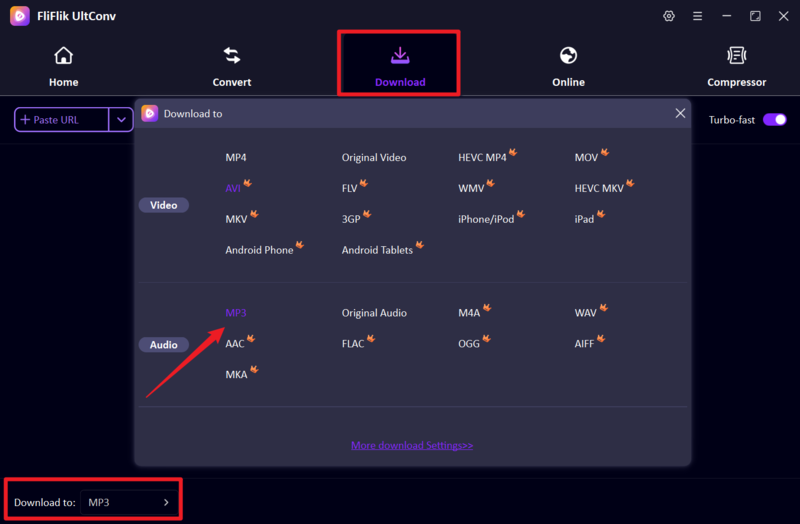
After installing and launching the app, go to the Download section and click the Download to button in the lower-left corner. When the output format window pops up, locate and select MP3 or FLAC.
-
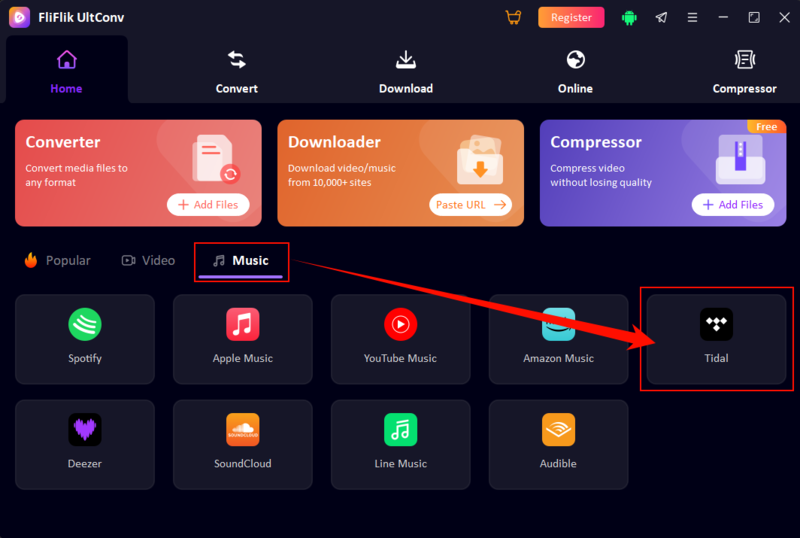
Return to the Home page, find the Tidal entry under the Music section, and click to enter the website.
-
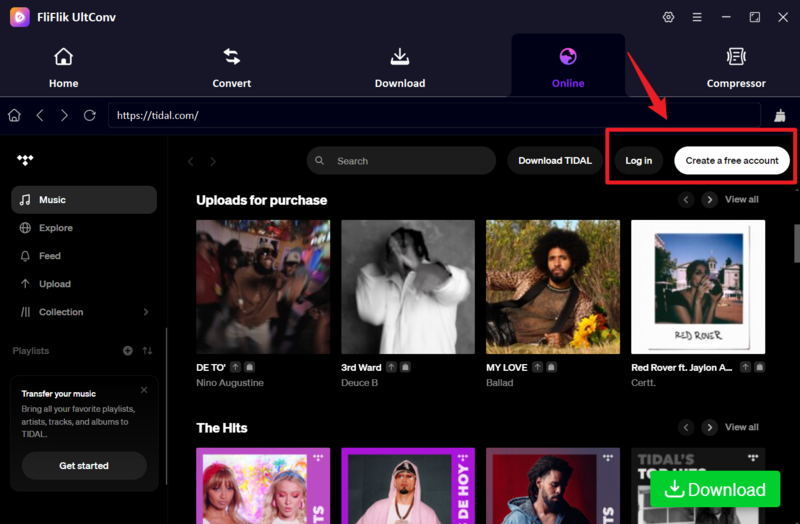
Once you’re on the Tidal website, click the Log In button and sign in with your credentials. If you don’t have an account yet, please sign up first.
-
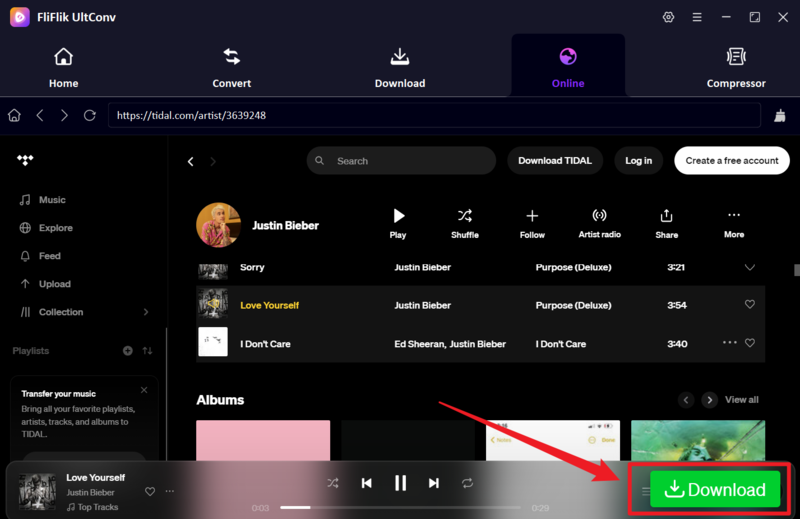
As shown in the image below, find the music you want to download and simply click the Download button in the lower-right corner.
-
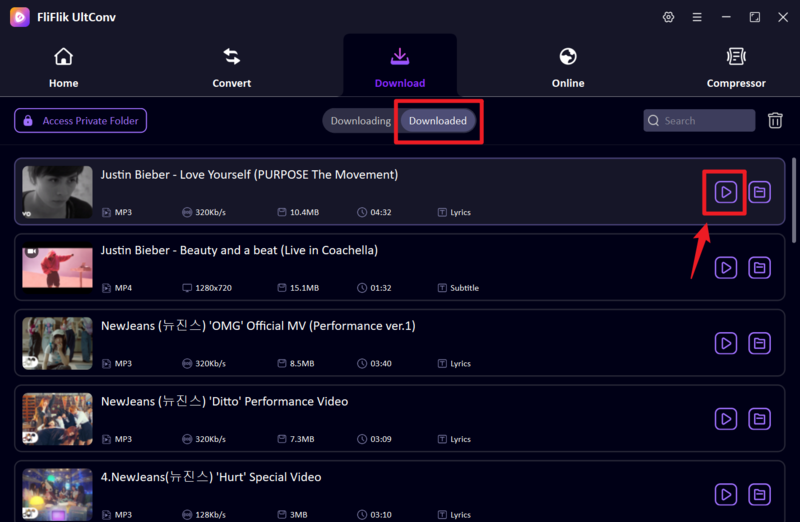
Once the download starts, please do not pause the process. After waiting a few minutes, you can listen to the music offline by clicking the Play button in the Downloaded section. You can also check the local file path to see where the music is saved.


2. Macsome Tidal Music Downloader

Next, Macsom Tidal Music Downloader focuses on preserving the original sound quality, including Tidal HiFi and Master Audio. It supports multiple formats, including MP3, FLAC, and ALAC, ensuring that your music library is compatible across all devices. Thanks to its simple interface and high-fidelity output, it is the top choice for music enthusiasts who prioritize both usability and sound quality details.
- Keeps HiFi and Master audio quality
- Supports multiple output formats
- Simple and easy-to-use interface
- The free version has limitations
- Can feel a bit slow with large playlists
3. Tidabie Tidal Music Converter

Tidabie Tidal Music Converter is a comprehensive solution for exporting Tidal tracks in formats such as MP3, FLAC, and WAV. It is particularly skilled at retaining ID3 tags (titles, artists, and albums) to keep your music library organized. With its high-speed batch download feature, it is an ideal tool for efficiently converting entire playlists with no technical operations required.
- Works with multiple streaming platforms
- Keeps high audio quality and ID3 tags
- Supports batch conversion at faster speeds
- Interface can feel a bit crowded at first
- Some features are locked behind the paid version
4. Tidal Media Downloader Pro

Tidal Media Downloader Pro is a lightweight, feature-rich tool suitable for users who prioritize practicality over a beautiful interface. It offers two versions: tidal-dl (command line) and tidal-gui (graphical interface). Although it lacks some additional features and may require some time to set up, it focuses on efficiently downloading Tidal’s music and videos, making it a reliable and user-friendly choice.
- Free and lightweight to use
- Supports both CLI and GUI versions
- Can download tracks and videos from Tidal
- Not very beginner-friendly
- Lacks advanced features and polish compared to other tools
Part 3. Top 3 Tidal FLAC/Playlist Downloader Online Free
If you don’t want to install anything, online tools can still get the job done. Here are 2 best options.
1. FliFlik Online Screen Recorder

FliFlik Online Screen Recorder is a browser-based alternative that captures Tidal music by recording system audio. If you don’t want to install the software, it’s a perfect alternative. Simply select the audio source, play music, and save the high-definition video. The best part is that it has no watermarks and is also very user-friendly for ordinary users.
- Works directly in your browser, no installation needed
- Can record system audio in good quality
- No watermark on saved recordings
- Records in real time (takes longer)
- Not a true downloader, so a manual process is required
2. Apowersoft Free Online Audio Recorder

Apowersoft’s online audio recorder provides a simple and efficient way to record Tidal music. It focuses on system audio rather than the entire screen audio, thereby providing a clearer recording experience. This software is very lightweight—just open the page, click record, and then play your music. As a free and installation-free tool, it offers excellent audio quality and convenient setup.
- One-click recording with no installation
- Captures system audio clearly
- Simple and beginner-friendly
- Real-time recording only
- Not suitable for batch downloads or playlists
FAQs
Q1. Can I download Tidal files?
Yes, FliFlik UltConv converts Tidal’s protected offline cache into permanent MP3 or FLAC files, freeing up your music from application-only restrictions and enabling full offline control.
Q2. How to convert Tidal to MP3 on my Android?
To get the Tidal MP3 on your Android device, first download the FliFlik UltConv app from the Google Play Store, which is the best way to maintain high-quality audio.
Q3. What is the best Tidal downloader?
FliFlik UltConv is an ideal desktop choice for quick and high-quality downloads of FLAC playlists, seamlessly combining powerful performance with a simple interface.
Conclusion
Tidal is great for streaming, but downloading music isn’t always as smooth as you’d expect. Sometimes it’s a simple glitch. Other times, it’s just the app’s built-in limitations getting in the way. That’s why having a backup plan helps. FliFlik UltConv Tidal Downloader supports high-quality formats, and handles playlists without much effort. You get your music the way you want in offline mode.
Secure Download
Secure Download
