

 By
By  7 minutes read


Ever tried to open HBO Max before a flight, only to realize that the show or movie you want to watch is not available for offline viewing? Or you want to keep your favorite show on your computer, but the official download methods come with many annoying limitations? I’ve been there, too.
That’s why I tried some of the most popular HBO Max downloaders available today in 2026. I examined download quality and speed, supported output formats, subtitle support, user-friendliness, and price. Some worked surprisingly well, but others had limitations you should know about before spending your money. In this guide, I will share the 7 best HBO Max downloaders and compare their features so you can pick the one that suits your needs best.

Part 1. What is HBO Max, Does HBO Max Allow Downloads?
HBO Max is a streaming service that streams HBO Originals, blockbuster movies, TV shows, documentaries, and content from Warner Bros., DC, Discovery, and more. Yes, HBO Max allows offline downloads, but only on the mobile app, and only for eligible ad-free subscribers. Downloads expire after a while, are locked to the app, and can’t be transferred to other devices. If you’d like to save HBO Max videos permanently or watch them without these restrictions, you’ll need a third-party HBO Max downloader.
Part 2. 7 Best HBO Max Video Downloaders Reviewed
Below, we compare seven HBO Max video downloaders based on quality, formats, subtitles, supported systems, workflow, and pricing.
1. FliFlik UltConv – Best HBO Max Downloader Overall
If you’ve ever tried downloading a movie from HBO Max, you’ve probably noticed the official download feature comes with quite a few limitations. Your downloads expire, they’re locked to the app, and you can’t transfer them to another device. That’s where FliFlik UltConv HBO Max Downloader comes in.
UltConv HBO Max Downloader will download HBO Max movies and TV shows directly to your Windows or Mac computer for permanent storage. Save videos in up to 4K or 1080p as standard MP4 or MKV files that you can play on almost any device without the need for the HBO Max app. The downloaded files preserve multiple audio tracks, 5.1 surround sound, subtitles, and metadata so that your files look and sound exactly like the originals. Whether you are preparing for a trip, want to build your own offline collection, or just want to say goodbye to download restrictions, UltConv HBO Max Downloader makes the process fast, easy, and reliable.

- Download HBO Max movies and TV shows in up to 4K or 1080P.
- Save videos as MP4 or MKV for playback on any device.
- Keep multilingual audio tracks with 5.1 surround sound.
- Save subtitles as embedded, external SRT, or multilingual subtitles.
- Download entire TV seasons in one click.
- Up to 10× faster download speed with batch downloads.
▼ How to Save HBO Max Videos with UltConv HBO Max Downloader?
Step 1: First, you need to download and install UltConv HBO Max Downloader on your Windows or Mac computer. Once the setup is finished, you can launch the program.
-
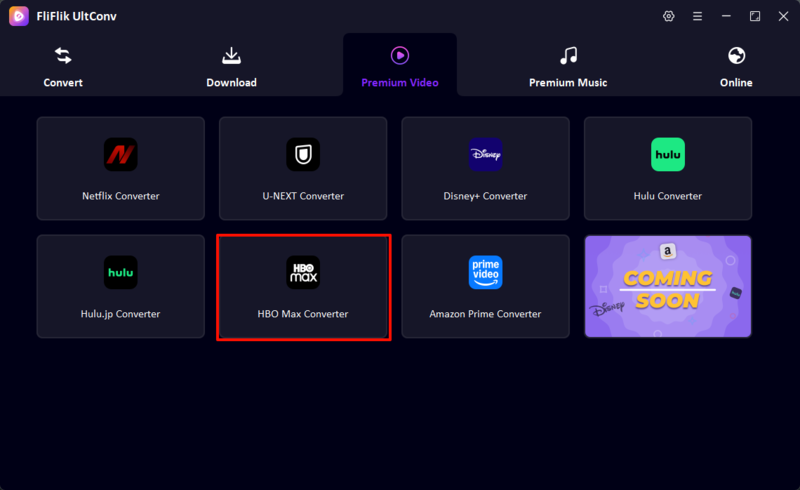
Step 2: In the main interface, click the Premium Video tab and select HBO Max Converter to open the built-in HBO Max downloader.
-
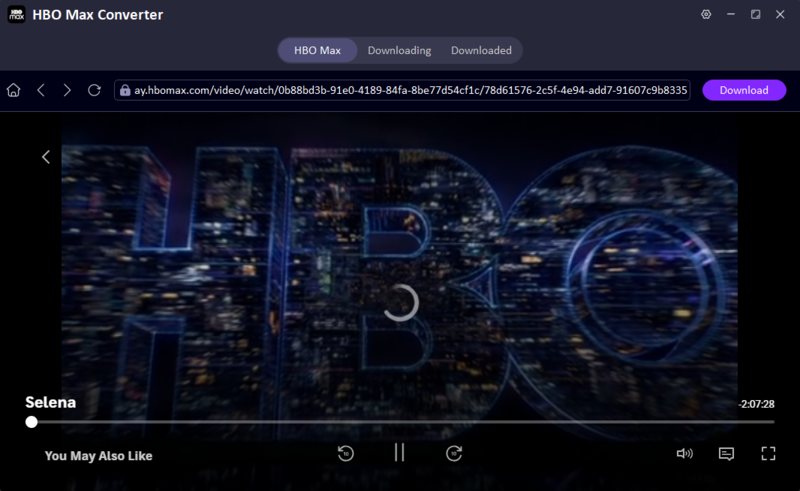
Step 3: Sign in to your HBO Max account via the built-in browser using your email address and password. After that, find and open the title you want to download.
-
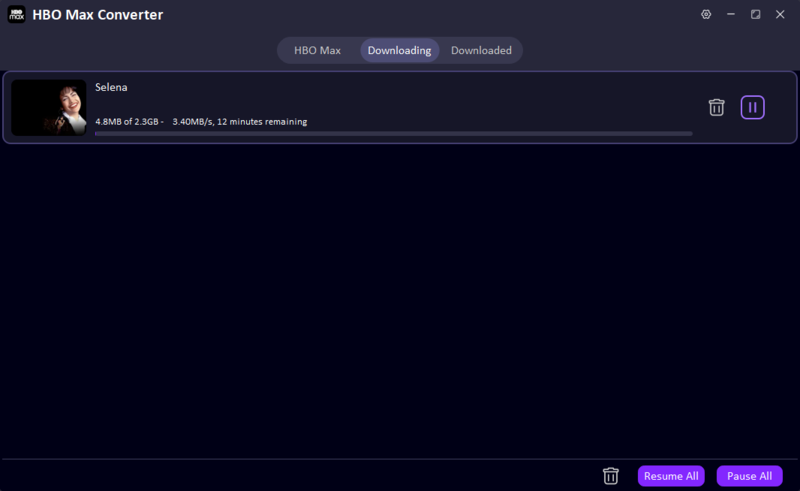
Step 4: Click the Download button, choose the desired video quality, audio track, subtitles, and output settings, then confirm the download. After the process is finished, you will find all your downloaded videos in the Downloaded tab, where you can play them offline anytime.


2. StreamFab Max Downloader – Best for Advanced Video Quality

The next option that we can use is StreamFab Max Downloader. This tool is a good option for those who want to download HBO Max content in the highest quality possible while also preserving advanced video and audio codecs. The software supports up to 4K with Dolby Vision, HDR10, and Dolby Atmos audio, so it is a good choice for home theater setups or large-screen devices. The downloader also saves videos in MP4 or MKV format for playback on virtually any device.
- Supports up to 4K with Dolby Vision and HDR10
- Preserves Dolby Atmos 5.1 audio
- Saves videos as MP4 or MKV
- Batch download support
- Premium software with a higher price
- Some advanced features require a lifetime version
Price: A lifetime license costs $109.99. Promotional discounts may be available at checkout.
3. MovPilot Max Video Downloader – Best for a Simple Download Workflow

MovPilot Max Video Downloader is a good option if you want an easy-to-use downloader with a simple download workflow without complicated initial setup. You just have to sign in to your Max account, search for the title you wish to download, and press start. It is compatible with movies, TV shows, documentaries, and Max Originals in 1080p, while saving videos in MP4 or MKV format. You can also transfer downloaded files to phones, tablets, TVs, or USB drives for offline playback.
- Clean and beginner-friendly interface
- Downloads in 1080p MP4 or MKV
- Batch download support
- Works with multiple devices
- No 4K download support
- Paid software after trial
Price: Starts at $59.95/year. A lifetime license is available for $89.95.
4. KeepStreams for Max – Best for Automatic Episode Downloads

If you are a fan of TV series and frequently watch new episodes, KeepStreams for Max can save you a lot of time. This program has an automatic download feature that can grab newly released episodes as soon as they are available to watch. It also supports batch downloads, multilingual audio, and subtitle options, and downloads in up to 1080p or 4K on supported titles. Plus, the downloaded videos will never expire, so it is a good choice if you are building an offline library.
- Automatically downloads new episodes
- Supports batch downloads
- Saves videos as local files for offline playback
- Multiple audio and subtitle options
- Full features require a paid subscription
- Interface may feel overwhelming for beginners
Price: Starts at $34.99/month, with yearly and lifetime plans available.
5. TunePat HBO Max Video Downloader – Best for Multilingual Audio and Subtitles

TunePat HBO Max Video Downloader is a downloader that is best for users who regularly watch content in different languages. It can download Max videos in 1080p and preserve multiple audio tracks with 5.1 surround sound, as well as subtitles in several formats. The tool also supports up to 26 different languages in its interface and downloads at up to 10× faster speed.
- Keeps multilingual audio tracks
- Supports embedded and external subtitles
- Downloads in MP4 or MKV
- Fast download speed
- Limited to 1080p resolution
- Trial version has download limits
Price: $69.90 / Lifetime License
6. CleverGet MAX Downloader – Best for Batch Episode Downloads

CleverGet MAX Downloader is suitable for users who want to download multiple episodes or complete seasons quickly. The program automatically detects all available episodes and allows you to download the selected seasons in one click. It saves videos in up to 720p resolution while preserving audio tracks and subtitles for offline playback.
- Easy batch downloading for TV shows
- Detects complete seasons automatically
- Saves videos as MP4 or MKV
- Simple download process
- Limited to 720p output
- Lower video quality than some of the competitors
Price: Starts at $41.96/year. A lifetime license is available for $69.96.
7. PlayOn Cloud – Best for Cloud-Based Recording

Unlike traditional downloaders, PlayOn Cloud is a service that records streaming videos in the cloud, instead of directly downloading them. After recording a video, you can save it to your computer, phone, or a cloud storage of your choice. It works with Max and many other streaming services, so it is a good tool to have if you are subscribed to several platforms. Since the recordings are done in the cloud, you do not have to leave your computer on all the time.
- No need to leave your computer on
- Works with many streaming services
- Save recordings to different devices
- Simple mobile app
- Uses a cloud recording system instead of direct downloads
- Credit-based pricing can become expensive for frequent users
Price: Uses a credit-based pay-as-you-go model. Credit bundles and subscription plans are also available.
Part 3. Comparison of the Top 7 HBO Max Downloaders
To make your decision easier, here’s a quick comparison table highlighting the main features of each HBO Max downloader.
| Tool | Supported Device | Resolution Support | Output Format | Subtitles Support | Tech & Speed | Price |
|---|---|---|---|---|---|---|
| FliFlik UltConv | Windows, Mac, Android | Up to 4K | MP4, MKV | Yes, embedded & SRT, multi-language | Direct download, batch download, up to 10× faster | $9.95/month |
| StreamFab Max Downloader | Windows, Mac | Up to 4K | MP4, MKV | Yes | Direct download, batch mode, high-speed | $109.99/lifetime |
| MovPilot Max Video Downloader | Windows, Mac | Up to 1080p | MP4, MKV | Yes | Direct download | $59.95/year |
| KeepStreams for Max | Windows, Mac | Up to 1080p/4K | MP4, MKV | Yes | Automatic downloads, batch mode | $34.99/month |
| TunePat HBO Max Video Downloader | Windows, Mac | Up to 1080p | MP4, MKV | Yes | Direct download, 10× faster | $69.90 / Lifetime License |
| CleverGet MAX Downloader | Windows, Mac | Up to 720p | MP4, MKV | Yes | Batch episode downloads | From $41.96/year |
| PlayOn Cloud | Android, iOS | Up to HD | MP4 | Closed captions supported | Cloud recording (slower than direct download) | Pay per recording or subscription |
Prices were checked in July 2026 and may vary depending on promotions, region, platform, and billing options.
Conclusion
If you only need occasional offline viewing, the official download feature from HBO Max may be enough. However, if you want to save your favorite movies and shows forever, transfer them to any device, or avoid the limitations of in-app offline downloads, a dedicated HBO Max downloader is the way to go.
Among all the tools we reviewed, FliFlik UltConv HBO Max Downloader stands out because of its ease of use, support for up to 4K downloads, MP4/MKV support, up to 10× faster batch downloads, and reliable subtitle and audio preservation. It offers the best value for most users in terms of quality, speed, and price.
 Secure Download
Secure Download
Secure Download