

 By
By  6 minutes read


OnlyFans is a popular subscription-based platform where creators share photos, videos, and exclusive content with their paying fans. Over the past few years, it has become very well-known worldwide, especially because of its private and premium content model. Because the content is paid and exclusive, many users wonder if they can take screenshots or save what they see. This raises a lot of questions about privacy, rules, and what is actually allowed on the platform.
In this article, we’ll explain whether can you screenshot OnlyFans, what happens when you try, and how the platform handles it. Lastly, we will also share how you can download videos from OnlyFans for offline watching. Keep reading.

Part 1. Does OnlyFans Notify Screenshots?
Short answer: No. OnlyFans does not notify creators if you take a screenshot or screen record their content. Unlike apps like Snapchat, there is no built-in alert system that tells creators when someone captures their content. So, in most cases, screenshots of posts, photos, or messages are not directly tracked or reported to the creator.
Even though screenshots are not detected, it’s important to remember that sharing or redistributing content without permission can violate OnlyFans rules and may lead to account penalties or legal issues.
Part 2. Why Do I Screenshots on OnlyFans with a Black Screen?

Sometimes when users try to take a screenshot or screen record on OnlyFans, they don’t see the actual content and instead get a black screen. This can be confusing, but it usually happens because of content protection systems used by the platform. OnlyFans uses DRM (Digital Rights Management) and other security methods to protect paid and private content.
These protections are designed to prevent copying or saving videos and images through screen recording tools. When the system detects a screenshot or recording attempt, it may block the visual output, which results in a black screen instead of the real content. This doesn’t happen on every device or in every situation, but it is a common issue on certain browsers, apps, or operating systems where protection features are more active.
Part 3. How to Screenshot OnlyFans with Hotkeys on Windows & Mac
Now that we’ve answered the question “Can you screenshot OnlyFans?”, let’s look at a simple way people take screenshots using keyboard shortcuts (hotkeys). These are built-in methods available on both Windows and Mac computers.
▼ Windows:
- Step 1: Press PrtScn to capture the full screen. The image is copied to your clipboard.
-
Step 2:
Press
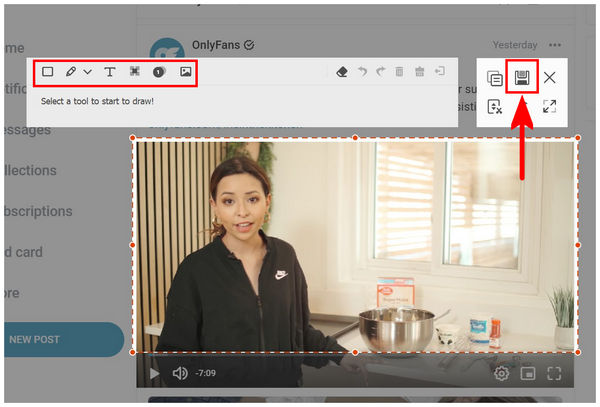
Win + Shift + S
to open the snipping tool and select a specific area of the screen.
- Step 3: Press Alt + PrtScn to capture only the active window you are using.

▼ Mac:
- Step 1: Press Command + Shift + 3 to take a full-screen screenshot.
- Step 2: Press Command + Shift + 4 to select and capture a specific area of the screen.
- Step 3: Press Command + Shift + 5 to open more screenshot and screen recording options.
Bonus Tip. Best OnlyFans Downloader for Windows, Mac and Android
Screenshots are convenient for capturing a single image, but they may reduce the original quality or include unwanted interface elements. For users who want to download OnlyFans images directly from an accessible creator page, FliFlik UltConv OnlyFans Downloader provides a more practical solution.
The software can save OnlyFans profile pictures, post images, and supported videos to a Windows PC, Mac or Android. It also supports batch downloading, allowing you to collect multiple pictures without taking screenshots one by one. In addition to OnlyFans images, UltConv can save supported videos in MP4 and other common formats for offline viewing.

- Bulk download OnlyFans profile pictures and post images in one click.
- Remove DRM from OnlyFans videos to play anywhere, anytime.
- Download multiple pictures and supported videos in batches.
- Save OnlyFans videos as MP4 in 720p, 1080p, or up to 4K when available.
- Download supported message videos for personal offline viewing.
- Support Fansly, JustForFans, LoyalFans, Patreon, and 10,000+ sites.
▼ Steps to Download OnlyFans Images with FliFlik UltConv:
-
Step 1: Download and install FliFlik UltConv OnlyFans Downloader on your Windows PC or Mac. Launch the software, open the Online section, and add the official OnlyFans website or creator-page link.
![open onlyfans in ultconv]()
-
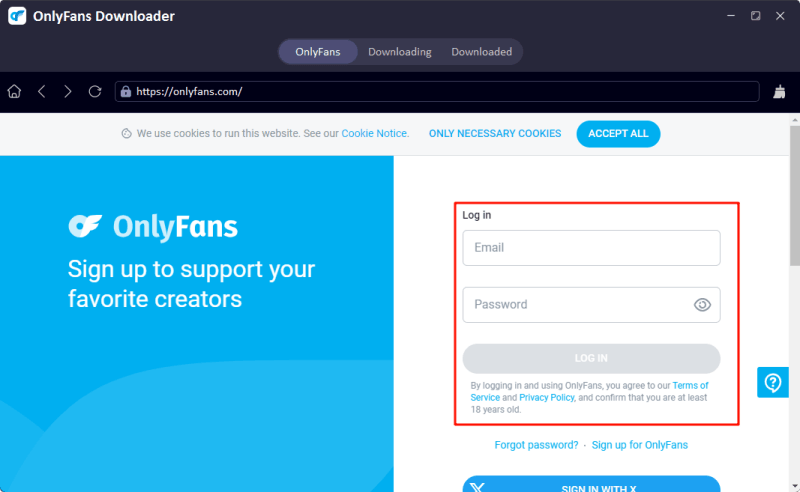
Step 2: Sign in to your OnlyFans account through UltConv’s built-in browser to access creator pages and content included in your subscription or purchases.
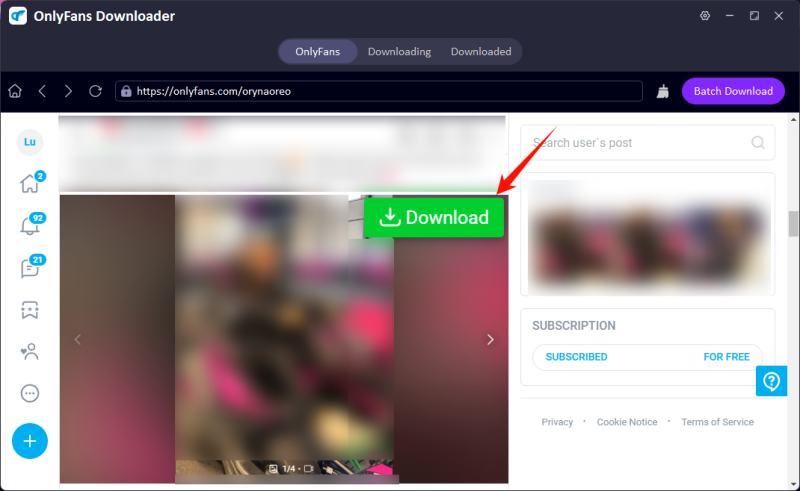
Step 3: Open the creator’s profile or post and select the pictures you want to save. Click the green Download button when UltConv detects the available images.
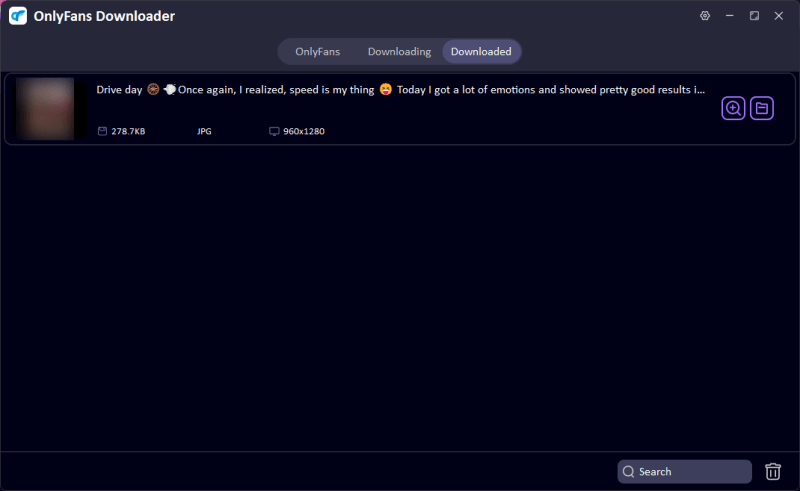
Step 4: Wait for the download to finish, then open the Downloaded section or the local output folder to view the saved OnlyFans images.


FAQs
Q1. Is it legal to screenshot OnlyFans?
It depends on how you use it. Taking a screenshot for personal use is not usually illegal, but sharing, reposting, or selling paid content without permission can violate copyright laws and OnlyFans’ terms of service.
Q2. Can OnlyFans creators see who screenshots their content?
No, OnlyFans does not notify creators or show them who takes screenshots or screen records. However, creators can still take action if their content is shared or leaked.
Conclusion
To wrap things up, can you screenshot OnlyFans? Yes, you can, and OnlyFans does not notify creators if you take a screenshot or screen record, but that doesn’t mean everything is risk-free.If you’re looking for a more flexible and powerful way to manage and save online media, FliFlik UltConv OnlyFans Downloader is a strong all-in-one option.
It allows you to download and convert videos in high quality from multiple platforms, making it a much more complete solution compared to basic methods.
 Secure Download
Secure Download
Secure Download
