

 By
By  6 minutes read


Short-form dramas have quietly revolutionized digital entertainment, delivering compelling content through fast-paced, engaging episodes that typically last only a few minutes. This mobile-friendly viewing experience makes it easy to binge-watch half a series before you know it, which is precisely why platforms like Dramawave have skyrocketed in popularity.
As interest grows, many viewers are searching for reviews of Dramawave, exploring its library, or questioning whether the service is truly free. To help you better understand this trend, this guide provides a comprehensive overview of how Dramawave works, its pricing structure, the types of short dramas available, and the best ways to download content for offline viewing.

Part 1. What is Dramawave?

Dramawave is a mobile streaming app that appeared in September 2024. It focuses on short, vertical dramas designed for quick viewing on phones. Most stories are fast‑paced and fall into popular genres like romance, melodrama, and suspense.
The platform hosts a growing collection of short drama series, and many titles include subtitles in multiple languages to reach a wider audience. The app itself can be downloaded for free, but some episodes are locked. Access to those episodes is usually provided through ads or in‑app purchases.
Part 2. Is Dramawave Free to Use?
Dramawave can be installed and opened without payment, but the service is not fully free. Some episodes may be watched at no cost, while others are locked. Coins or a subscription are usually required to unlock more parts of a series.
This means a user can try the platform first and watch a few episodes, but full access to many Dramawave movies will require payment inside the app.
Part 3. How to Use Dramawave?
Getting started with Dramawave is simple. After the app is installed, an account can be created and short dramas can be explored inside the app. The steps below show how to log in and find popular Dramawave movies.
▼ Steps to Log in to Dramawave
- Step 1: Open the Dramawave app on your phone.
-
Step 2:
Tap the
Profile
or
Login
option on the main screen.
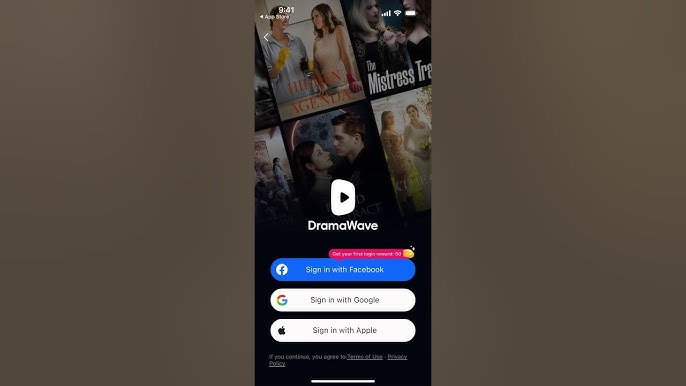
- Step 3: Sign in using your email, Google account, or another login method provided by the app.
- Step 4: Once the login is complete, your account dashboard will be loaded and the home page will appear.

▼ Steps to Find Popular Dramawave Movies
- Step 1: Open the Dramawave app and go to the Home page.
- Step 2: Scroll through the Trending or Popular sections where recommended short dramas are listed.
-
Step 3:
Use the
Search
icon if you want to find a specific Dramawave movie or series.
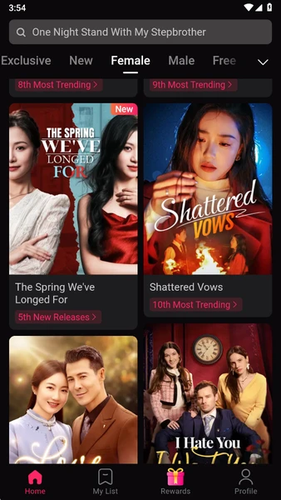
- Step 4: Tap the drama poster to open the series page and start watching the episodes.

Part 4. How to Download Dramawave Short Drama Using Third-party Tool
However, if you want to save short dramas from Dramawave for offline viewing, you can use FliFlik UltConv Video Downloader. It can save short dramas to your device as MP4 files for convenient viewing anytime. Simply add the Dramawave video link to the tool, and the program will automatically analyze the link and complete the download.
Downloaded videos can be saved in high-definition quality, such as 720p, 1080p, 2K, or 4K, preserving the original viewing experience. The tool also supports batch downloading, meaning you can download multiple episodes or videos at once instead of downloading them one by one.

- Download videos from 10,000+ websites, Dramawave, YouTube, TikTok etc
- Support HD downloads up to 4K and higher resolutions
- Batch download multiple videos or episodes at once
- Convert videos to audio formats like MP3, WAV, and 100+ formats
- Built‑in browser for finding and downloading videos directly
▼ Steps to Download Dramawave Short Dramas with FliFlik UltConv
-
Open FliFlik UltConv Video Downloader and go to the Download section. At the bottom of the interface, click Download to and select the format you want to save the video.
FREE DOWNLOAD![secure download]() Secure Download
FREE DOWNLOAD
Secure Download
FREE DOWNLOAD![secure download]() Secure Download
Secure Download

-
Choose the output format before starting the download. Many users select MP4 because it works on most phones, tablets, and computers.

-
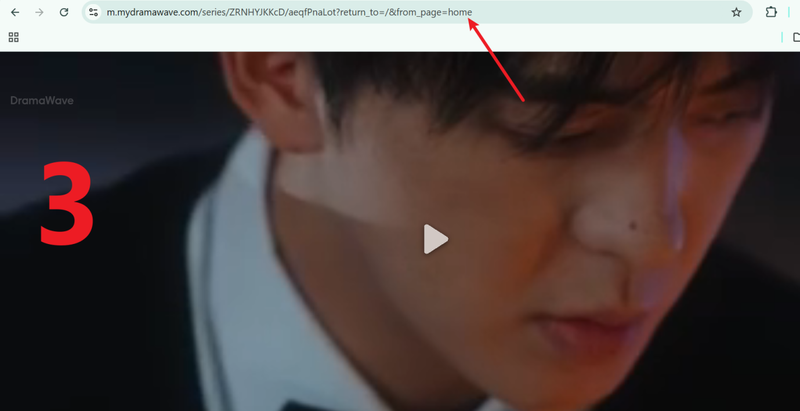
Open the website or app where the Dramawave or any short drama is available and find the episode you want to save. Copy the video link from the browser address bar.
-
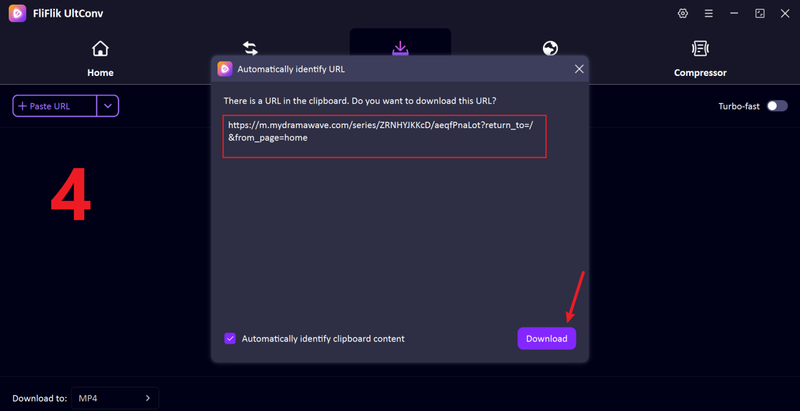
Return to UltConv. If the program detects the link automatically, click Download. If it does not, paste the copied link into the search box and start the download.
-
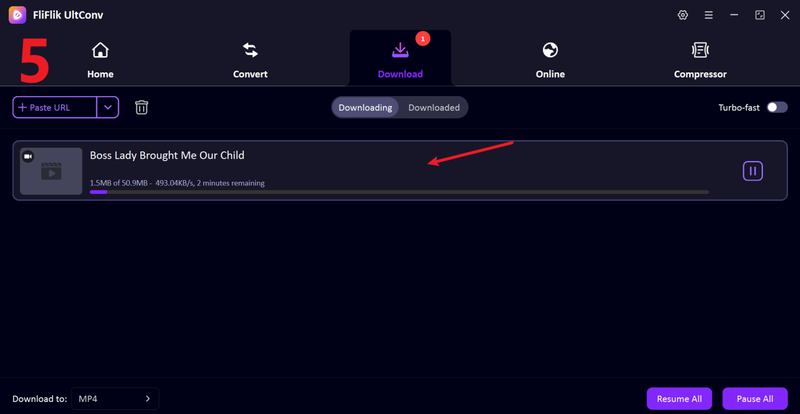
When the download finishes, the Dramawave video will be saved on your device. The episode can then be opened anytime and watched offline without buffering.


FAQs
Q1. Is Dramawave safe to use?
Yes, Dramawave is generally safe when it is downloaded from official sources such as the App Store or Google Play. The app is widely used for short drama streaming. As with any platform, users should avoid unofficial downloads and protect their account details.
Q2. Can I watch Dramawave short movies on PC?
Dramawave is mainly designed for mobile devices. However, short dramas can still be watched on a PC by using an Android emulator or by accessing supported web versions if available.
Q3. How to get free coins on Dramawave?
Free coins on Dramawave are usually earned through activities inside the app. This may include watching ads, completing daily check‑ins, or joining promotional events. These coins can then be used to unlock some locked episodes.
Conclusion
With their fast-paced, engaging format, short dramas have redefined storytelling on mobile devices. This guide covers every aspect of Dramawave, from how it works to pricing and popular content—it’s all here. FliFlik UltConv Video Downloader converts Dramawave episodes into high-quality MP4 format, allowing you to watch offline anytime, anywhere and take full control of your entertainment. Ready to start building your offline collection? Try FliFlik today!
 Secure Download
Secure Download
Secure Download
