

 By
By  8 minutes read


Imgur has long been the go-to platform for users worldwide to share images—ranging from amusing memes on Reddit to creative works by artists—winning countless fans thanks to its user-friendly interface and lightning-fast upload speeds. However, with Imgur’s 2026 crackdown on NSFW content and its restrictions on anonymous hosting, many users have begun to feel constrained.
If you have found your images deleted without explanation, or are frustrated by the requirement to register an account, now is the perfect time to seek out Imgur alternatives. In this article, we will round up the best image hosting platforms and share how to efficiently download and migrate your data away from Imgur.

Part 1. Why Look for Imgur Alternatives in 2026?
One major reason is stricter content policies. Changes related to NSFW content and anonymous uploads mean some images may be removed or restricted more quickly than before. Storage limits and moderation rules can also make long‑term hosting less predictable.
Another factor is flexibility. Many users now prefer platforms that offer better privacy controls, higher image quality, or easier ways to organize and share albums. As a result, exploring alternative image hosting sites has become a practical choice for creators, communities, and everyday users.
Part 2. Top 6 Imgur Alternatives
If you’re looking for a reliable Imgur alternative, several platforms offer solid image hosting, better organization tools, and more flexible sharing options
1. Flickr

Flickr is one of the most well‑known photo hosting platforms online. It’s especially popular among photographers who want to showcase high‑quality images and build a portfolio. Unlike basic hosting sites, Flickr offers albums, tagging features, and a large creative community where users can explore and comment on images. The platform also supports high‑resolution uploads and provides detailed privacy settings, making it a strong choice for both casual users and professionals who want more control over their image hosting.
2. Photobucket

Photobucket has been around for years and remains a solid option for storing and sharing images online. It provides tools for organizing photos into albums, editing images, and sharing them through direct links. Many users prefer Photobucket because it focuses on long‑term storage and easy embedding for blogs and websites. This makes it a practical alternative for people who regularly host images for forums or online content.
3. 500px

500px is designed primarily for photographers who want to display their work professionally. It’s less about casual image hosting and more about showcasing creative photography. The platform offers beautiful portfolio layouts, community exposure, and opportunities for photographers to discover inspiration from other creators. If image quality and presentation matter to you, 500px is a strong Imgur alternative.
4. Catbox

Catbox is a simple and lightweight hosting service that allows users to upload images quickly without creating an account. Its minimal interface makes it appealing to people who just want a fast upload and a shareable link. Because of its straightforward design and fewer restrictions, Catbox is often used on forums and communities that need quick image hosting without complicated settings.
5. ImageShack

ImageShack is another long‑standing image-hosting service that offers reliable storage and easy-to-use sharing tools. Users can organize images into albums and generate direct links for embedding across websites. It also offers useful features such as image management and privacy controls, making it suitable for both personal use and for content creators managing large image libraries.
6. Postimages

Postimages is a simple and free image hosting tool that focuses on speed and convenience. It allows users to upload images instantly and generate sharing links for forums, blogs, and social media. The platform is particularly popular among users who need quick uploads and easy embedding options without complicated account requirements.
Part 3. How to Batch Download Imgur Albums & Video in Seconds
You may want to save an entire Imgur album, download a short video clip, or keep certain images for offline use. The problem is that Imgur usually requires you to download files one at a time, which can be slow and inconvenient if you’re dealing with multiple posts or galleries.
FliFlik UltConv Video Downloader can make this process much easier. It supports more than 10,000+ platforms, allowing users to save videos, albums, and audio from sites like Imgur, YouTube, Vimeo, TikTok, etc. The tool also provides flexible format options such as MP4, MP3, WAV, and more than 100+ other formats. On top of that, it supports high‑quality downloads up to 4K or even 8K resolution, so you don’t have to compromise on quality when saving media for offline viewing.

- Download media from 10,000+ websites including Imgur, YouTube, Vimeo, and TikTok.
- Batch download albums, videos, and playlists in a single process.
- Convert media into 100+ formats such as MP4, MP3, WAV, AAC, and FLAC.
- Support high‑quality downloads up to 4K and 8K resolution.
- Fast download engine for saving large files quickly.
▼ How to Download Imgur Video to MP4 with UltConv?
After installing the software on your computer, you can quickly download videos from Imgur in MP4 format for offline viewing by following these steps.
 Secure Download
Secure Download
Secure Download
-
Open FliFlik UltConv Video Downloader on your computer and go to the Download to option in the main interface can make this process much easier.

-
Choose MP4 as the output format so the Imgur video will be saved in a widely supported format.

-
Visit Imgur and find the video you want to download. Copy the video page URL from your browser.

-
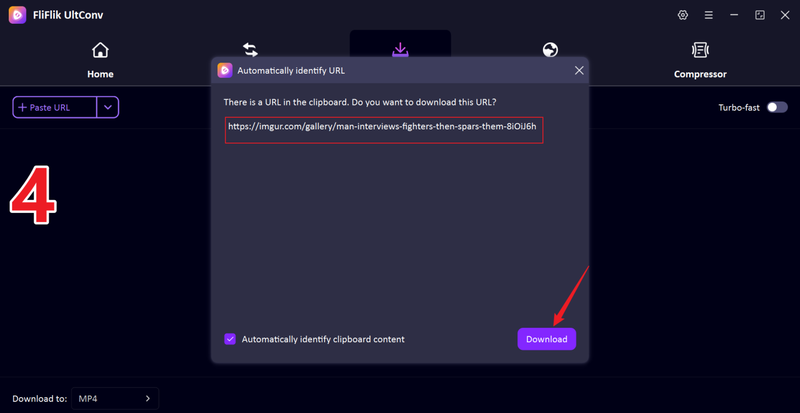
Once you copied the link, the tool will automatically detect the link and will show you a popup window with the Download button. Just click the Download button.
-
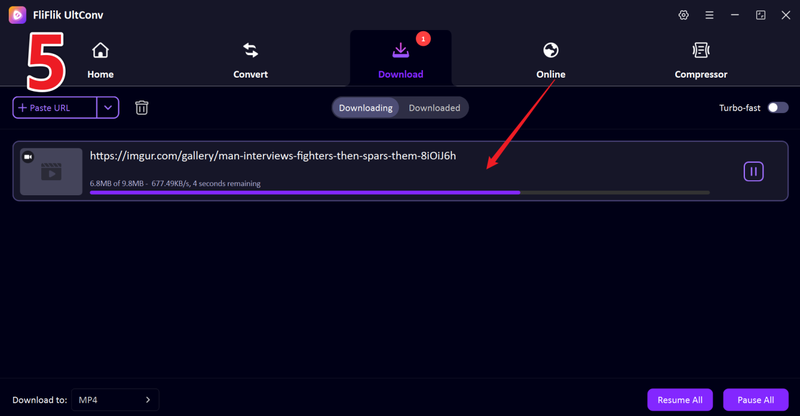
If the link is not automatically detected, just paste the link manually and click the Download button and wait for the process to finish. The video will be saved to your computer in MP4 format for offline use.


FAQs
Q1. Can I download images from Imgur?
Yes, you can download images directly from Imgur. For a single image, simply open the post, right‑click on the image, and choose Save image as to download it to your device.
Q2. What is the best Imgur alternative for image sharing?
For photographers and high‑quality portfolios, Flickr and 500px are great options. If you prefer quick uploads and simple sharing links, services like Postimages or Catbox can be more convenient.
Q3. Is an Imgur downloader safe to use?
Most Imgur downloader tools are safe as long as you use reliable software or trusted websites. FliFlik UltConv Video Downloader help download media without installing suspicious browser extensions or visiting risky sites.
Conclusion
Platforms like Flickr, ImageShack, and Postimages offer strong alternatives for hosting and sharing images quickly. At the same time, if you want to download from Imgur, especially albums or videos, a dedicated tool such as FliFlik UltConv Video Downloader can make the process much easier. With support for thousands of websites, multiple formats, and high‑quality downloads, it provides a convenient way to save media for offline use.
Secure Download
Secure Download
