

 By
By  8 minutes read


iMovie is a great starting point for Mac and iPhone users because it’s simple, free, and easy to learn. It’s perfect for basic edits like cutting clips and adding music. However, it can feel limited once you need advanced features or want to work on Windows and Android.
If you’ve outgrown iMovie or need a tool that works on all your devices, there are better options available. This guide covers the best iMovie alternatives for every platform and introduces a handy tool to help you easily download video clips for your projects.

Part 1. iMovie Alternatives: Quick Comparison Table
Here’s a quick comparison of iMovie alternatives to help you choose the right tool at a glance. We’ve summarized platform support, key features, and pricing so you can find your perfect match without reading every detailed review.
| Name | Supported Platforms | Key Features | Price | Best For |
|---|---|---|---|---|
| Clipchamp | Windows, Web | Drag-and-drop editing, templates, cloud integration | Free / Paid | Beginners & quick edits |
| VSDC Free Video Editor | Windows | Advanced effects, color tools, and timeline editing | Free / Paid | Intermediate users |
| Adobe Premiere Pro | Windows, Mac | Professional editing, color grading, and effects | Paid (Subscription) | Professionals |
| Filmage Editor | Mac/Mac | Simple editing, screen recording, and basic tools | Free / Paid | Mac beginners |
| DaVinci Resolve | Windows, Mac | Advanced color grading, pro editing suite | Free / Paid | Advanced editors |
| CapCut | Windows, Mac, Android | Templates, effects, social media tools | Free/Paid | Social media creators |
| PowerDirector | Android, Windows | AI tools, multi-track editing, fast export | Free / Paid | Mobile editors |
Part 2. Top 3 iMovie Alternatives on Windows
For Windows users, below are three popular options that range from beginner-friendly editors to professional-grade software.
1. Clipchamp

Clipchamp is a modern, beginner-friendly video editor developed by Microsoft, designed mainly for users who want quick and simple editing without dealing with complex software. It is commonly used for creating YouTube videos, social media clips, presentations, and short marketing content. It provides essential editing tools like trimming, cutting, transitions, text overlays, stock media, and audio controls. Its clean interface and guided workflow make it a top choice for beginners and pros alike who want professional results without the steep learning curve.
- Very easy to use with drag-and-drop editing
- Built-in stock videos, music, and templates
- Cloud integration with Microsoft services
- Limited advanced editing features compared to Pro Tools
- Some export and premium assets require a paid plan
2. VSDC Free Video Editor

VSDC Free Video Editor is a powerful Windows-only editing tool that offers more advanced control compared to many free video editors. It supports a wide range of formats and provides non-linear editing, meaning you can place clips, effects, and audio anywhere on the timeline. It also includes tools for color correction, visual effects, masking, and audio editing, making it suitable for users who want more than basic cutting and trimming. It is often used by YouTubers, educators, and semi-professional editors who need flexibility and precision.
- Completely free with advanced editing tools
- Supports many video formats and codecs
- Strong effects and color correction options
- Interface can feel complicated for beginners
- Performance may lag on low-end systems
3. Adobe Premiere Pro

Adobe Premiere Pro is also one of the most widely used professional video editing tools in the world, trusted by filmmakers, YouTubers, and production studios. It offers a complete editing environment where users can handle everything from basic cutting to advanced motion graphics, color grading, audio mixing, and multi-camera editing. Premiere Pro is part of the Adobe Creative Cloud ecosystem, which allows smooth integration with tools like After Effects and Photoshop. It is designed for serious creators who need full creative control and industry-standard output quality.
- Industry-standard professional editing software
- Advanced tools for color, audio, and effects
- Excellent integration with the Adobe ecosystem
- Expensive subscription-based pricing
- Steep learning curve for beginners
Part 3. Top 3 iMovie Alternatives on Mac
Mac users can also find powerful editing tools beyond iMovie. Below are the top 3 tools.
Contents
1. Filmage Editor

Filmage Editor is a Mac-focused video editing tool designed as a simple upgrade from iMovie. It provides a clean interface and supports multi-track editing, allowing users to combine video, audio, and text layers easily. It is often used by content creators who want more flexibility than iMovie without switching to highly complex professional software. Its lightweight design ensures smooth performance on most Mac devices, making it a practical choice for everyday editing tasks.
- Easy transition from iMovie with a simple interface
- Supports screen recording and multi-track editing
- Lightweight and optimized for Mac performance
- Limited advanced professional tools
- Some features require a paid upgrade
2. DaVinci Resolve

DaVinci Resolve is especially known for its advanced color grading tools, which are among the best in the industry. In addition to editing, it also includes visual effects, motion graphics, and professional audio post-production tools, all in one platform. While its powerful free version is ideal for professional film and YouTube production, it requires a steeper learning curve for users seeking total creative control.
- Best-in-class color grading tools
- Free version includes professional-level features
- All-in-one editing, VFX, and audio suite
- Requires a high-performance computer
- Difficult for beginners to learn
3. CapCut

CapCut is a widely popular video editing app developed by ByteDance, designed for both mobile and desktop users. It has become especially popular among TikTok and short-form video creators due to its easy workflow and trendy effects. CapCut includes features like auto captions, filters, transitions, templates, and AI-powered tools that make editing fast and simple. It is ideal for users who want to create engaging social media content without spending much time on manual editing.
- Very easy for beginners and fast editing
- Trendy effects, templates, and AI tools
- Free and available on multiple platforms
- Limited advanced professional control
- Some features depend on internet access
Part 4. Best Android Alternative to iMovie
PowerDirector is a powerful and widely used video editing app for Android, developed by CyberLink. It is designed to balance simplicity and advanced editing features, making it suitable for both beginners and more experienced creators. On mobile devices, it offers a smooth editing experience with tools like multi-track timelines, transitions, effects, and easy export options for platforms such as YouTube, TikTok, and Instagram. It also stands out because it includes AI-powered features that help speed up editing tasks, such as automatic video creation, background removal, and smart cut tools.

- AI-powered editing tools like background removal and auto-editing
- Multi-track timeline for advanced video editing
- Supports social media-friendly aspect ratios
- Some advanced features require a paid version
- Can feel heavy on low-end Android devices
Pro Tip: How to Download Clips for Your iMovie Alternatives
If you often edit videos using iMovie alternatives, you’ll usually need clips from different websites like YouTube or social platforms. FliFlik UltConv Video Downloader helps you download video clips from over 10,000+ websites, including YouTube, TikTok, Instagram, Facebook, and many streaming platforms. It is designed for users who need quick access to online videos for editing projects without worrying about compatibility issues.
You can download videos in MP4, MP3, and 100+ formats, and choose resolutions ranging from 720p, 1080p, 2K, 4K, and even up to 8K. It also allows direct video-to-audio conversion, so you can easily extract soundtracks or background audio for your edits. With batch downloading support, you can save multiple videos, playlists, or entire channels in one go.

- Download videos from 10,000+ websites including major social platforms
- Save videos in MP4, MP3, and 100+ formats
- Batch download playlists, channels, and albums in bulk
- Supports HD, 2K, 4K, and up to 8K quality
- Convert video to audio without losing quality
- Built-in browser for quick searching and downloading
▼ Howto Download YouTube to MP4 with UltConv Video Downloader
-
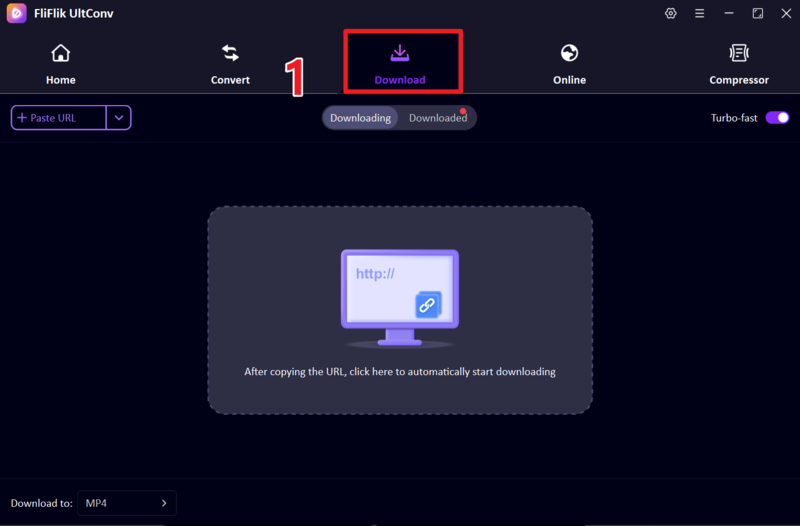
Download and launch FliFlik UltConv Video Downloader on your computer. After opening the software, navigate to the Download section and select the ” Download to ” option to choose your output settings.
FREE DOWNLOAD![secure download]() Secure Download
FREE DOWNLOAD
Secure Download
FREE DOWNLOAD![secure download]() Secure Download
Secure Download
-
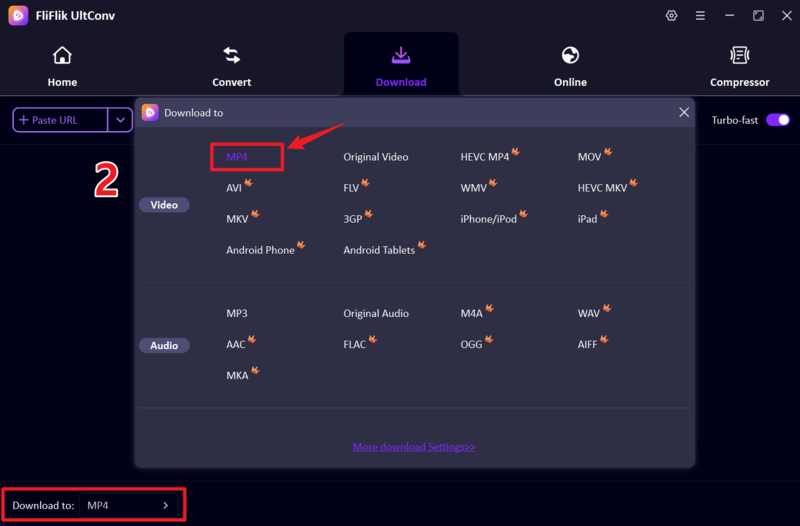
Choose MP4 as your output format so the downloaded video can be played easily on all devices and media players.
-
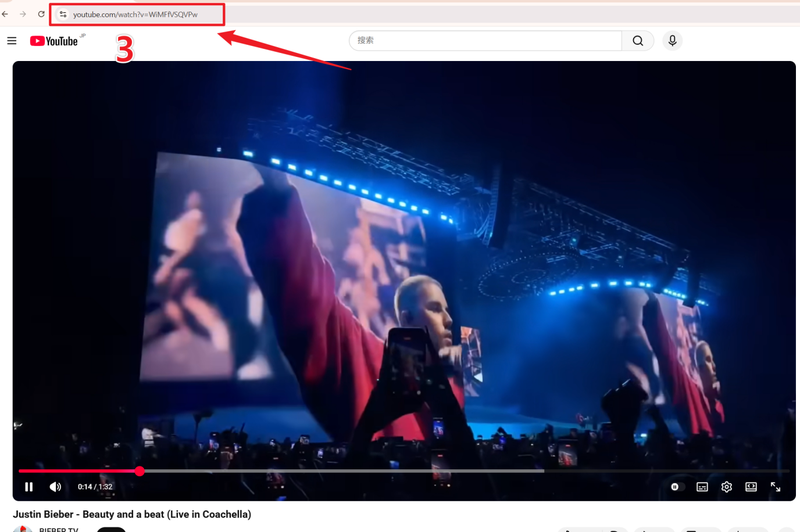
Open YouTube in your browser, find the video you want, and copy its URL from the address bar.
-
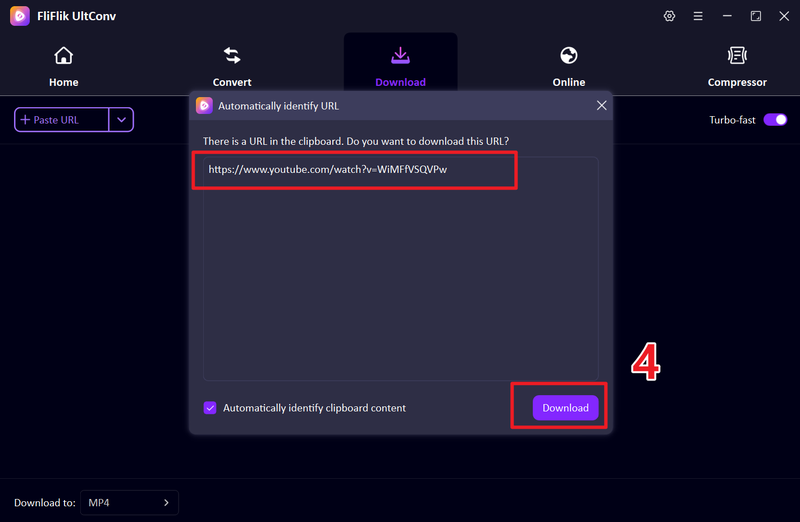
Go back to UltConv. If the link is not detected automatically, paste it into the input field and click the Download button to continue.
-
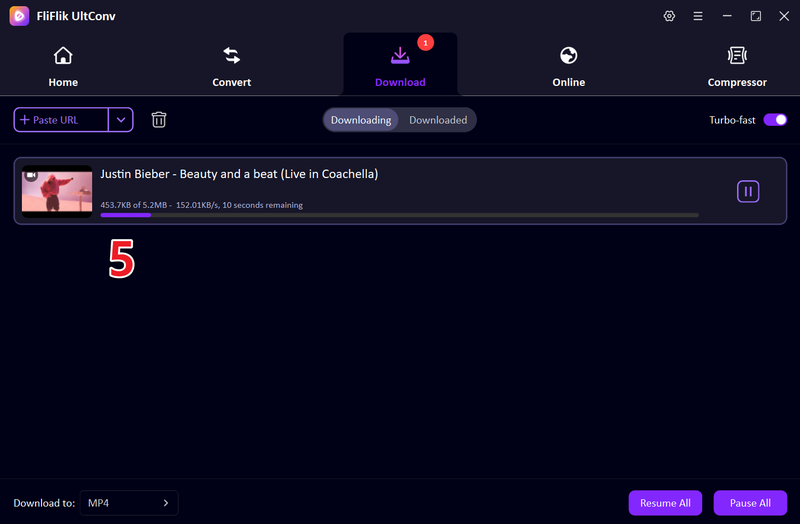
Wait for the download process to finish. Once completed, your video will be saved as an MP4 file ready for offline use.


FAQs
Q1. Can I export iMovie as an MP4?
Yes, iMovie allows you to export videos in MP4 format. When you choose the “File” export option, iMovie saves the video in a compatible MP4 (H.264) format that can be played on most devices and shared easily online.
Q2. What is the best iMovie alternative for Windows?
Some of the best iMovie alternatives for Windows include Clipchamp for beginners, VSDC Free Video Editor for advanced free editing, and Adobe Premiere Pro for professional-level video production. The best choice depends on your skill level and editing needs.
Conclusion
Choosing the right iMovie alternative depends on your specific goals. For projects requiring a quick and simple workflow, CapCut or Clipchamp make excellent starting points; conversely, DaVinci Resolve and Premiere Pro offer the advanced features necessary to achieve professional-grade results.
If you need to download a wide variety of video assets, consider using a reliable tool like FliFlik UltConv Video Downloader . It enables you to effortlessly save high-quality video clips from various platforms, ensuring you have access to the perfect source material for unrestricted creative editing.
 Secure Download
Secure Download
Secure Download