

 By
By  8 minutes read


iStock is one of the most popular high-quality stock platforms widely used by creators, marketers, and businesses around the world, offering a vast collection of professional visual content. To obtain full-resolution, watermark-free versions of assets, users typically need to purchase a paid subscription or redeem credits.
In this article, we’ll explain what iStock video downloaders are, how the official free download mechanism works, and recommend the most popular and practical tools currently available to help you easily obtain iStock videos and images in HD and even 4K resolution.

 Important Notes:
- Most iStock content is copyrighted and requires proper licensing for legal use.
- Free downloads (if available) are usually limited to previews or trial content with watermarks.
- Using third-party downloaders may not always align with iStock’s terms of service.
- Always make sure you have the right to use any downloaded content for personal or commercial projects.

Part 1. How to Download iStock Videos for Free Officially?
If you want to download iStock videos without paying, the official way is through iStock’s own free content options. iStock regularly offers free weekly or monthly stock videos and images, which you can download legally and use in your projects.
What are iStock Free Weekly/Monthly Downloads?
iStock provides a rotating selection of free stock videos and images that users can download every week or month. These files are fully licensed for free use during the promotional period, making them a great option for creators who want high-quality visuals without immediate cost. They are usually found in the Free Stock Videos & Footage section on the iStock website and are updated frequently.
▼ How to Download Free iStock Photos/Videos (Official Method)
-
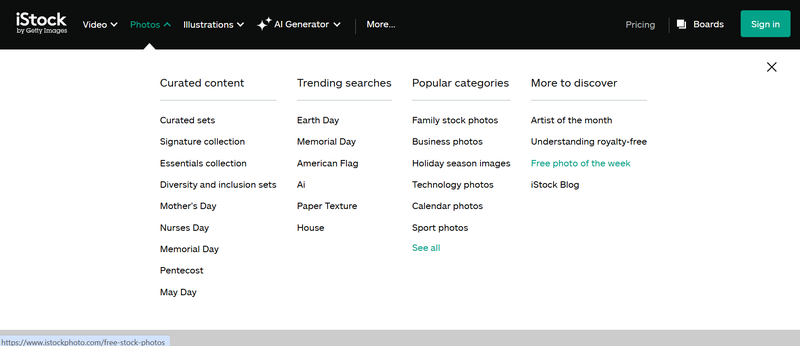
Step 1: Go to the iStock website and open the Free Photo of the Week section.
-
Step 2: Browse the available free photos or videos for the current week or month.
-
Step 3: Select the video or photo you want to download.
-
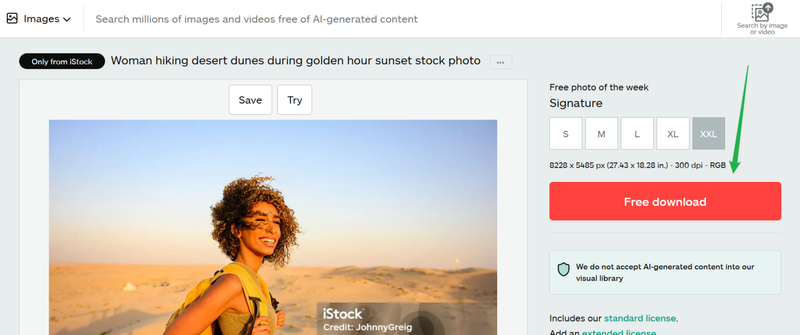
Step 4: Click the Download button to save it to your device.


🔥Want to download iStock videos or images on Android? Get the UltConv mobile app from Google Play for a smoother offline saving experience.
Part 2. Top 5 iStock Video & Image Downloaders
If you’re looking for ways to save iStock videos and images more easily, several online tools can help. Below are five commonly used iStock video downloaders that people explore for quick access to stock content.
1. Fetchpik iStock Video Downloader

Fetchpik is a lightweight online tool designed for users who want a quick and simple way to download iStock videos. It works by letting you paste a video link into its search box and instantly generating a downloadable file. The platform is especially popular among beginners because it doesn’t require any software installation or technical setup. Everything runs directly in the browser, making it fast and convenient for one-click downloads.
- Easy to use with a simple interface
- No software installation required
- Works directly in the browser
- Limited advanced features
- May not support all video formats or resolutions
2. ToolXoX iStockphoto Video Downloader Online

ToolXoX is another browser-based tool that supports downloading both iStock videos and images. It is built for users who want a quick and flexible way to access stock content without creating an account. The tool works by analyzing the pasted URL and generating downloadable media files in a few seconds. However, since it is a free web tool, the interface can sometimes feel cluttered due to ads, and performance may vary depending on server load.
- Supports both images and videos
- No registration required
- Quick processing speed
- Interface can feel outdated
- Contains ads during use
3. Downloader.la iStock Video Downloader

Downloader.la is designed with a focus on simplicity and speed. It offers a clean, minimal interface where users can paste an iStock video link and quickly generate a downloadable file. There are no extra menus or complicated options, which makes it appealing for users who prefer a no-distraction experience. This tool is often used for quick one-time downloads rather than heavy usage. While it performs well for standard-quality files, it may not always be the best option when you need higher resolution or advanced format selection.
- Clean and simple interface
- Fast link processing
- Works on most browsers
- Limited customization options
- May not always support high-resolution downloads
4. StepToDown iStock Downloader

StepToDown is a more flexible downloader that supports multiple stock platforms, including iStock. Unlike simpler tools, it aims to be a multi-purpose solution where users can download different types of stock media in one place. The process is still simple: paste the link and download, but it offers broader compatibility compared to single-platform tools. Many users prefer StepToDown because it reduces the need to switch between different downloaders. It is especially useful if you work with multiple stock websites.
- Supports multiple stock platforms
- Easy paste-and-download process
- No installation required
- Performance can vary depending on server load
- Contains ads during use
5. Downpic iStockPhoto Downloader

Downpic is focused mainly on downloading stock images and videos from platforms like iStock. It provides a clean interface where users can quickly paste links and download content. It is commonly used for basic downloading tasks, especially when users don’t need advanced customization. While it performs well for simple use cases, it may not always deliver consistent high-quality outputs, especially for larger or premium files.
- Simple and lightweight tool
- Supports both images and videos
- Fast download process
- Limited advanced features
- Not always consistent with high-quality outputs
Extra Tip. Best Video & Image Downloader without Watermark – FliFlik UltConv
When you’re downloading stock content like iStock videos and images, you often run into limits such as watermarks, restricted previews, or platform-only access. FliFlik UltConv Video Downloader is an all-in-one media downloader that helps you bypass platform restrictions and easily obtain watermark-free HD content. It supports over 10,000 websites worldwide, freeing you from the limitations of a single platform so you can collect the videos, images, and audio you need anytime, anywhere.
For creators seeking efficiency, this tool supports 4K and even 8K ultra-high-definition downloads, and offers powerful features for batch downloading entire channels or playlists. The built-in converter also allows you to adjust formats or extract audio immediately after downloading, providing a one-stop solution for all your professional editing and creative needs.

- Downloads videos from 10,000+ websites, including stock and streaming platforms
- Supports HD, 2K, 4K, and up to 8K quality downloads
- Batch download playlists, channels, and multiple files in one click
- Converts video to audio formats like MP3, WAV, FLAC, AAC without quality loss
- DRM removal support for music platforms like Spotify and Apple Music
▼ How to Download Videos to an MP4 file without a watermark with FliFlik UltConv?
-
Download and install FliFlik UltConv Video Downloader. Next, launch the program and go to the Download section. Then click the Download tab and set your output format by choosing the “Download to” option.
FREE DOWNLOAD![secure download]() Secure Download FREE DOWNLOAD
Secure Download FREE DOWNLOAD![secure download]() Secure Download
Secure Download 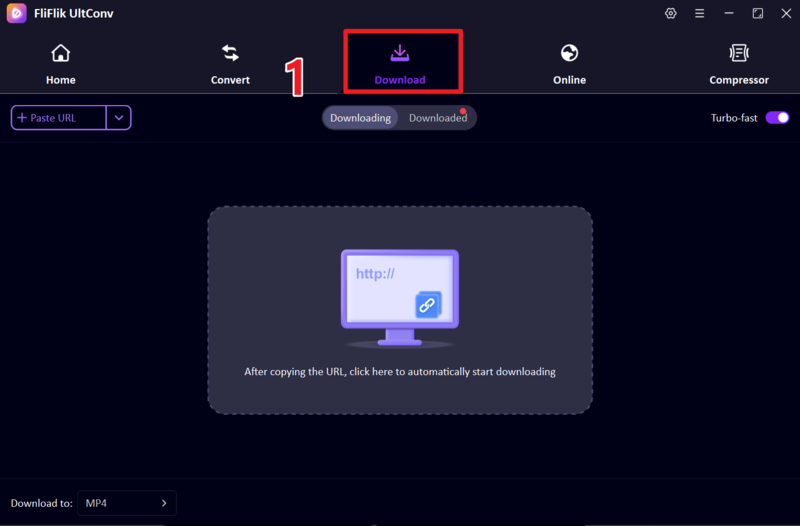
-
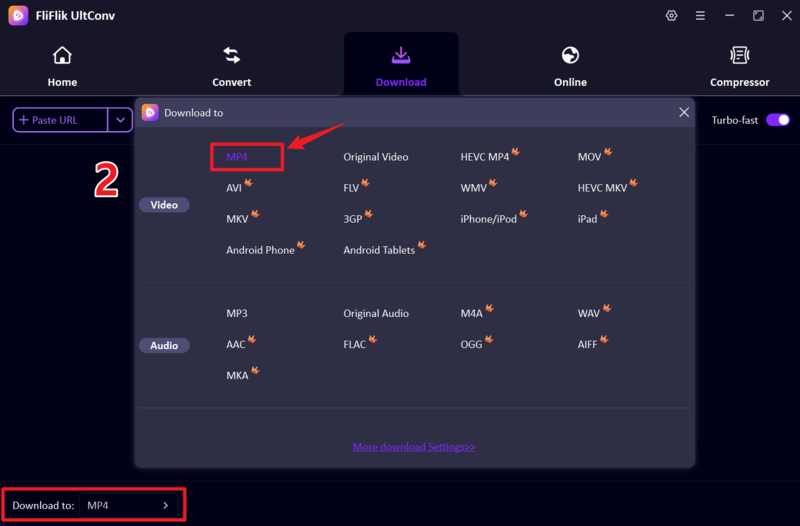
Choose MP4 as your output format so the video works smoothly on most devices.
-
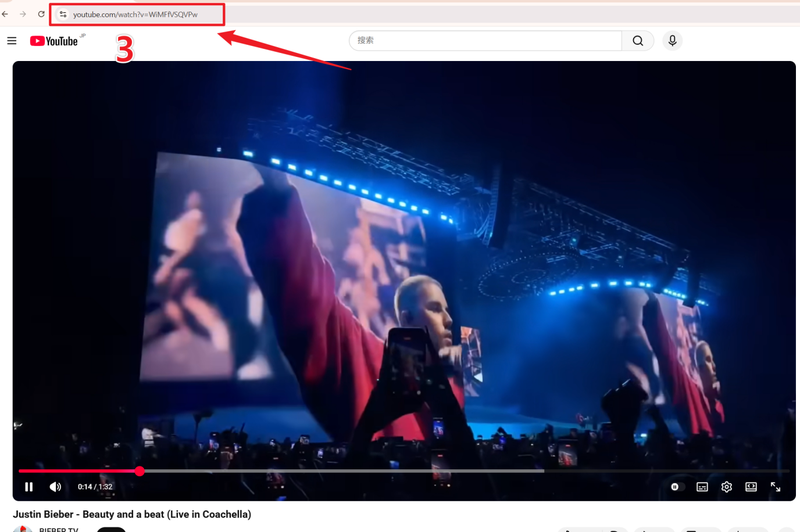
Go to the website where the iStock or video content is available (such as social media or YouTube), then copy the video URL from the browser.
-
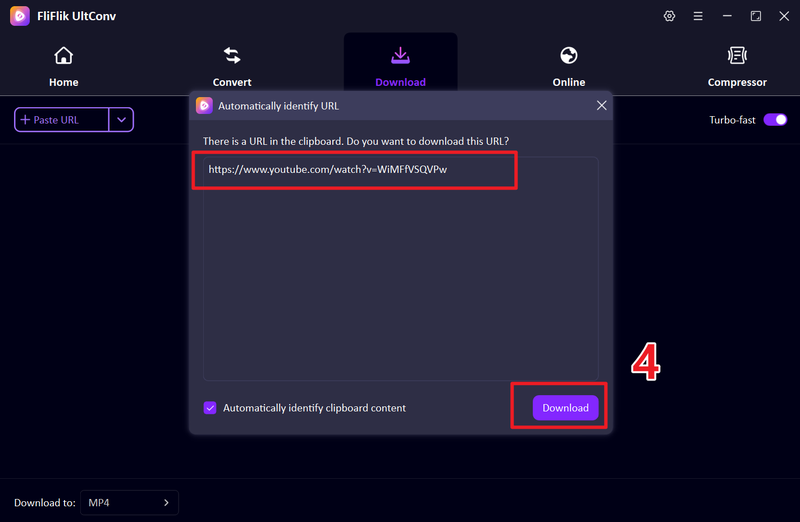
Return to UltConv. If the tool detects the link automatically, click Download. If not, paste the link into the input box manually.
-
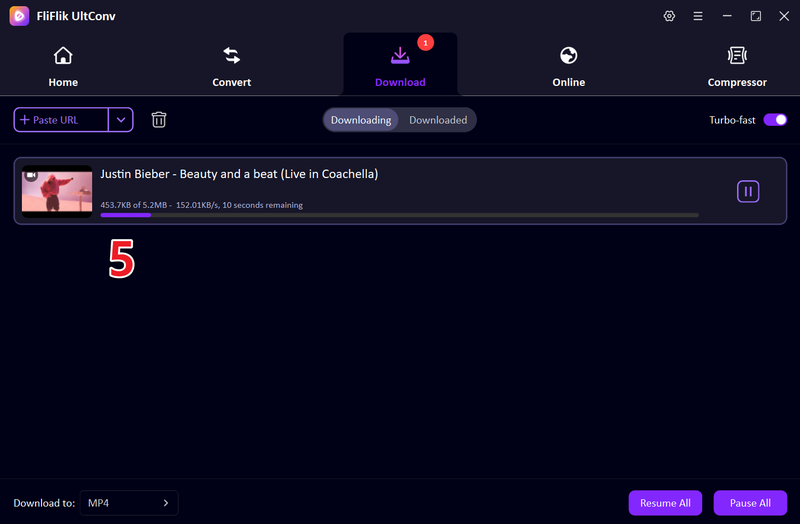
Next, you will see your tool will start saving the video to your device automatically in your preferred format.


FAQs
Q1. What can I do with the free iStock videos?
Free iStock videos can be used for personal projects, testing designs, presentations, or non-commercial creative work, depending on the license terms. They’re a great way to try out high-quality stock content before committing to a paid plan.
Q2. Are there free videos on iStock to download?
Yes, iStock offers a selection of free videos and images that change regularly. These are available in the “Free Stock Videos & Footage” section and can be downloaded during the promotional period.
Q3. How to download iStock videos without a watermark?
The only official way is through paid subscriptions or credits, which give access to watermark-free licensed content. Free previews usually include watermarks and are not meant for final use.
Conclusion
In this article, we explored different ways to access iStock content, from official free downloads to third-party best iStock downloaders that people often use for convenience. However, for a more complete and flexible solution, tools like FliFlik UltConv Video Downloader can help you download and manage online videos in high quality, making it easier to handle media across different platforms.
 Secure Download Secure Download