

 By
By  6 minutes read


As a globally popular social media platform, TikTok boasts compelling content that attracts countless users who wish to browse “invisibly.” Urlebird was once a standout among third-party viewers of this kind, allowing users to watch videos and view creator profiles without needing an account—a convenience greatly appreciated by those concerned about their privacy. However, amidst the evolving cybersecurity landscape of 2026, Urlebird’s frequent pop-up ads and inconsistent performance have led many users to question its security and actively seek out superior alternatives.
This article offers an objective assessment of Urlebird’s pros and cons, while specifically highlighting the best Urlebird alternatives available in 2026. If you are looking for a safer, smoother, and more feature-rich way to browse TikTok anonymously, the curated list below is a guide you won’t want to miss.

Part 1. What is Urlebird?

Urlebird is a free TikTok viewer that works in a web browser. It lets people browse and watch TikTok videos without having to log in. People who want to watch videos anonymously or without having to install the TikTok app love it the most.
 Why Urlebird is popular among TikTok Users:
- You can view completely anonymously without having an account.
- You can follow hashtags, songs, and profiles in real time that are trending.
- You can easily find videos by keyword, username, or hashtag using the search.
- You can use it on any device using your browser without downloading.
- All functions are free, so everyone can use them.
Part 2. Is Urlebird Safe to Use?
While Urlebird offers a convenient way to browse TikTok anonymously, its operation operates in a legal and ethical gray area. Before using it, please consider the following three main risks:
- Privacy & Security: Lacking official oversight, the site often uses intrusive ads that may lead to phishing or malware. Additionally, your IP address and browsing habits could be tracked for advertising.
- Legal Compliance: By “scraping” content without permission, Urlebird violates TikTok’s Terms of Service. This makes the platform unstable and subject to sudden shutdowns.
- Ethical Impact: Bypassing the official app deprives creators of legitimate views and engagement data, which directly impacts their livelihoods and control over their own content.
Conclusion⚠️: While Urlebird is a useful shortcut, its security trade-offs are significant—making the search for a reliable alternative in 2026 more important than ever.
Part 3. How to Use Urlebird: An Anonymous TikTok Viewer
If you just want to browse some TikTok videos anonymously without creating a profile with Urlebird, here’s what you need to do:
-
Step 1: Open a web browser on your phone or computer and go to Urlebird’s website. At the top of the homepage, you will find a search box. You can enter a TikTok username, hashtag, or keyword you’re interested in searching for there.
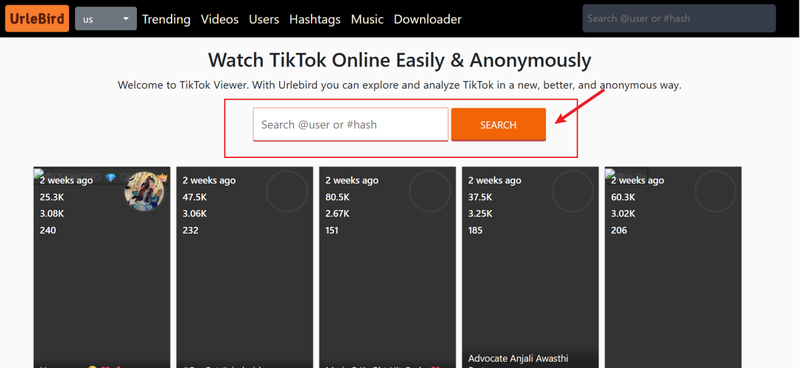
- Step 2: Press enter, and Urlebird will load TikTok videos about your search term. Scroll through the results, click on any video you want to watch and watch it right away, no account, no login, no hassle. There you have it. In just a few clicks, you are a ninja anonymously browsing TikTok.

Part 4. Top 5 Urlebird Alternatives to View TikTok Videos
Urlebird is a good way to browse TikTok anonymously, but it’s not the only option. Here are five of the best options you should try if you want something safer, faster, or more reliable.
1. TikToklooker

TikToklooker is one of the most popular anonymous TikTok viewing tools. It lets users look at videos and profiles without having to log into the official app. The main thing that makes it different is its focus on simplicity. There are no extra steps; you just type in usernames, hashtags, or keywords into a clean search bar to get to content right away. You don’t have to download an app or share personal information because it works right in your browser. The platform is free to use, but it does have some limits, especially when compared to TikTok itself. TikToklooker is still a good choice for quick, private browsing.
- Easy, clean interface with no learning curve
- Anonymous video browsing and profile checking
- Provides some analytics and engagement data
- Works on both desktop and mobile browsers
- Features can feel limited compared to the TikTok app
- Occasional ads may interrupt browsing
- Doesn’t always load all content instantly
2. Xaller

Another popular way to watch TikTok videos without an account is with Xaller. The fact that it focuses on speed and reliability is what makes it appealing. The search results load quickly, and the interface is simple. Xaller works well on all of your devices, so you can easily switch between your phone, tablet, and desktop. This is a big plus. It does make it easy to find TikTok videos, but it doesn’t give you as much information as some other options do. Xaller works well if you just want to watch videos without being seen and without distractions.
- Fast-loading results and smooth browsing
- Works across all devices
- Clean, simple design with no clutter
- Allows anonymous searches by username or hashtag
- Lacks advanced analytics tools
- Ads can occasionally pop up
- Doesn’t always display full profile data
3. MaveKite

MaveKite stands out among TikTok viewers because it lets you do more than just browse anonymously. You can use it to watch videos and look up hashtags, but it also gives you more information about content trends, which is helpful for creators and marketers. With MaveKite, you can quickly find out which videos are trending, which accounts are getting more followers, and which hashtags are going viral right now. You don’t have to download anything because the platform works right in your browser. The smooth interface makes it easy to search, whether you’re just browsing or doing in-depth research.
- Offers insights into trends and profiles
- Browser-based, no account needed
- Helpful for creators, marketers, and researchers
- Easy to use across devices
- More complex than simpler viewers
- Some features may overwhelm casual users
- Limited offline options
4. Trollishly

Trollishly is a TikTok viewing service. In addition to letting you watch anonymously like Urlebird, Trollishly also provides tools and services to help with engagement, followers, and analytics. Users of TikTok visit Trollishly not just to watch content, but also to boost their own visibility on the platform.. The combination of these two factors is why Trollishly has caught on with both casual viewers and creators looking for growth services. The site is fairly easy to navigate and can be used from the browser.
- Combines viewing and growth services
- Anonymous browsing without login
- Offers social media management tools
- Easy to access from any device
- Some features require payment
- Focused more on growth than casual viewing
- May not appeal to users who just want a simple viewer
5. TikTok Viewer

TikTok Viewer is a simple platform for anonymous browsing, as the name suggests. The best thing about it is how easy it is to use; you don’t need to sign up or download an app. You can get a list of public TikTok videos right away by typing in a username, hashtag, or keyword. People who don’t want extra features or complicated menus often prefer TikTok Viewer. It doesn’t take up much space, loads quickly, and works on all devices.
- Very simple and beginner-friendly
- No account or app required
- Quick video searches and smooth playback
- Works on both desktop and mobile
- Limited features beyond video viewing
- No analytics or trend insights
- Occasional ads
Extra Tip. How to Download TikTok Videos Without a Watermark
Urlebird and its alternatives are popular solutions for watching TikTok videos anonymously, but many of us are still looking for ways to download TikTok clips with the watermark removed. TikTok’s built-in download button includes a watermark by default, displaying the platform’s logo along with the username of the person who uploaded the video.
FliFlik UltConv Video Downloader is an easy-to-use downloader for all types of users, from casual browsers to content collectors. It’s fast, safe, and works with more than just TikTok, but also many other platforms. Whether you want to rewatch videos offline, back up trending clips, or extract audio, UltConv gives you a simple, all-in-one solution. If you like saving videos from YouTube, Twitter, or other sites, this is a great option for you.

- Download TikTok videos without a watermark.
- Download videos in HD, 2K, 4K and higher resolution.
- Download batch TikTok clips at once.
- With one click, convert TikTok to MP3.
- Quick and safe downloads with a built-in browser.
▼ Download TikTok Videos Without Watermarks Using UltConv Video Downloader:
First, download UltConv Video Downloader on your device and install it. Then, you need to follow the simple steps below:
 Secure Download
Secure Download
Secure Download
-
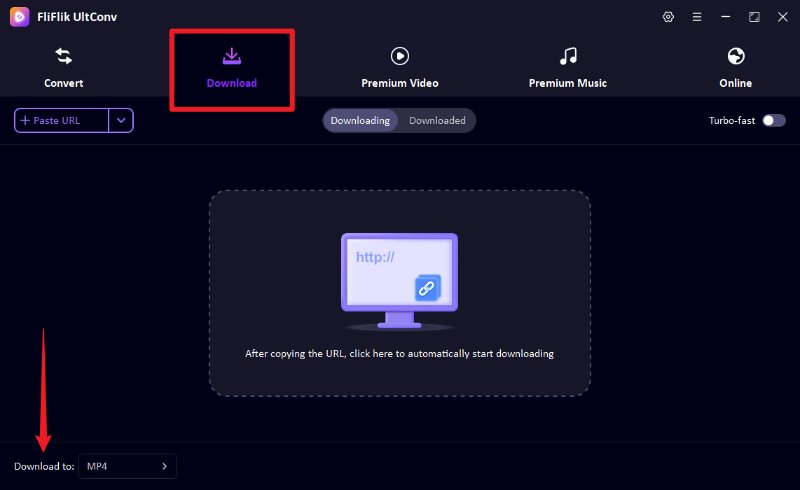
Launch UltConv Video Downloader and click the “Download to” button in the main window.
-
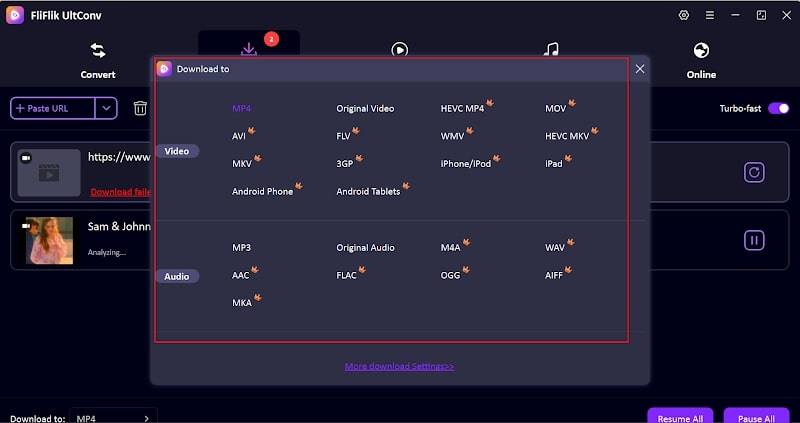
Select your desired output format. MP4 for video or MP3 for audio.
-
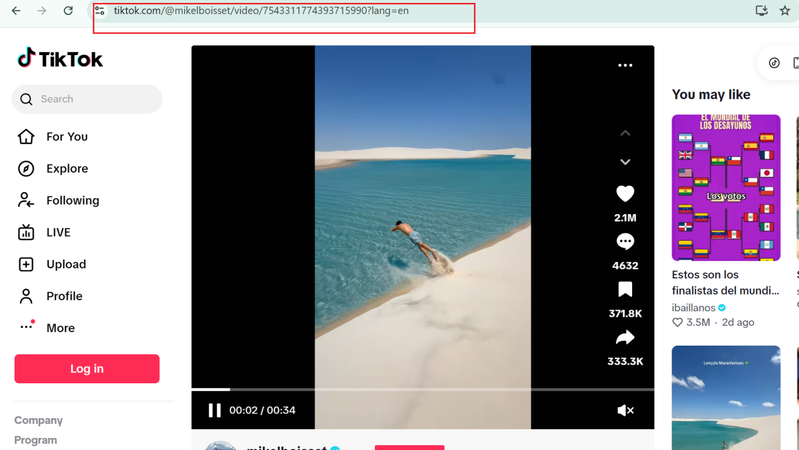
Go to TktTok and copy the URL of the TikTok video you want to download.
-
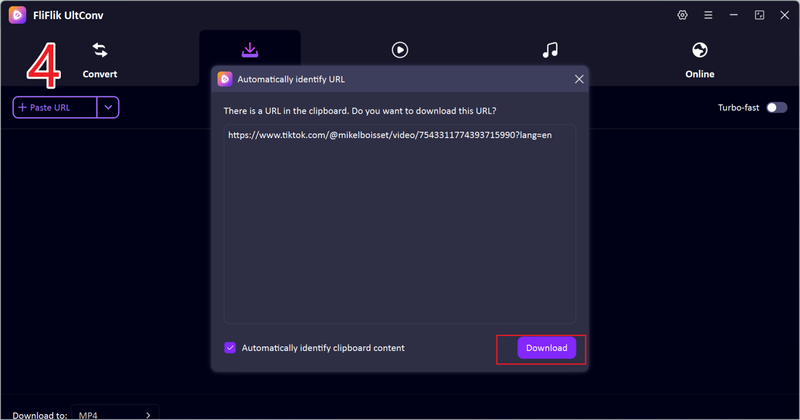
If you get a pop-up after copying the link, click Download to save the TikTok video without a watermark.
-
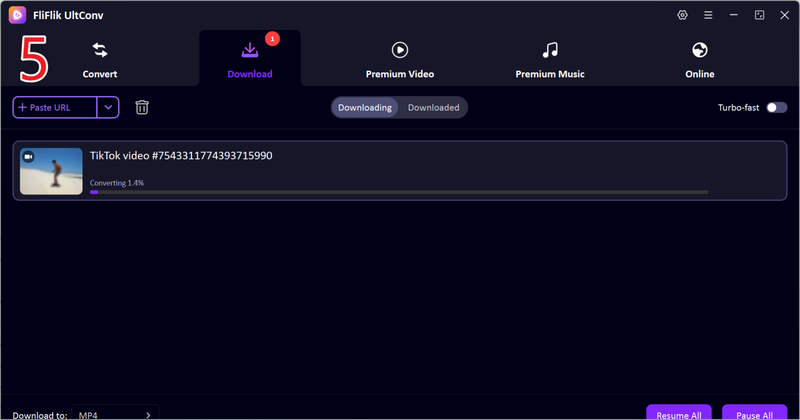
If no pop-up appears, paste the video link into the downloader’s URL bar and click Download to save the TikTok video without a watermark to your device.


UltConv Video Downloader can help you download TikTok videos without watermarks. You can download TikTok videos quickly on Mac or Windows, in high quality, and in your desired format. Then you can view them offline anytime.
FAQs
Why is Urlebird Popular?
Urlebird is known for its speed, ease of use, and the ability to view TikTok videos anonymously. Its user-friendly interface is a big reason for its popularity.
How to analyse TikTok video data?
You can analyse TikTok video data by tracking metrics like views, likes, shares, comments, and engagement rates. TikTok’s built-in analytics (available for Pro accounts) and third-party tools can be used for this purpose. Analysing the data will help you understand performance, identify trends, and optimise your content strategy for better results.
Is it legal to download videos from TikTok?
Downloading TikTok videos for personal use is generally allowed, especially if the video is publicly accessible. However, redistributing or sharing the content without permission may violate copyright laws. It is important to respect the rights of content creators and comply with TikTok’s terms of service.
Conclusion
While Urlebird is a popular entry point, switching to more secure alternatives like TikToklooker, Xaller, or MaveKite ensures a safer and more reliable experience in 2026. For those who need to save content, FliFlik UltConv Video Downloader is the top choice for downloading high-quality, watermark-free videos securely. By choosing the right tool, you can enjoy the best of TikTok with total privacy and convenience.
Secure Download
Secure Download