

 By
By  8 minutes read


In today’s world, people love capturing everything on their iPhones, whether it’s travel moments, family memories, or social media content. But with higher video quality comes a common problem: videos take up a lot of storage space very quickly.
That’s where a video compressor app for iphone becomes really useful. These apps help reduce video size without losing too much quality, making it easier to save storage, share files faster, and keep your phone running smoothly. In this article, we’ll share the 5 best video compressor apps for iPhone, compare their features, and help you choose the right one based on your needs.

Part 1. Which is the Best Video Compressor App
There are many video compressor apps for the iPhone, but the best one depends on what you actually need. Some apps are great for quick one-tap compression, while others are better for advanced control, batch processing, and high-quality output. Below, let’s see a comparison of the top features users usually care about:
Comparison of Video Compressor Apps
| Feature | Video Compressor – Save Space | Compress Videos & Resize Video | Panda Video Compress & Convert | Desqueeze – Batch Resizer | Video Compress – Shrink Videos |
|---|---|---|---|---|---|
| Batch Compression | Yes | Yes | Yes (limited/free) | Yes (advanced) | Yes |
| Watermark | No | No | No | No | No |
| Output Format | MP4, MOV, etc. | MP4 | Multiple formats | High-res formats + export options | MP4 |
| Speed | Fast | Fast | Medium–Fast | Fast (optimized) | Fast |
| Quality Control | Advanced settings | Optimized auto compression | Good balance controls | Very advanced resizing | Simple slider control |
| Offline Use | Yes | Yes | Yes | Yes | Yes |
Part 2. Top 5 Video Compressor Apps for iPhone
Now, let’s get into the details of each of the 5 options below that we compared above.
APP 1: Video Compressor — Save Space

Video Compressor — Save Space app is designed to quickly reduce video size and free up storage on your iPhone. It lets you compress videos with simple controls or use advanced settings for more customization. You can adjust resolution, bitrate, and frame rate for better control over quality. It also supports batch compression, so you can compress multiple videos at once. Other useful tools include video trimming, cropping, photo compression, and splitting long videos into smaller clips.
APP 2: Compress Videos & Resize Video

Compress Videos & Resize Video app is a popular and highly rated app focused on easy and fast video compression without losing quality. It helps iPhone users save storage space while keeping videos clear and sharp. The app is very simple to use and is optimized for social media sharing. It also compresses videos directly on your device, ensuring privacy and fast processing without uploading files online.
APP 3: Panda Video Compress & Convert

Panda Video Compress & Convert is a powerful app that not only compresses videos but also converts formats and reduces file size efficiently. It is useful for saving storage and reducing mobile data usage when sharing videos. The app supports batch compression, and the premium version allows unlimited processing. It also lets you record, compress, and share videos all in one place, making it very convenient for everyday use.
APP 4: Desqueeze — Batch Resizer

Desqueeze is more advanced compared to basic compression apps. It focuses on resizing, upscaling, and batch processing videos and photos. It supports high-resolution outputs up to 8K videos and even large image sizes. You can choose different resizing modes like stretch, fit, and fill. It also supports Live Photos, HDR content, and advanced templates for social media optimization while preserving quality and metadata.
APP 5: Video Compress — Shrink Videos App

Video Compress — Shrink Videos app makes video compression extremely simple. You can easily set your desired file size using a slider, and the app automatically adjusts compression accordingly. It works completely offline, meaning no internet is required, and no data is uploaded. It’s perfect for users who want quick, private, and easy compression while saving storage space without complicated settings.
Pro Tip. How to Download Your Favorite Video From Social Media
While a video compressor app for iPhone is great for reducing file size and handling quick edits, it is mainly useful for already-downloaded clips. If you actually want to download videos directly from social media or streaming sites, then you need a more powerful tool. FliFlik UltConv Video Downloader is a professional all-in-one downloader and converter that lets you save videos and music from 10,000+ websites in just one click.
Unlike basic apps, it doesn’t just compress files, it helps you download, convert, and manage media in high quality, making it a true “pro” solution for heavy users. You can download videos in resolutions up to 8K, convert them into different formats, and even save full playlists or channels easily. It also supports music platforms, live streams, and DRM-protected content, giving you much more flexibility than normal apps.

- Download videos from 10,000+ websites, YouTube, TikTok, Instagram, etc
- Batch download multiple files in MP4, MP3, and 100+ formats
- Download playlists, channels, and albums in bulk
- Convert video to audio without quality loss
- Supports HD, 2K, 4K, and up to 8K video downloads
- Remove DRM from Spotify and Apple Music
▼ Steps to Download YouTube Video to Mp4 with UltConv Video Downloader
-
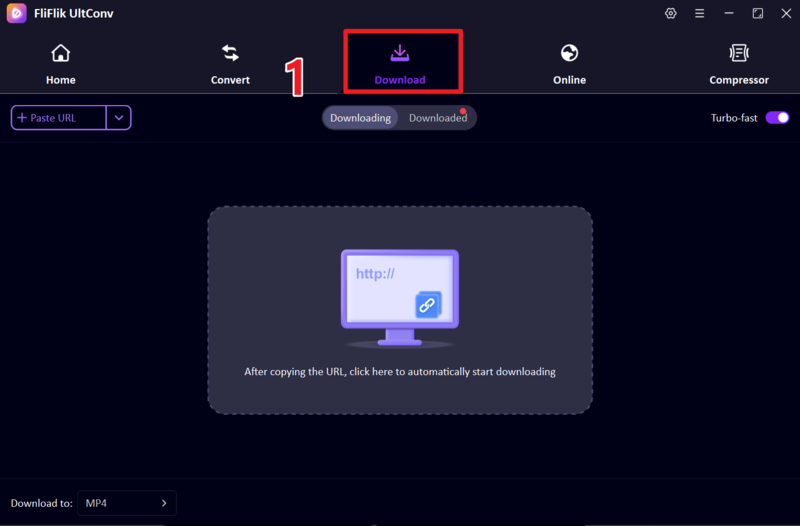
First download and install FliFlik UltConv Video Downloader. Next, launch the program and go to the Download section. Next, click the Download tab and then click the bottom, Download to option to set your output format.
FREE DOWNLOAD![secure download]() Secure Download
FREE DOWNLOAD
Secure Download
FREE DOWNLOAD![secure download]() Secure Download
Secure Download
-
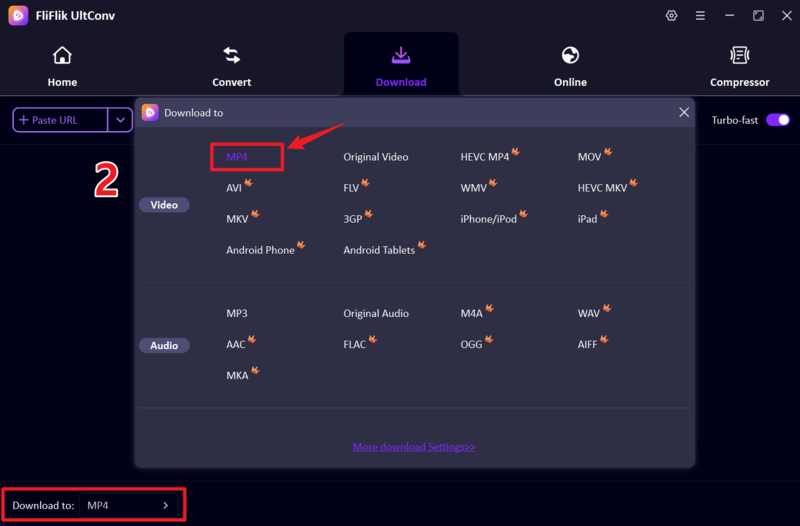
Select MP4 as your output format so the video works on all devices.
-
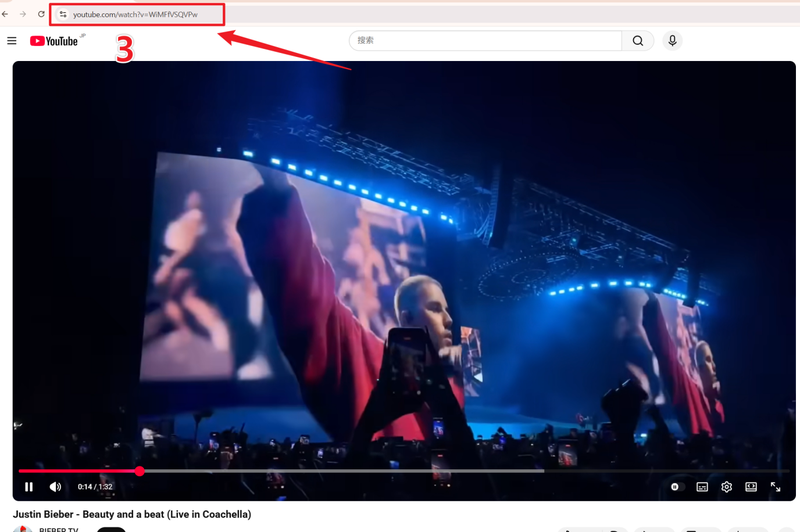
Open YouTube in your browser, find the video you want, and copy the video URL from the address bar.
-
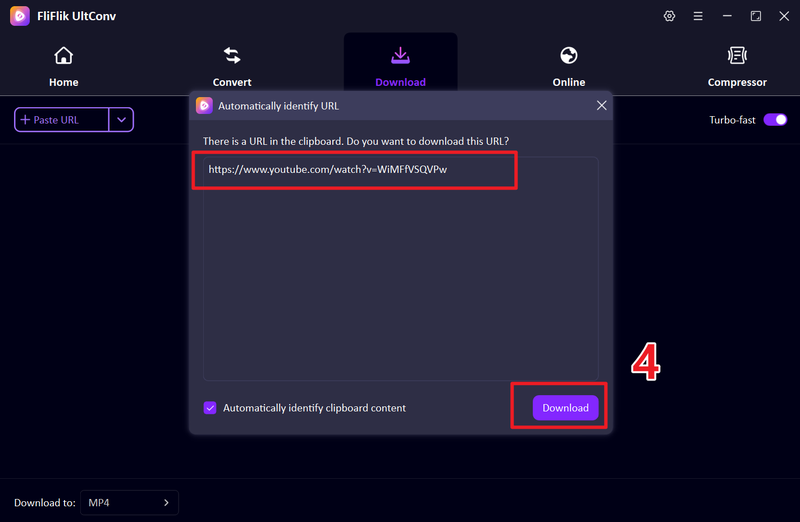
Go back to UltConv. If the link is detected automatically, click Download. Otherwise, paste the URL manually.
-
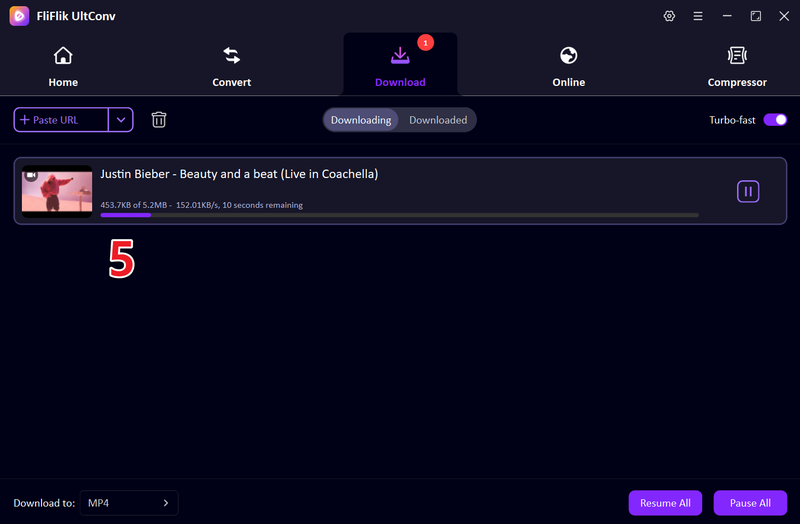
Wait for the download to finish. Your YouTube video will be saved as an MP4 file on your computer.


FAQs
Q1. Can I compress videos on my iPhone?
Yes, you can easily compress videos on your iPhone using video compressor apps. These apps reduce file size while keeping good video quality, helping you save storage space and share videos faster.
Q2. Which is the best video compressor app for iPhone?
It depends on your needs, but apps like Video Compressor — Save Space, Compress Videos & Resize Video, and Panda Video Compress & Convert are among the best options in 2026 for simple and effective compression.
Conclusion
A video compressor app for iPhone is very useful when you want to save storage space and manage large video files easily. They are perfect for everyday use, especially for quick compression. However, if you want more than just compression, like downloading, converting, and managing videos from multiple platforms, then FliFlik UltConv Video Downloader is the better all-in-one solution.
It lets you download videos in high quality, convert formats, and handle media much more flexibly. In short, compressor apps are great for simple tasks, but FliFlik UltConv is the smarter choice for complete video control.
 Secure Download
Secure Download
Secure Download
