

 By
By  9 minutes read


Many people use Video DownloadHelper to download videos from websites, but one common problem is that it doesn’t work on YouTube. Due to platform restrictions, the extension often fails to detect or download YouTube videos, which can be frustrating when you just want to save a video quickly.
This is why more users are now looking for a reliable Video DownloadHelper alternative that actually works across different platforms, including YouTube. In this article, we’ll look at some of the best Video DownloadHelper alternatives for Chrome, Firefox, and Edge, and help you find the right tool for smooth and hassle-free video downloading.

Part 1. Is Video DownloadHelper Safe to Use?

In general, the Video DownloadHelper extension itself is not harmful, but the overall user experience has raised some concerns recently. When we checked user reviews, especially on platforms like Trustpilot, the feedback is mixed but leans negative. The tool has a relatively low rating, with many users giving 1 or 2 star reviews. Common complaints include the need to install a separate “companion app,” unexpected limitations in the free version, and watermarks added to downloaded videos.
So, while Video DownloadHelper isn’t necessarily unsafe, it’s not the most reliable or user-friendly option anymore, especially if you’re looking for a smooth and fully free experience.
Part 2. Why Use a Video DownloadHelper Alternative?
One of the biggest issues is that it doesn’t work well with YouTube, which is where most people want to download videos. On top of that, the free version has become limited, often requiring a paid companion app to unlock full features. This makes the process more complicated than it should be.

Another common problem is inconsistent performance. Sometimes the extension fails to detect videos, downloads are slow, or watermarks are added unless you upgrade. These limitations can be frustrating, especially if you just want a quick and simple download.
That’s why using a Video DownloadHelper alternative makes sense. Better tools offer more stable downloads, support for more websites, higher video quality, and a smoother user experience.
Part 3. Top 6 Video DownloadHelper Alternatives
Now, below we will look at the top 6 options that are reliable Video DownloadHelper alternatives.
1. FliFlik UltConv Video Downloader
Our first recommendation is FliFlik UltConv Video Downloader, a powerful and reliable tool that works as a great Video DownloadHelper alternative. Unlike browser extensions that often have limits (especially on YouTube), UltConv is a desktop software designed for smooth and high-quality downloading. It allows you to download videos from 10,000+ websites with just one click.
What makes it stand out is its flexibility and performance. You’re not limited to basic downloads; you can choose from 100+ different formats, download in high resolutions like 4K, 2K, 1080p, and even convert videos into audio without losing quality. It also supports bulk downloads, which means you can download entire playlists or channels at once instead of doing it one by one.
System: Windows 10 (64-bit) / Windows 11/ Mac/ Android

- Download videos and music from 10,000+ sites, YouTube, TikTok, Instagram, etc.
- Save videos in MP4, MP3, and 100+ formats
- Batch Download playlists, channels, and albums in bulk
- Supports HD, 2K, 4K, and up to 8K video quality
- Remove DRM from Spotify and Apple Music
- Built-in browser for easy searching and downloading
▼ Steps to Download YouTube Video to MP4 with UltConv Video Downloader
-
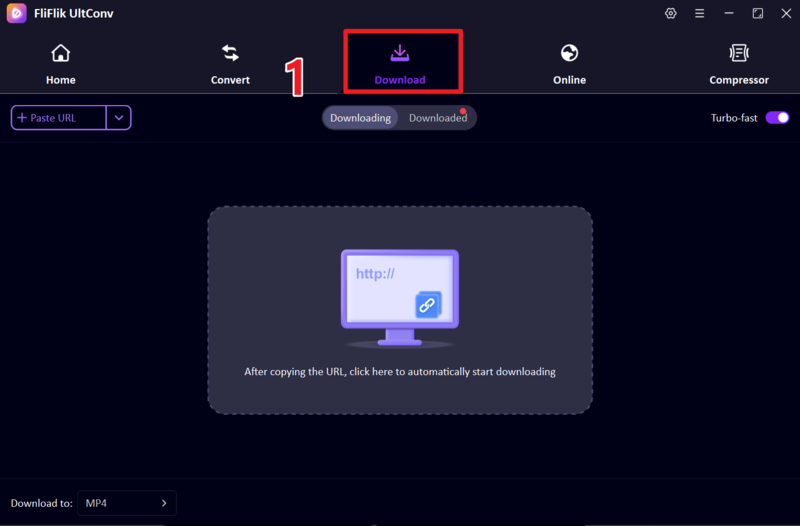
Install and open FliFlik UltConv Video Downloader on your computer. Once launched, go to the Download tab and then click the Download to option to set your output format.
FREE DOWNLOAD![secure download]() Secure Download
FREE DOWNLOAD
Secure Download
FREE DOWNLOAD![secure download]() Secure Download
Secure Download
-
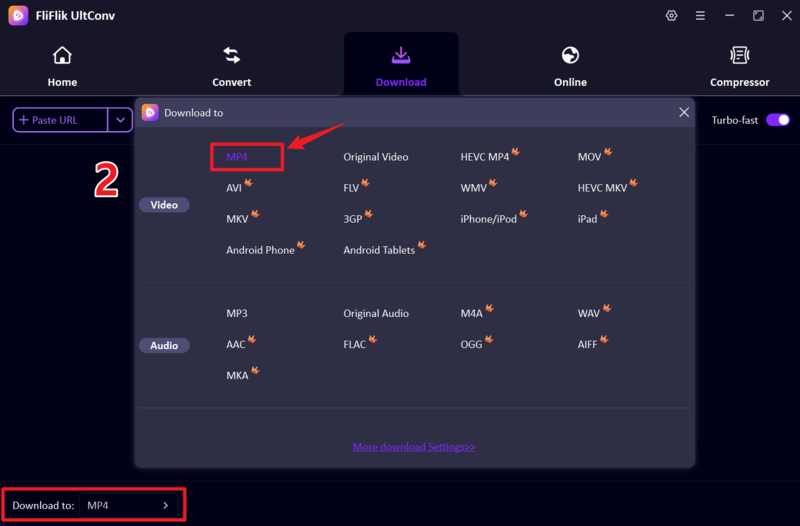
Set the output format to MP4 so the video can be played on most devices.
-
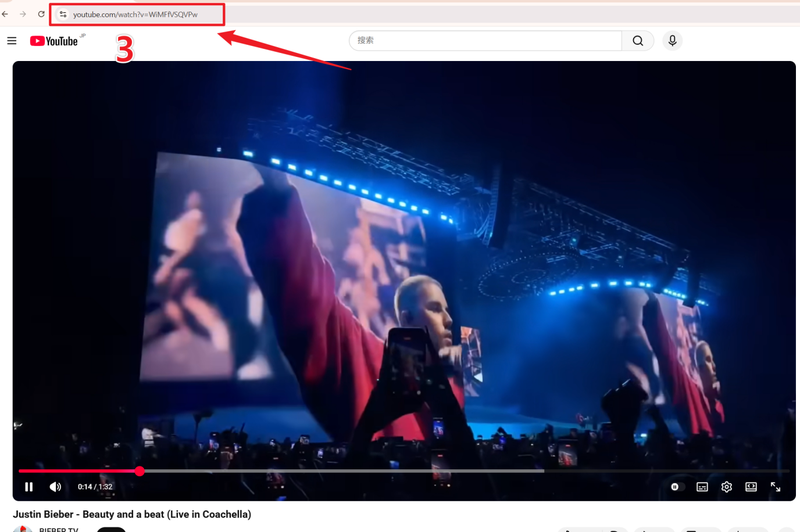
Go to YouTube, find the video you want to download, and copy its URL from the browser address bar.
-
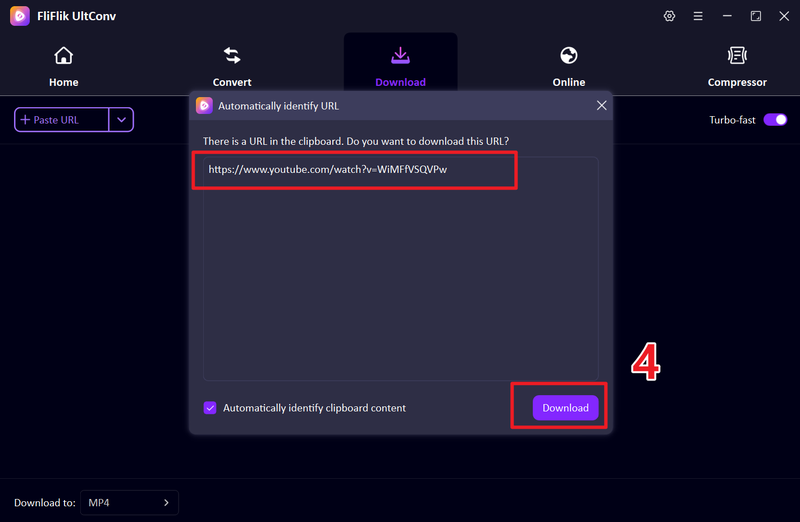
Return to UltConv. The tool may detect the link automatically if not, simply paste the URL into the input box and click Download.
-
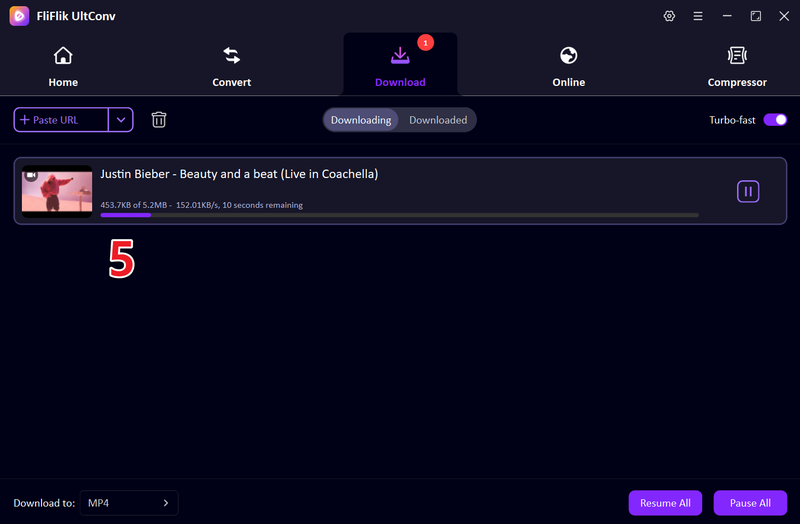
Wait for the process to complete. Once finished, the video will be saved as an MP4 file on your computer.


2. Video Downloader Professional

Video Downloader Professional is another popular and easy-to-use browser extension designed for users who want a simple way to download videos while browsing. Once installed, it automatically detects videos on supported websites and gives you download options with just a click. It’s especially useful for saving videos for offline viewing without needing any extra software. The interface is clean and beginner-friendly, making it a good choice for casual users.
System: Chrome browser (also works on Microsoft Edge via Chrome Web Store extension support)
3. FetchV Video Download Extension

FetchV is a more advanced video downloader extension that offers better flexibility compared to basic tools. It supports multiple formats, including MP4 and streaming formats like HLS (M3U8), making it useful for downloading videos from a wider range of websites. One of its standout features is faster download speed thanks to multi-thread technology. It also gives users more control over video quality and format selection.
System: Chrome browser (also compatible with Edge and Chromium-based browsers)
4. CocoCut — Video Downloader

CocoCut is a well-known video downloader extension that works on Chrome and Edge. It can automatically detect videos playing on a webpage and provide download options in different formats and qualities. One useful feature is its ability to handle streaming videos by recording them if direct downloading is not possible. This makes it more flexible than many basic extensions. The tool is easy to use and works on a wide range of websites, but download speed and performance can vary depending on the source.
System: Chrome / Edge browser (Chromium-based browsers)
5. NetVideoHunter

NetVideoHunter is a lightweight and reliable video downloader mainly built for Firefox users. It scans web pages for available media files and allows you to download videos quickly with minimal effort. The tool is simple and doesn’t require complicated setup, which makes it a good option for users who prefer straightforward solutions. However, compared to newer tools, it lacks some advanced features like batch downloading or high-resolution options, and support for certain modern websites may be limited.
System: Windows/Mac
6. MPMux Online Video Downloader

MPMux is an online video downloader that works directly in your browser, so there’s no need to install anything. It is especially useful for downloading streaming videos, including those using the M3U8 format, and converting them into MP4 files. This makes it a convenient option for quick downloads from different sites. However, since it’s a web-based tool, performance may depend on your internet speed and the website you’re using, and it may not be as fast or stable as dedicated software.
System: Available for Chrome and Edge
FAQs
Q1. Is Video DownloadHelper still safe in 2026?
Yes, it is generally safe to use, but its reliability has decreased. Many users report limitations, extra paid requirements, and inconsistent performance compared to newer tools.
Q2. Which is the best extension like Video DownloadHelper?
Tools like FetchV, CocoCut, and Video Downloader Professional are popular alternatives. For a more powerful option, desktop tools like FliFlik UltConv Video Downloader are even more reliable.
Q3. Does Video DownloadHelper work on YouTube?
In most cases, no. Due to YouTube’s restrictions, Video DownloadHelper often fails to detect or download YouTube videos properly.
Conclusion
As we’ve seen throughout this article, Video DownloadHelper comes with several limitations. Many users are now moving toward more reliable and feature-rich alternatives. Browser extensions such as FetchV, CocoCut, and Video Downloader Professional can be useful for quick downloads.
If you want a more powerful, stable, and long-term solution, FliFlik UltConv Video Downloader is the best choice. It supports thousands of websites, downloads videos in high quality, and offers advanced features like batch downloads, format conversion, and live stream saving, all in one tool.
 Secure Download
Secure Download
Secure Download
