

 By
By  9 minutes read


VidMate is a popular video downloader app that allows users to save videos and music from different websites directly to their Android devices. It is widely used because it supports fast downloading and multiple formats, making it convenient for offline viewing. However, many users still question its safety, availability, and whether it is legal to use, especially since it is not available on the Google Play Store.
In this article, we will explain whether VidMate is safe or not and what risks you should be aware of when using it. We will also show how it works, how to download videos with it, and finally introduce the best VidMate alternatives for Android, Windows, and Mac.

Part 1. Is VidMate Safe?
VidMate is not available on the Google Play Store because it does not fully meet Google’s strict app policies related to downloading content from third-party websites, especially copyrighted material. Google often restricts apps that enable direct video downloading from platforms like YouTube, which is one of the main reasons VidMate must be installed through APK files instead of official app stores.
Important Notes When Downloading This App
Before using VidMate, it is important to understand a few safety risks and precautions.
- Always download VidMate only from trusted and official APK sources to avoid fake or modified versions.
- Be careful of apps that come bundled with ads, pop-ups, or unwanted third-party software.
- Since VidMate is not on Google Play, it does not go through Google’s security checks.
- Keep your device security settings and antivirus enabled for extra protection.
- Avoid granting unnecessary permissions that the app does not need to function.
- Regularly check for updates from reliable sources to reduce security risks.
Part 2. How to Download Video from VidMate
VidMate is designed to make video downloading simple by allowing users to search, stream, and save videos directly from supported websites. Below are the basic steps to download videos using VidMate.
▼ Steps to Download Video from VidMate
- Step 1: Open the VidMate app on your Android device and allow the required permissions for storage and media access.
- Step 2: Use the built-in search bar or browser to find the video you want to download from supported websites.
-
Step 3:
Open the video and tap the
Download
button that appears on the screen.
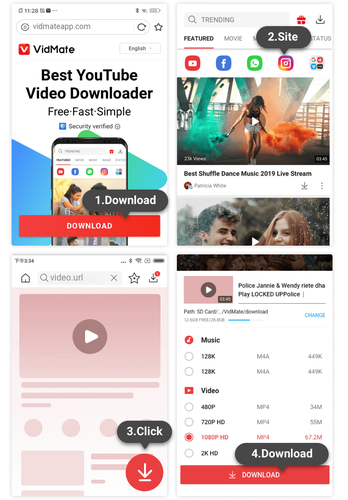
- Step 4: Select your preferred video quality and format, such as MP4 or audio-only options.
- Step 5: Confirm the download and wait for the process to finish. You can track progress in the download section.
- Step 6: Once completed, open the downloaded section to access and watch your saved video offline anytime.

Part 3. Best VidMate Alternative on Windows & Mac
FliFlik UltConv Video Downloader is a high-performance video downloader for Windows and Mac, designed to provide a more stable environment than mobile apps like VidMate. It supports content extraction from over 10,000 websites, including YouTube and major social media platforms, featuring a built-in browser for seamless searching and access.
This all-in-one tool combines downloading and conversion, supporting 100+ formats (such as MP4 and MP3) while delivering stunning 4K and 8K ultra-HD quality. With batch downloading and high-speed conversion technology, users can process large volumes of content with maximum efficiency. By offering additional Android support alongside its robust desktop features, UltConv provides a flexible, secure, and feature-rich alternative for all your video acquisition needs.

- Download videos from 10,000+ websites with one click
- Convert videos to MP4, MP3, and 100+ formats
- Supports HD quality downloads up to 4K and 8K resolution
- Batch download multiple videos, playlists, and channels
- Built-in browser for direct downloading inside the app
- 10x faster download speed with stable performance
▼ How to Download YouTube to MP4 with UltConv Video Downloader?
-
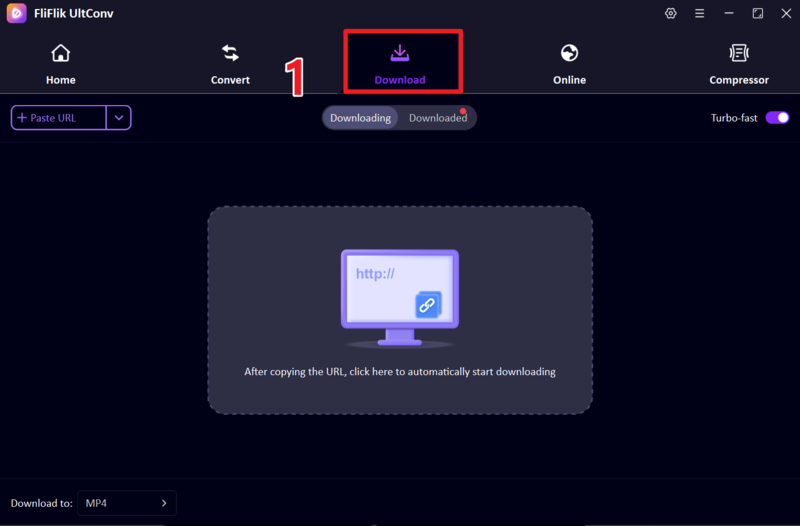
Launch FliFlik UltConv Video Downloader on your computer. From the home screen, open the Download section and choose the ” Download To ” option to adjust output settings.
FREE DOWNLOAD![secure download]() Secure Download
FREE DOWNLOAD
Secure Download
FREE DOWNLOAD![secure download]() Secure Download
Secure Download
-
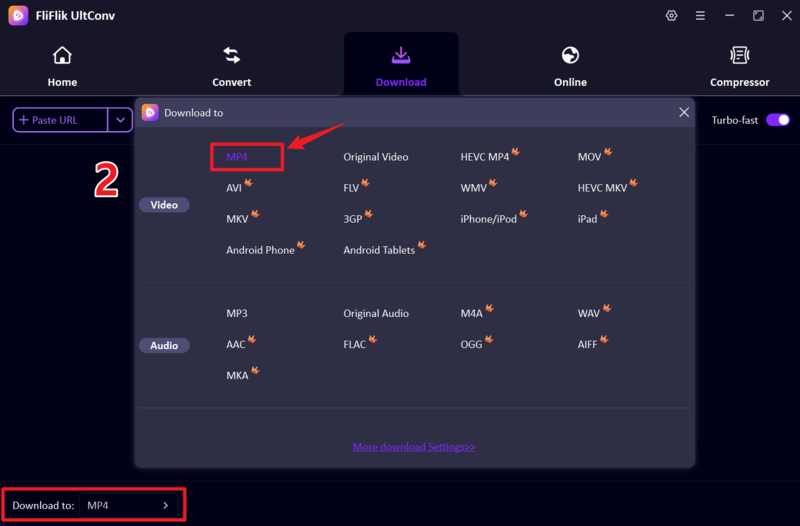
Set the output format to MP4 so your video can be played easily on any device, player, or system.
-
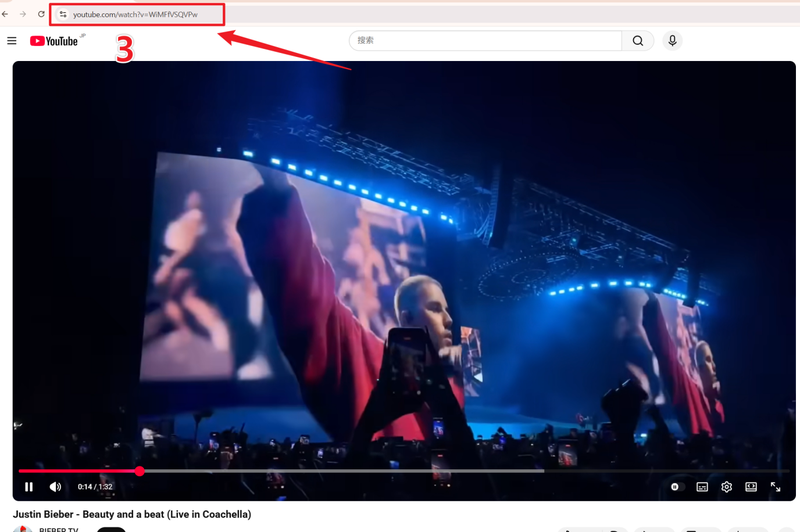
Open YouTube in your browser, find the video you want, and copy its URL from the address bar.
-
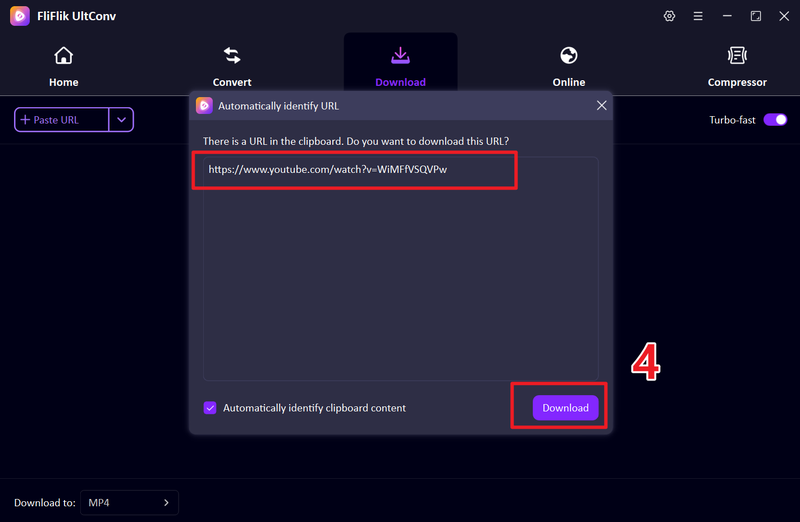
Go back to UltConv and paste the copied link into the input field. If it is not detected automatically, click the Download button to continue.
-
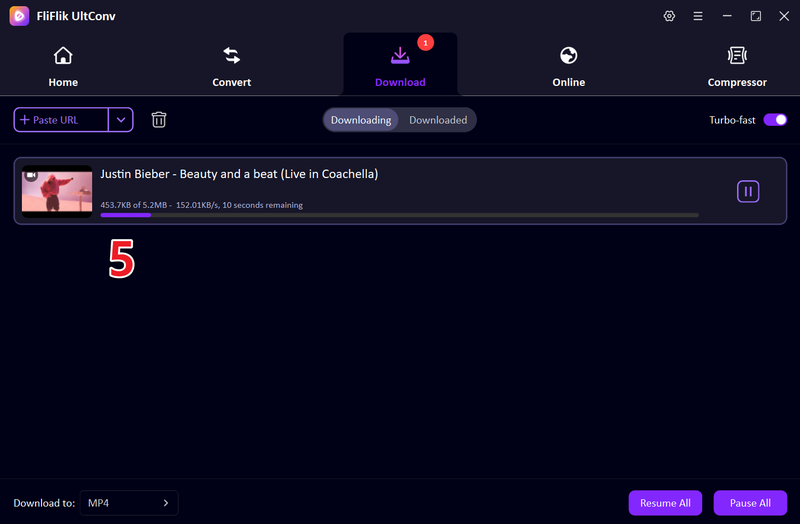
Wait while the download completes. Once done, your video will be saved in MP4 format and ready for offline viewing anytime.


Part 3. Top 6 VidMate Alternative Apps (Android Only)
If you are looking for safer or more stable options than VidMate, then you can use the 5 best VidMate alternative apps for Android users.
1. NewPipe

NewPipe is a lightweight, open-source Android app that allows users to stream and download videos without ads or tracking. It is mainly designed for privacy-focused users who want a simple YouTube alternative with offline download support. The app does not require Google services, making it ideal for users who prefer minimal permissions and smooth performance on low-end devices.
2. Snaptube

Snaptube is a popular Android video downloader that supports multiple platforms like YouTube, Facebook, and Instagram. It allows users to download videos in different resolutions and also extract audio in MP3 format. The app is widely used because of its simple interface and fast downloading speed for mobile users.
3. KeepVid

KeepVid is an Android video downloader that helps users save videos from various streaming websites for offline viewing. It supports multiple formats and resolutions, making it flexible for different user needs. The app is designed with a clean interface and focuses on easy video downloading without complicated steps.
4. InsTube

InsTube is another fast and secure Android downloader that supports video and music downloads from many popular websites. It offers high-speed downloading and multiple format options, including MP3 and MP4. The app also includes a built-in browser for searching and downloading content directly inside the app.
5. VLC Media Player

VLC Media Player is also mainly known as a media player, but it can also stream and save online content in some cases. It supports almost all video and audio formats and works smoothly on Android devices. VLC is a trusted open-source tool widely used for offline playback and media management.
FAQs
Q1. How to download videos from VidMate on an iPhone?
VidMate isn’t available on iPhone due to Apple’s strict security policies and lack of APK support. Instead, use FliFlik UltConv on your computer to download videos and then transfer them to your iPhone.
Q2. What is the best VidMate alternative on Android?
Top Android alternatives to VidMate include NewPipe, Snaptube, and InsTube. These apps provide video downloading, offline playback, and MP3 conversion, with varying performance and ad levels to suit user preference.
Q3. Is VidMate free to use?
Yes, VidMate is generally free to use. However, since it is not on the Google Play Store, users must download it from third-party sources.
Conclusion
Since VidMate isn’t on official app stores, downloading it from third-party sites poses security risks. For a safer and more stable experience on Android, consider reputable alternatives like NewPipe, Snaptube, or InsTube.
For a more powerful, consistent tool across Windows, Mac, and Android, FliFlik UltConv Video Downloader is a top-tier option. It offers high-speed, high-quality downloads and wide format support, making it a reliable long-term solution.
 Secure Download
Secure Download
Secure Download
