

 8 minutes read


Downloading YouTube videos is something most of us have tried at least once, especially when we want to watch something offline without worrying about internet issues. But the truth is, not every tool out there works smoothly, and that’s where things start to get a little frustrating. Some downloaders are slow, some feel outdated, and others don’t really deliver the quality they promise.
One tool that often comes up in this space is WinX YouTube Downloader, mainly because it claims to make video downloading quick and simple for everyday users. But before relying on it, it’s worth asking a few real questions: Is WinX actually safe? Does it still work well in 2026? And is it really the right choice compared to newer alternatives? In this review, we’ll break it all down in simple terms so you can decide for yourself.

- Part 1. What is WinX YouTube Downloader
- Part 2. Is WinX YouTube Downloader Safe?
- Part 3. How to Use WinX YouTube Downloader?
- Part 4. WinX YouTube Downloader Not Working? Best Alternative Here!
- Part 5. WinX YouTube Downloader vs. UltConv YouTube Downloader
- Final Words
- FAQs about WinX YouTube Downloader
Content Table:
Part 1. What is WinX YouTube Downloader

WinX YouTube Downloader is a desktop tool that allows users to download videos directly from YouTube and other popular platforms like Facebook, Vimeo, and Dailymotion. It works in a very simple way: you just copy the video link, paste it into the software, and it scans the file so you can choose your preferred format and start downloading. The interface is designed to be beginner-friendly, so even first-time users can figure it out without much effort.
In day-to-day use, it focuses more on speed and simplicity rather than advanced editing features. You can quickly download multiple videos, and the process usually doesn’t take long if your internet connection is stable. However, some users do report a few limitations and stability concerns, especially when dealing with certain sites or formats. Below, let’s look at its pros and cons in usage.
- Supports multiple video websites like YouTube, Facebook, Vimeo, and more
- Allows batch downloading of multiple videos at the same time
- Offers different formats and quality options for downloads
- Simple and beginner-friendly interface
- No direct MP3/audio extraction option
- Limited advanced control over output settings
- Some WinX YouTube downloader issue reports with certain video sources
- Occasional compatibility or parsing errors, depending on platform updates
Part 2. Is WinX YouTube Downloader Safe?
WinX YouTube Downloader is not considered fully reliable anymore in 2026, mainly because it hasn’t been properly updated for a long time. Modern streaming platforms like YouTube frequently change how videos are delivered, and older tools often struggle to keep up. Because of this, users may experience unstable video detection, slower downloads, or limited output quality (usually up to 1080p), especially when compared to newer and more actively maintained alternatives.
Another important concern is availability. WinX YouTube Downloader is no longer officially available on the WinXDVD website, and most copies found online come from third-party sources. This raises a serious safety issue, since unofficial downloads can sometimes include outdated files or modified installers. While the original software itself was not designed to be harmful, using old or unverified versions can expose users to security risks or broken functionality. It may still work in some cases, but for users who care about stability, updates, and safety, it is generally better to look for a more modern and actively supported alternative.
Part 3. How to Use WinX YouTube Downloader?
Using WinX YouTube Downloader is fairly simple, even if you’re a beginner. The tool mainly works through copy-paste links, so you don’t need any technical setup or advanced settings. Once installed, the whole process takes just a few clicks from start to finish.
- Step 1: Download and install WinX YouTube Downloader, then open the software on your computer.
- Step 2: Go to YouTube in your browser and copy the link of the video you want to download.
-
Step 3:
Open WinX YouTube Downloader and click the ”
Add URL
” button. Paste the copied link and click ”
Analyze
” to process the video.
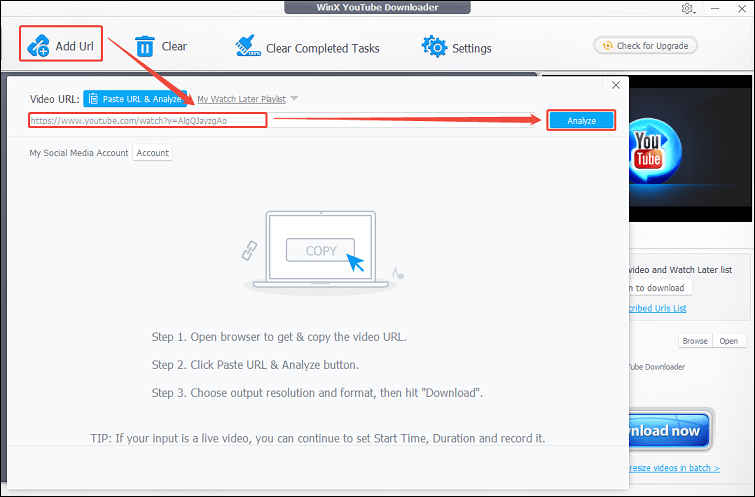
- Step 4: After analysis, the tool will show available download formats and quality options. Choose the one that fits your needs.
- Step 5: Click ” Download Now ” to start downloading the video to your computer. Once finished, you can access it from your saved folder.

Part 4. WinX YouTube Downloader Not Working? Best Alternative Here!
If WinX YouTube Downloader is no longer working properly for you, you’re honestly not alone. Since the software hasn’t received major updates in a long time, many users now face problems like failed video analysis, broken downloads, unsupported links, or limited quality options. A more modern alternative is FliFlik UltConv Video Downloader, which is designed for users who want a smoother and more flexible downloading experience without a complicated setup.
Unlike older tools that only support a handful of sites, UltConv Video Downloader works with 10,000+ platforms, including YouTube, TikTok, Facebook, Spotify, SoundCloud, and many others. It also supports higher-quality downloads like 1080p, 2K, 4K, and even 8K videos while preserving original audio quality. For users who regularly save playlists or large amounts of content, the batch download feature of UltConv Video Downloader is especially useful because it allows multiple videos, playlists, albums, or channels to download together automatically instead of manually handling files one by one.

- Download videos from 10,000+ websites
- Save videos in MP4, MP3, and 100+ formats
- Download playlists, channels, and albums in one click
- Support HD, 2K, 4K, and 8K video quality
- Batch download multiple videos at the same time
- Convert video to audio without quality loss
- Remove DRM from supported music platforms like Spotify and Apple Music
▼ Steps to Download YouTube Video to MP4 with UltConv Video Downloader
-
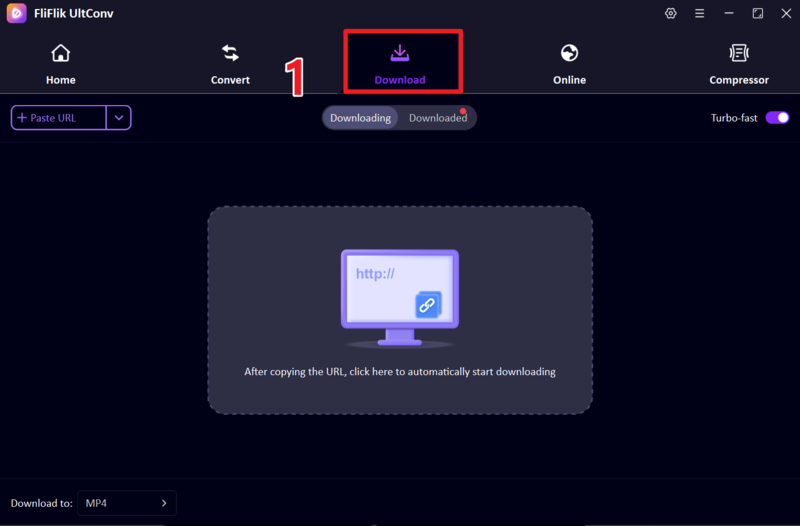
Download and install FliFlik UltConv Video Downloader on your Windows or Mac computer. After installation, launch the software and open the Download section.
-
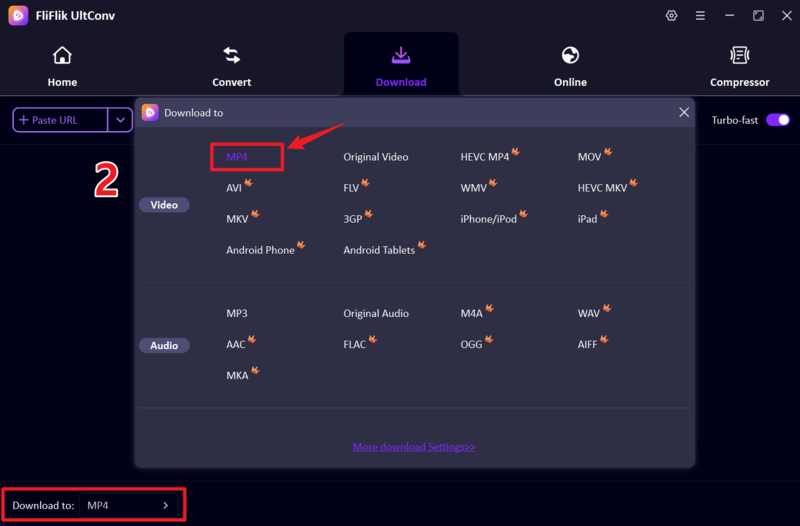
Next, click the ” Download to ” option at the bottom. choose MP4 as the output format so the downloaded video works smoothly on most devices and media players.
-
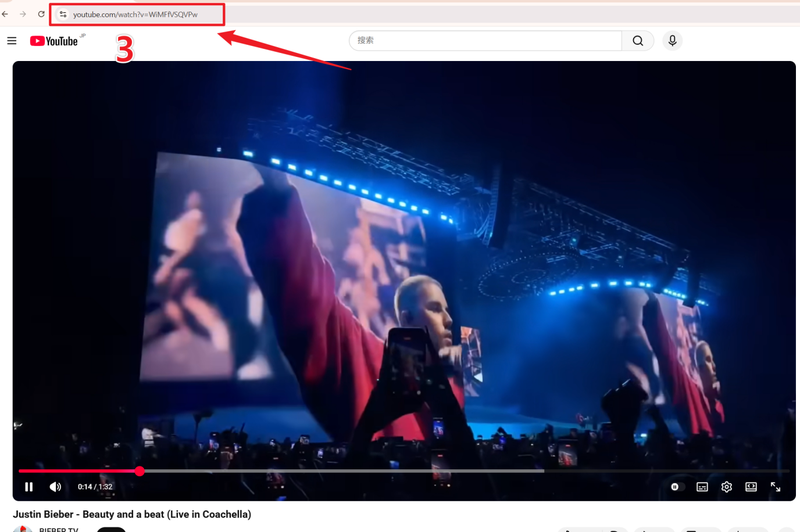
Open YouTube in your browser, find the video you want to save, and copy its URL from the address bar.
-
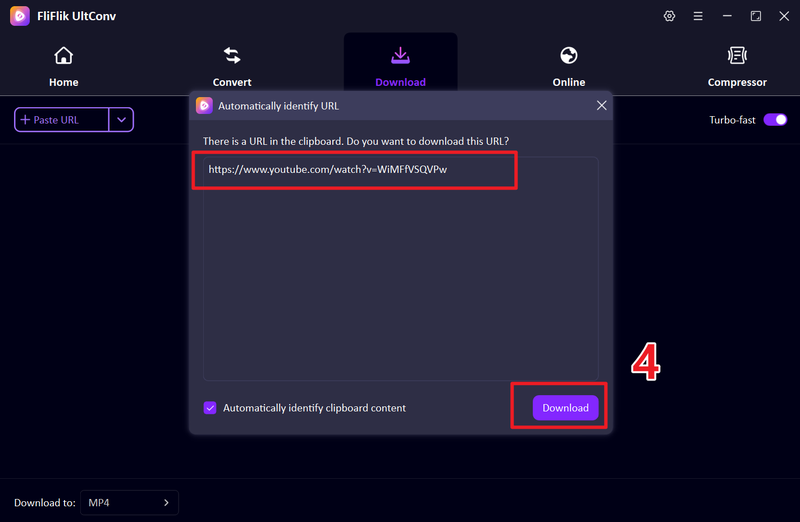
Return to UltConv and paste the copied link into the input box. In some cases, the tool can automatically detect the copied URL. Click the Download button to continue.
-
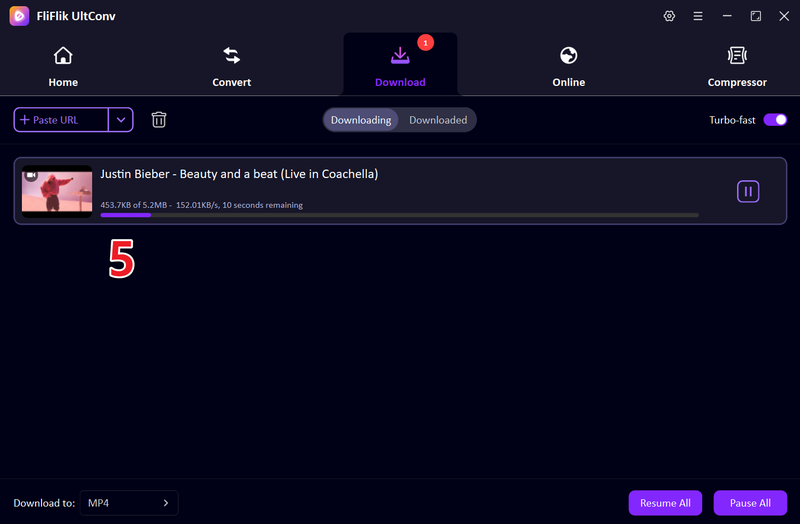
Wait for the download process to finish. Once completed, the video will be saved as an MP4 file on your computer for offline viewing anytime.


Part 5. WinX YouTube Downloader vs. UltConv YouTube Downloader
While WinX YouTube Downloader still works for basic video downloads, it now feels a bit limited compared to newer tools. Many users mainly switch because of better platform support, higher download quality, faster speed, and more reliable batch downloading features available in modern alternatives. Here’s a quick comparison between WinX YouTube Downloader and FliFlik UltConv YouTube Downloader:
| Feature | WinX YouTube Downloader | FliFlik UltConv YouTube Downloader |
|---|---|---|
| Supported Platforms | Mainly YouTube, Facebook, Vimeo, Dailymotion, and a few others | Supports 10,000+ websites, including YouTube, TikTok, Facebook, Vimeo, Twitch, Spotify, SoundCloud, and more |
| Output Formats | Limited format support | MP4, MP3, and 100+ formats |
| Maximum Video Quality | Up to 1080p in most cases | Supports HD, 2K, 4K, and even 8K downloads |
| Download Speed | Moderate | 10X Faster |
| Batch Download | ❌ | ✅ |
| Playlist Download | ❌ | ✅ |
| Audio Download | ❌ | High-quality MP3 downloads up to 320kbps |
| Built-in Browser | ❌ | ✅ |
| DRM Support | ❌ | Supports DRM removal for supported music platforms |
| Overall Stability | Older software with fewer updates | More actively maintained and compatible with modern platforms |
| User Rating | Good for basic downloads | Better for heavy downloading and modern features |
Final Words
Overall, WinX YouTube Downloader still works for simple video downloads, but it now feels outdated compared to newer tools available in 2026. Limited updates, occasional download issues, and fewer modern features make it less reliable for users who regularly save videos, playlists, or high-quality content. If you want a smoother experience with broader website support, faster downloads, batch downloading, and higher video quality options, FliFlik UltConv Video Downloader is a much more flexible alternative worth trying. It simplifies the entire process while supporting thousands of websites and modern download formats for everyday use.
 Secure Download
Secure Download
Secure Download
FAQs about WinX YouTube Downloader
Q1. Is WinX YouTube Downloader Free to Use?
Yes, WinX YouTube Downloader offers a free version for basic video downloading. However, some advanced features and higher-quality options may be limited compared to newer downloader tools.
Q2. Why is the WinX YouTube Downloader not working?
The most common reason is that the software has not been updated regularly, while YouTube and other platforms constantly change their video delivery systems. This can lead to failed analysis, broken downloads, or unsupported links.
Q3. Can I use WinX YouTube Downloader on my Android mobile?
No, WinX YouTube Downloader is mainly designed for Windows and Mac computers. There is no official Android version available.
Hey there! I am Maxwell Clark. I'm always looking for new tech tools that make a difference, from making visuals and audio better to making workflows better. I'm going to share tips and tricks for using AI tools for videos, audio, and images. I'm excited to help you navigate the digital world more efficiently and creatively!

