

 By
By  7 minutes read


Y2mate MP4 downloader lets you download YouTube videos as MP4 files fast and for free, all right from your browser, no need to install anything. That’s why so many folks stick with it. Still, with all the ads, sketchy pop-ups, and limits on video quality, you’ve got to wonder if it’s worth it.
In this article, we’ll look at whether the Y2mate MP4 downloader is safe, how to use it for YouTube to MP4 downloads, and compare it with a stronger alternative – FliFlik UltConv Video Downloader, so you can decide what works best for you.

Part 1. Is Y2mate MP4 Downloader Safe?

Y2mate MP4 downloader works directly in your browser, which means you don’t install any software. That sounds convenient, but it also comes with risks. The site relies heavily on pop-up ads and redirect pages, some of which may lead to unsafe or misleading websites. While Y2mate itself doesn’t ask for account details, accidental clicks can expose your device to unwanted downloads or security warnings.
- Converts YouTube videos to MP4 quickly
- No signup or software installation required
- Works on desktop and mobile browsers
- Supports basic video resolutions
- Free to use with no download limits shown
Part 2. How to Use Y2mate to Download YouTube Videos to MP4?
Downloading videos with Y2Mate MP4 is simple and doesn’t take much effort. Here’s how the process works, step by step:
- Step 1: Open YouTube and find the video you want to save. Copy the video link from the address bar.
- Step 2: Open Y2Mate in your web browser.
-
Step 3:
Paste the copied YouTube link into the search box on the Y2Mate homepage. The site will scan the video automatically. Choose
MP4 OR MP3
as the output format and select your preferred quality.
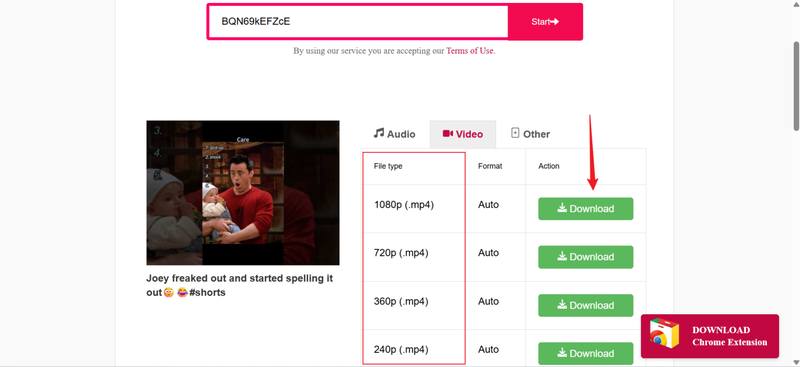
- Step 4: Click the Download button and wait a few seconds. Once the file is ready, save the MP4 video to your device.

This method works on both desktop and mobile browsers, making it easy to download YouTube videos in MP4 for offline viewing.
Part 3. Better Y2mate Alternative: FliFlik UltConv Video Downloader
If you want a more reliable Y2mate alternative, then instead of using online tools, it’s smarter to use a dedicated desktop downloader. One of the most recommended options here is FliFlik UltConv Video Downloader. Unlike browser-based converters that depend on ads, pop-ups, and unstable links, UltConv runs directly on your computer. That alone makes a big difference in speed, success rate, and overall control.
UltConv supports downloads from 10,000+ websites, including YouTube, TikTok, Facebook, Instagram, Vimeo, Twitter, and many more. You can save videos in MP4, MP3, and over 100 formats, making it easy to play files on any device. Video quality goes up to 1080p, 2K, 4K, and even 8K, while audio downloads reach 320kbps. It also supports batch downloading, so you can grab full playlists, channels, or multiple videos at once without repeating the same steps.

- Download videos from 10,000+ streaming and social sites
- Save files in MP4, MP3, and 100+ video and audio formats
- Support HD, 1080p, 2K, 4K, and 8K video quality
- Batch download playlists, channels, and multiple links
- Convert video to audio without quality loss
- Built-in browser for smooth and stable downloads
▼ Convert Streaming Sites Videos to MP4 with FliFlik UltConv Video Downloader:
FliFlik UltConv Video Downloader makes it easy to download videos from different sites on both Windows and Mac. Once the software is installed, you can download videos in high quality without dealing with ads, limits, or broken links. Here’s how the process works.
 Secure Download
Secure Download
Secure Download
-
Open UltConv Video Downloader and open the Download tab. Click the Download to option at the bottom to begin.

-
Choose MP4 as your output format based on your playback needs.

-
Go to YouTube in your web browser and copy the link of the video you want to save.
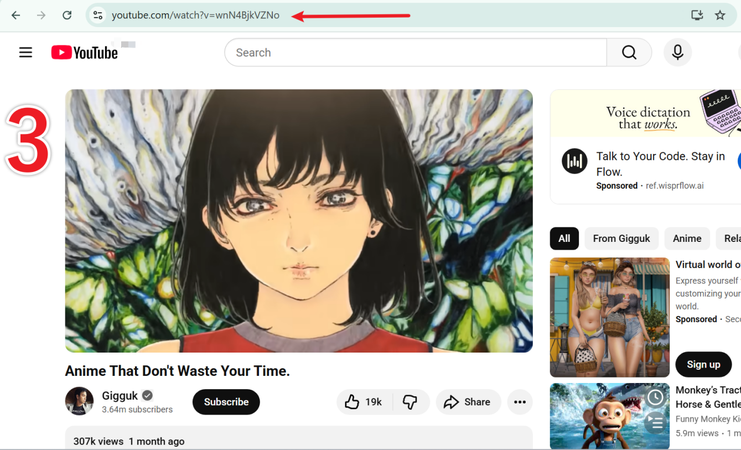
-
Switch back to UltConv. If the link is detected automatically, just click Download.
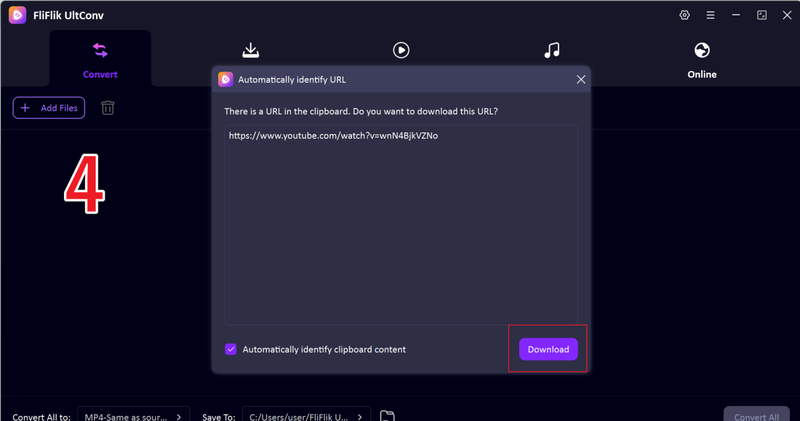
-
If auto-detection doesn’t work, paste the link into the input box manually and hit Download.
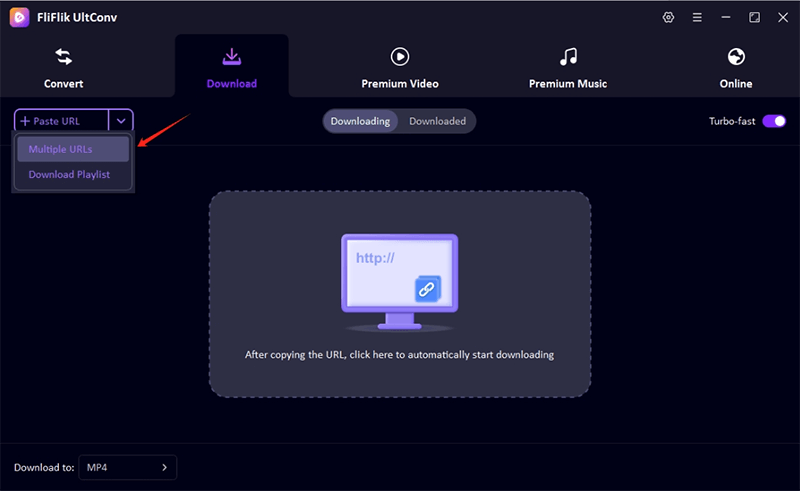


Once the download finishes, the MP4 file is saved to your device, ready for offline viewing anytime.
While Y2mate works well for quick, occasional MP4 downloads, UltConv offers more flexibility, higher quality, and better safety. Let’s break down the differences in a quick comparison table:
| Feature | FliFlik UltConv Video Downloader | Y2mate |
|---|---|---|
| Platform | Desktop software (Windows & Mac) | Web-based (browser only) |
| Output Quality | Up to 8K video, 320kbps audio | Limited to standard YouTube quality |
| Safety & Ads | Clean interface, minimal ads | Heavy ads, pop-ups, risk of unsafe redirects |
| Batch Download | Yes – playlists, channels, multiple files | No – single video at a time |
| Format Support | MP4, MP3, +100 other formats | MP4, MP3 only |
| Download Speed | Fast, stable performance | Slower, depends on browser session |
| Offline Use | Yes | Yes |
| Additional Features | Built-in browser, DRM removal, live stream downloads | Basic online conversion |
| Price & Limits | Paid | Free, but with limited quality and features |
| Best For | Frequent downloaders, high-quality, and playlist saving | Quick one-off YouTube downloads |
FAQs
Q1. What is Y2mate YouTube MP4 downloader?
Y2mate YouTube MP4 downloader is an online tool that lets you save YouTube videos directly to your device in MP4 format. It’s free, browser-based, and doesn’t require installation, making it convenient for quick downloads.
Q2. How to download YouTube videos to MP4 using Y2mate?
Simply copy the YouTube video link, open Y2mate in your browser, paste the link, select MP4 as the output format, and click Download. The video will then be saved to your device for offline viewing.
Conclusion
Both Y2mate MP4 downloader and FliFlik UltConv Video Downloader make downloading YouTube videos simple, but the choice depends on your needs. If you want more control over video quality, format options, batch downloads, and a secure, ad-free experience, FliFlik UltConv Video Downloader is the smarter choice.
You can choose the exact video quality, pick the format you want, and even download full playlists in one go. No ads are breaking the flow. No risky buttons to avoid. You just paste the link and let it work. What this really means is less hassle and better results.
Secure Download
Secure Download
