

 By
By  7 minutes read


Many users want a simple way to rip music from Spotify so they can listen to their favorite songs offline without limits. Spotify Premium allows downloads inside the app, but those files only work within Spotify and cannot be moved or used freely on other devices. Because of this, people often look for tools that give more control over their music and allow offline access in different formats.
In this article, to help you enjoy offline playback anywhere, we’ve rounded up 6 best Spotify music rippers for PC, Mac, mobile, and free online use. These tools come with different features like format conversion, batch downloading, and audio quality options, making it easier to build an offline music library.

Part 1. Quick Comparison of 6 Spotify Rippers
When it comes to ripping from Spotify, different tools offer different strengths. We reviewed some of the best ones below. But before the detailed review below is a quick comparison of 6 popular Spotify rippers based on key performance factors.
| Tool | Type | Supported Sites | Formats | Max Quality | Speed | Batch Download | Stability | Best For |
|---|---|---|---|---|---|---|---|---|
| FliFlik UltConv | Desktop Tool | 10,000+ sites | 100+ MP3, FLAC, WAV, AAC, etc. | 320 kbps | 10x faster than nomal downloader | Yes | Very High | All-in-one music downloading |
| spotDL | CLI Tool | Spotify only | MP3 (via sources) | 256 kbps (for YouTube Premium users) | Medium | Yes | Medium | Tech users / developers |
| FliFlik UltConv for Android | App | 1,000+ sites | 100+ formats | 320kbps | Fast | Yes | High | Powerful mobile downloads |
| Telegram Bots | Bot Tool | Spotify links | MP3 | 320kbps | Medium | Limited | Low | Quick mobile downloads |
| SpotiDown | Online Tool | Spotify | MP3 | Up to 320 kbps | Fast | Limited | Medium | Simple web downloads |
| SpotiSaver | Online Tool | Spotify | MP3 | Depends on original source | Slow | No | Medium | Casual users |
Part 2. 2 Tools to Rip Music from Spotify on Win & Mac Computers
In this section, we will look at two popular desktop tools that help you save Spotify music on both Windows and Mac.
1. FliFlik UltConv Spotify Downloader
FliFlik UltConv Spotify Downloader is one of the best tools for desktop users who want an easy way to save Spotify music for offline listening. It is designed for both Windows and Mac users. It has wide format support, allowing you to convert Spotify songs into MP3, AAC, WAV, FLAC, M4A, and other popular formats. It also ensures high-quality audio output up to 320 Kbps, keeping the sound clear and lossless for a better listening experience.
Another important feature is its ability to download full playlists, albums, and artists in one click, which saves time when building a music library. It also keeps all ID3 tags and metadata information, including song title, artist name, album details, and cover art, so your music stays well-organized. In addition, FliFlik Music Downloader supports 10,000+ streaming websites, making it more than just a Spotify downloader. This wide compatibility not only makes it the best way to rip music from Spotify but also from different platforms in one place.
- Download Spotify songs, albums, artists, playlists, podcasts, and audiobooks
- Convert Spotify music to MP3, AAC, WAV, FLAC, M4A, and more formats
- Save high-quality audio up to 320 Kbps with lossless output
- Keep full ID3 tags and metadata like artist, album, and cover art
- Batch download entire playlists and albums in one click
- Works without Spotify Premium account for unlimited offline listening
▼ Steps to Download Spotify Songs with UltConv Music Downloader
-
Download and install FliFlik UltConv Music Downloader on your computer. Once the setup is complete, open the program to begin.
FREE DOWNLOAD![secure download]() Secure Download
FREE DOWNLOAD
Secure Download
FREE DOWNLOAD![secure download]() Secure Download
Secure Download
-
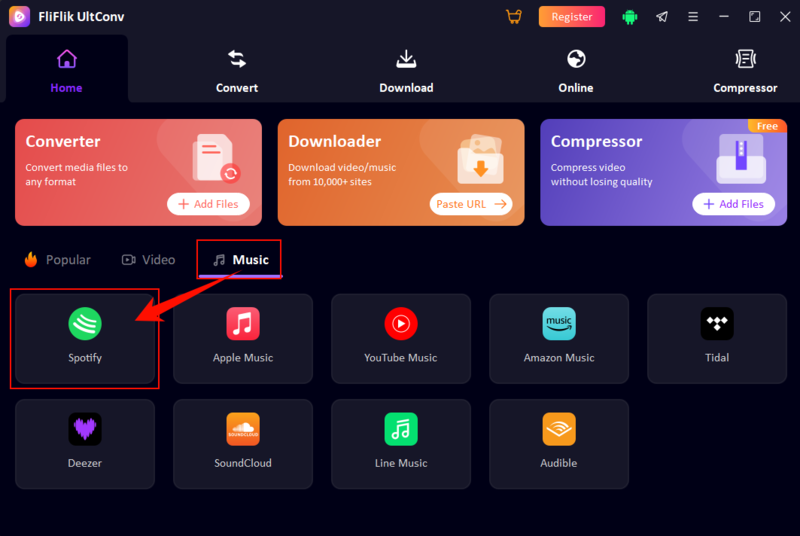
In the main interface, go to the Music section under the Home tab and click on the Spotify icon to continue.
-
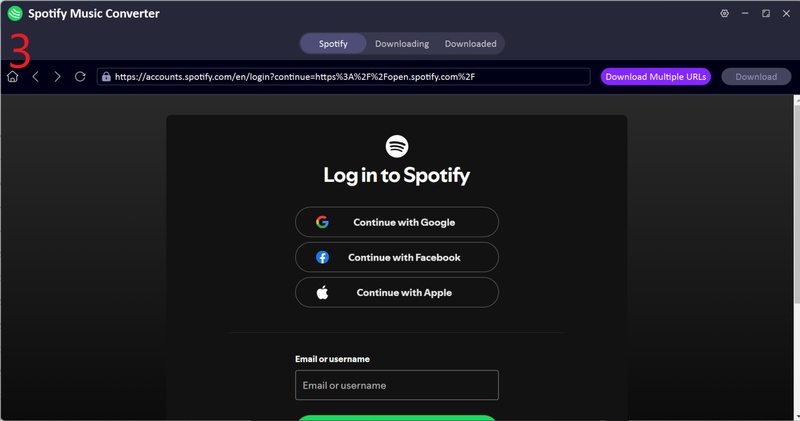
Sign in to your Spotify account using the built-in web player. You can use both free and Premium Spotify accounts.
-
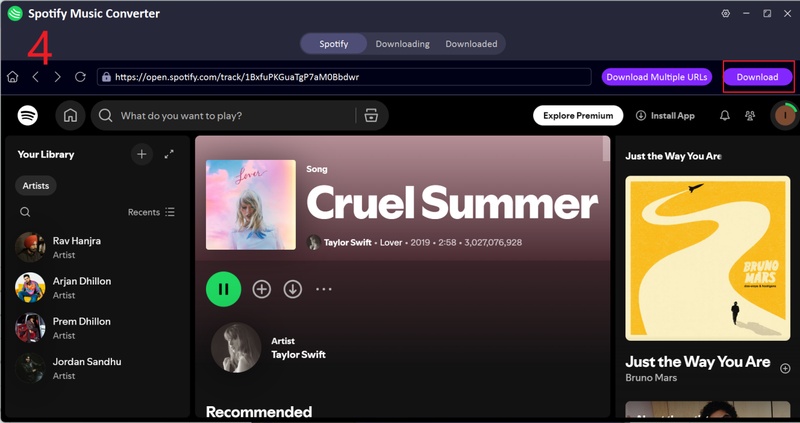
Browse your library and open the song, album, or playlist you want. This is where you can easily rip Spotify playlists to MP3 or download single tracks. Click the Download button to start saving your selected music.
-
After you click the Download button, the tool will process everything automatically.
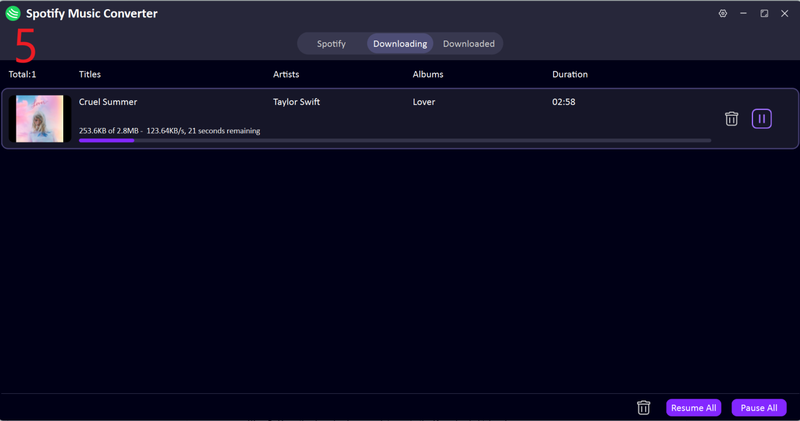


After completion, go to the Downloaded section to find your saved music files. This is the best way to keep songs offline with full ID3 tags and artwork.
2. spotDL
spotDL is a free and open-source command-line tool that allows users to download Spotify songs, albums, and playlists by matching them with sources available online. It is mainly used by developers and advanced users who are comfortable working with terminal commands.
- Free and open-source tool
- Supports downloading full playlists and albums
- Works with Spotify links directly
- High level of customization and control
- Lightweight and runs on most systems
- Good for batch downloading music
- Requires Python and FFmpeg installation
- No graphical user interface (command-line only)
- Not beginner-friendly
- Occasional errors with track matching
- Max audio quality is limited in 256 kbps (YouTube Premium users only)
▼ How to rip songs from Spotify with spotDL?
If you’re ready to try SpotDL, here’s a simple step-by-step guide to install and use it. Follow these instructions carefully to get SpotDL up and running on your computer.
-
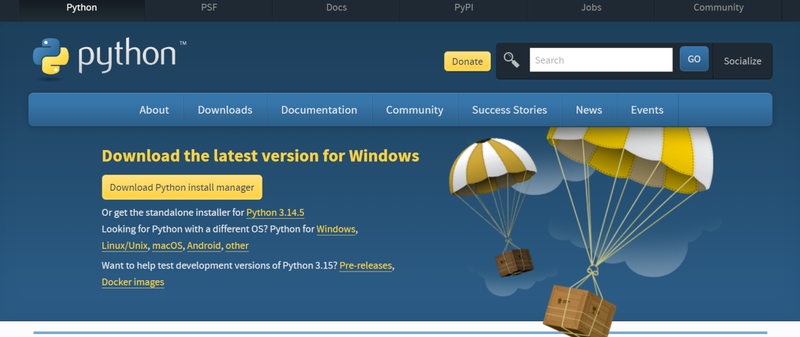
Step 1: Go to the official Python website and download the latest Python 3 version. During installation, make sure to check “Add Python 3.x to PATH” before clicking Install.
-
Step 2: For Windows: Download FFmpeg from https://www.gyan.dev/ffmpeg/builds/, extract it, and add the bin folder to the system PATH.
-
Step 3: Open Command Prompt or Terminal and type: pip install spotdl
-
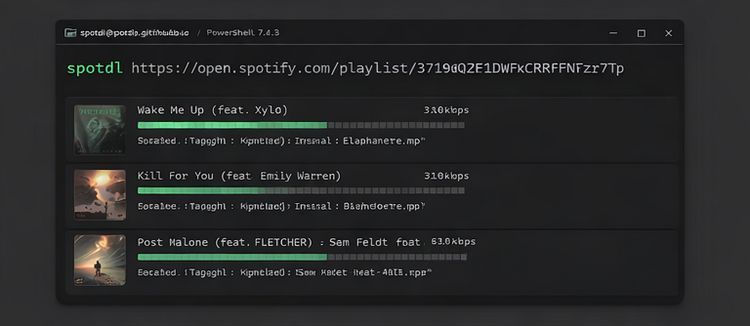
Step 4: To download a song: spotdl https://open.spotify.com/track/xxxxx
To download a playlist or album: spotdl https://open.spotify.com/playlist/xxxxx
To choose a folder: spotdl \URL\ –output “C:\Music”


Part 3. 2 Tools to Rip Music from Spotify on Android & iOS Phone
In this section, we will explore two mobile tools that help users save Spotify music directly on Android and iOS devices.
1. FliFlik UltConv for Android
When it comes to downloading music on Android, FliFlik UltConv for Android stands out as one of the most versatile tools for users who want an easy way to save Spotify songs and playlists offline. It is not limited to Spotify only; it supports over 1,000 streaming platforms, including YouTube, SoundCloud, TikTok, Instagram, and more. This makes it a flexible option for users who want all their favorite music in one place. It allows users to download individual tracks or full playlists while keeping audio quality up to 320 kbps. With its built-in browser, batch download feature, and fast conversion speed, it becomes a convenient choice for mobile users who want quick access to offline music anytime.
- Supports 1,000+ streaming websites
- High-quality audio up to 320 kbps
- Batch download for playlists and albums
- Built-in browser for easy searching
- Fast download and conversion speed
- Installation required
▼ How to Rip Music from Spotify with FliFlik UltConv for Android?
-
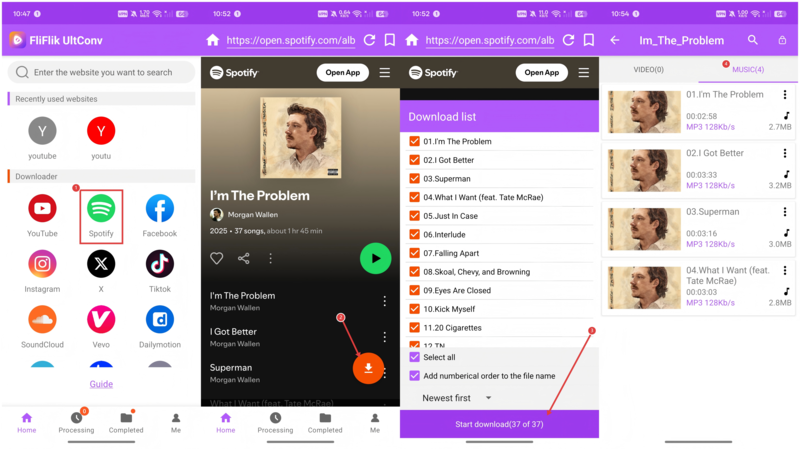
Step 1: Download and install the FliFlik UltConv App on your Android device. You can start with the free trial to test its features.
-
Step 2: Open the app and sign in if required. Use the built-in browser to search or paste your Spotify playlist or song link.
-
Step 3: Tap the Download button. Choose your preferred format such as MP3 for audio or MP4 if available, and select the quality up to 320 kbps.
-
Step 4: Press Start Download. Your music will be saved directly to your device and ready for offline listening anytime.

2. Telegram Bots
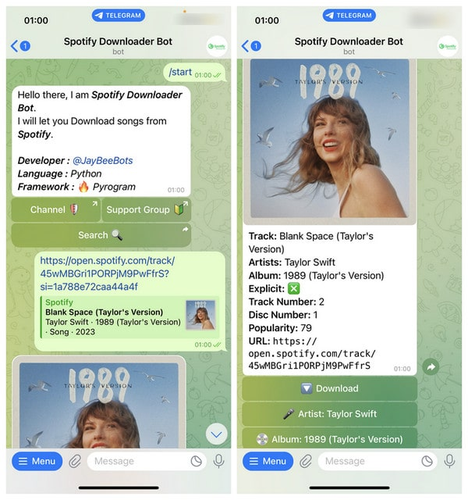
Telegram music bots are small but powerful tools built directly inside Telegram. They work like chat-based downloaders where you simply send a message, paste a Spotify link, or type a song name, and the bot replies with downloadable audio files. In simple words, these bots act like a lightweight Spotify to MP3 converter inside a chat app, making it easy to get songs without installing extra software or visiting websites. Some advanced bots also support playlists, batch downloads, and higher-quality audio like 320kbps MP3.
- Free and easy to use
- Works directly inside Telegram
- Supports songs, albums, and playlists
- Some bots offer 320kbps quality
- No extra software required
- Audio quality varies by bot
- Many bots stop working frequently
- Limited or unreliable batch downloads
- Inconsistent success rate
▼ How to Download Spotify Songs with a Telegram Bot?
-
Step 1: Install Telegram on your device (Android, iOS, Windows, or Mac).
-
Step 2: Search for a Spotify downloader bot or open a bot link, then tap Start or send /start.
-
Step 3: Open Spotify, copy the song, album, or playlist link (Share > Copy Link), then paste it into the bot chat. You can also type the song name.
-
Step 4: Wait for the bot to process the request and select the download option (usually MP3 128kbps or 320kbps).

Part 4. 2 Tools to Rip Music from Spotify Free Online
In this section, we will look at two online tools that help users save Spotify music without installing any software.
1. SpotiDown
SpotiDown is a free online Spotify downloader that allows users to convert Spotify songs, albums, and playlists into MP3 files. It works directly in the browser, so there is no need to install any app or software.
- Free and easy to use
- No installation required
- Works in any browser
- Supports songs and playlists
- Simple copy-paste process
- Limited audio quality options
- Ads on the website
- Does not support all playlists
- Depends on third-party servers
▼ How to Rip Music from Spotify for Free with SpotiDown?
-
Step 1: Open Spotify and copy the song, album, or playlist link.
-
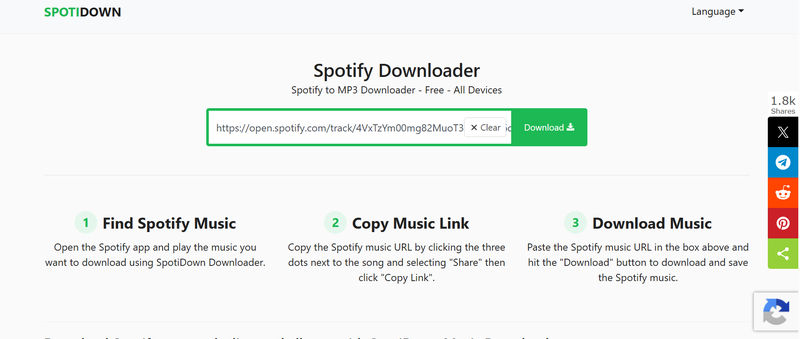
Step 2: Open the SpotiDown website in your browser.
-
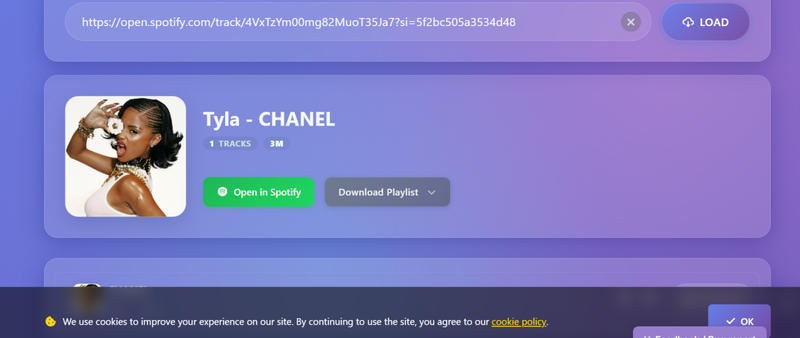
Step 3: Paste the Spotify link into the input box and click Download.
-
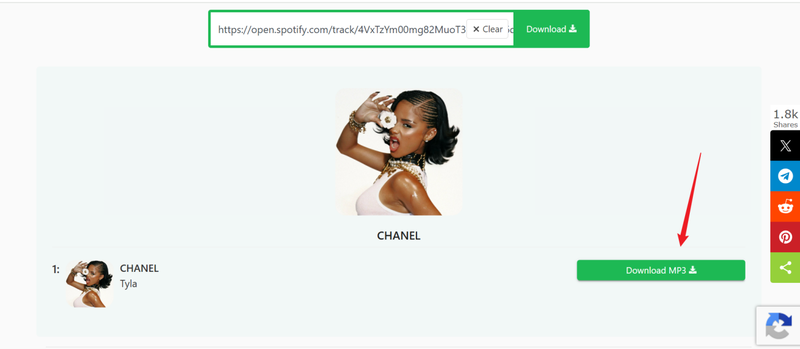
Step 4: Choose the MP3 option and download your music to your device.


2. SpotiSaver
SpotiSaver is another free online Spotify music downloader that lets users save tracks, albums, and playlists directly from Spotify links. It is designed for quick use without any setup, making it ideal for users who want fast results.
- Free browser-based tool
- No registration needed
- Supports Spotify songs and playlists
- Quick conversion process
- Limited advanced features
- Show ads
- Sometimes slow during peak use
▼ How to Rip Music from Spotify for Free with SpotiSaver?
-
Step 1: Copy the Spotify song or playlist link from the Spotify app.
-
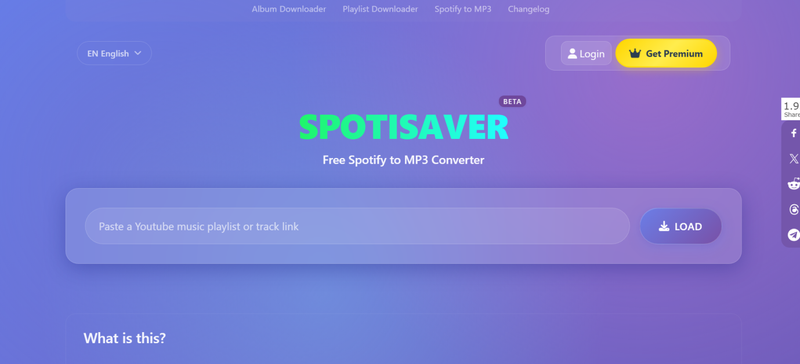
Step 2: Open the SpotiSaver website in your browser.
-
Step 3: Paste the link into the search box and press Download.
-
Step 4: Click the download button and save the file to your device.


Final Words
In today’s world, many users look for ways to rip music from Spotify so they can enjoy their favorite tracks offline without internet limits or app restrictions. In this article, we explored several tools that help you save Spotify songs, playlists, and albums in different formats, whether you’re using a PC, Mac, Android, iOS, or even Telegram bots and online downloaders. If you want a smoother and more reliable experience, FliFlik UltConv Music Ripper is a strong all-in-one option. It supports multiple platforms, high-quality audio downloads, and easy playlist conversion, making offline music access simple and convenient.
 Secure Download
Secure Download
Secure Download