

 By
By  8 minutes read


Streaming and downloading tools like Lucida.to change very quickly, and many users have recently started looking for a reliable Lucida.to alternative after facing issues like slow downloads, broken links, limited features, or website downtime. While Lucida.to has been a popular option for downloading music from different platforms, it may not always offer the best experience for every user.
That’s why many people are now exploring better alternatives that provide faster downloads, higher quality, safer browsing, and support for more websites. In this article, we’ll review Lucida.to, discuss its pros and cons, and introduce some of the best Lucida.to alternatives in 2026 that can help you download music more easily and reliably.

Part 1. What is Lucida.to?

Lucida.to is a browser-based music-downloading website that allows users to download songs from platforms such as Qobuz, Tidal, Deezer, SoundCloud, Amazon Music, and more. The platform became popular because it offers high-quality music downloads, including MP3 and FLAC formats, without requiring users to install software or create an account. Users simply paste a song link into the website and choose the format they want to download.
One of the biggest reasons people use Lucida.to is its support for high-bitrate and lossless audio downloads. It also supports metadata preservation, meaning downloaded files retain details such as album artwork, artist name, and track information. The website works entirely online, making it convenient for users who want a quick and simple downloading process.
However, Lucida.to also has several limitations. Many users report issues like slow download speeds, failed playlist downloads, server timeouts, and website downtime. Since it operates in an unofficial way, the site may frequently change domains or stop working temporarily. Some online security scanners have also flagged the site as potentially risky, so users should be careful when using it.
Part 2. Real Reviews to Lucida.to Downloader
From a user perspective, Lucida.to is a tool that many people like because it supports high-quality music downloads and works with multiple streaming platforms. However, real user feedback also shows that the experience is often inconsistent. While some users successfully download albums and playlists, many others complain about failed downloads, endless retry loops, server issues, and unstable performance.

Several users mentioned that Lucida.to has become less reliable over time. Some reported needing to constantly click the retry button just to finish downloading an album, while others said certain platforms or songs stopped working completely. A few users even started searching for alternatives because downloads would fail too often or only partial tracks were available. Overall, most users agree that the idea behind Lucida.to is good, but the actual experience can feel frustrating and unreliable at times.
- Supports multiple streaming platforms like Qobuz, Tidal, Deezer, and SoundCloud
- Allows high-quality audio downloads, including FLAC
- No software installation required
- Simple paste-and-download process
- Preserves metadata like artist name and album artwork
 What I Dislike About Lucida.to
- Downloads often fail or get stuck on retry
- Website performance can feel unstable and unreliable
- Some albums require constant manual retrying
- Certain platforms support disappears over time
- Users report server errors and incomplete downloads
- Some songs only download as short clips instead of full tracks
- The website may go offline or change domains unexpectedly
- Community support experiences can be inconsistent for some users
Part 3. 4 Best Lucida.to Alternatives to Download Music Free
Because Lucida.to can sometimes feel unstable or unreliable, many users now search for better alternatives with faster downloads and more consistent performance. Some tools also offer better audio quality, playlist support, and support for more music platforms. Below, we’ll introduce 4 of the best Lucida.to alternatives in 2026 and compare their main features, pros, and limitations.
Contents
Top 1: FliFlik UltConv Music Downloader
FliFlik UltConv Music Downloader is one of the best Lucida.to alternatives for users who want a more stable and reliable way to download music. Instead of dealing with retry errors, broken downloads, or missing platform support, UltConv Music Downloader offers a smoother experience.
Unlike browser-based tools that depend on unstable servers, UltConv Music Downloader is not only a Spotify downloader but is also designed as a full music downloading solution for both Windows and Mac users. It supports almost all the major platforms that Lucida.to supports, including Qobuz, Tidal, Deezer, SoundCloud, Amazon Music, Bandcamp, and more. The tool focuses heavily on smooth music downloading, allowing users to save songs, playlists, albums, podcasts, and artists in multiple formats like MP3, FLAC, WAV, AAC, and M4A. It also supports lossless audio quality up to 320kbps, fast batch downloading, and automatic ID3 tag preservation, making downloaded music much easier to organize and enjoy offline.

- Download songs, playlists, albums, podcasts, and artists
- Supports Spotify, Qobuz, Tidal, Deezer, SoundCloud, and 10,000+ music platforms
- Convert music to MP3, FLAC, WAV, AAC, M4A, and other formats
- Supports high-quality and lossless audio downloads up to 320kbps
- Batch download entire playlists and albums at high speed
- Keeps ID3 tags and metadata like artist name and album artwork
- No Premium account required for many supported platforms
▼ Steps to Download Spotify Music with FliFlik UltConv Music Downloader
-
Download and install FliFlik UltConv Music Downloader on your Windows PC or Mac. Once the installation is complete, launch the software to get started.
FREE DOWNLOAD![secure download]() Secure Download
FREE DOWNLOAD
Secure Download
FREE DOWNLOAD![secure download]() Secure Download
Secure Download
-
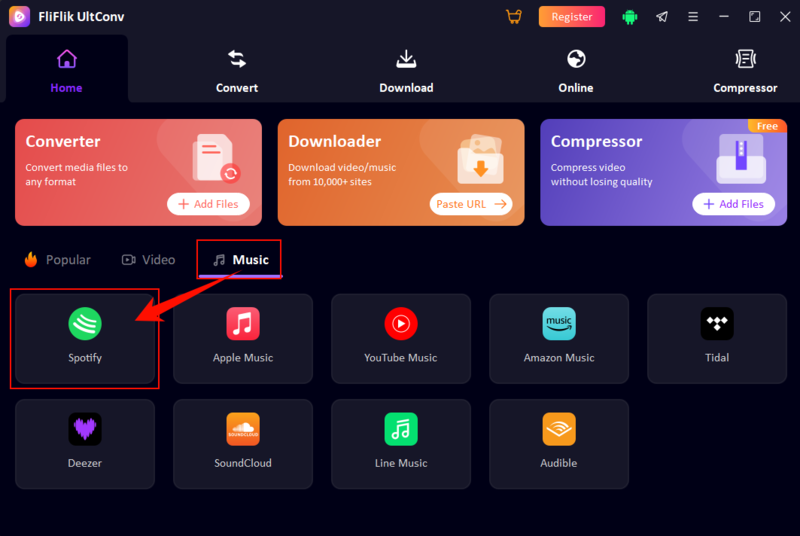
Open the Music section under the Home tab and choose the music platform you want to use, such as Spotify, Tidal, Deezer, SoundCloud, or Amazon Music.
-
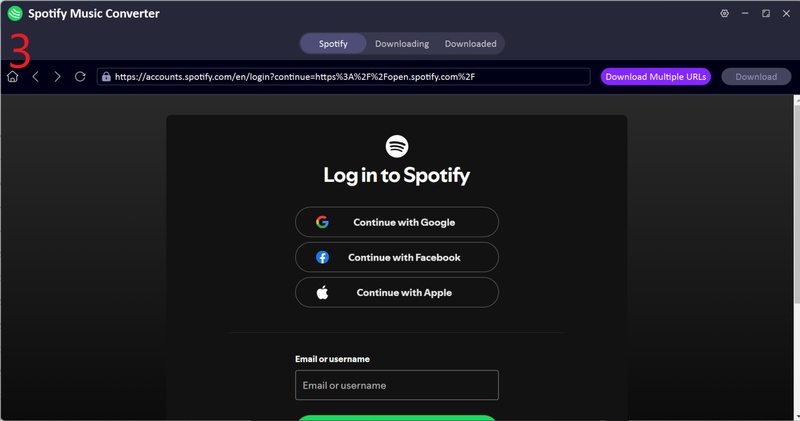
Sign in to your Spotify account through the built-in web player. Both free and Premium accounts can be used.
-
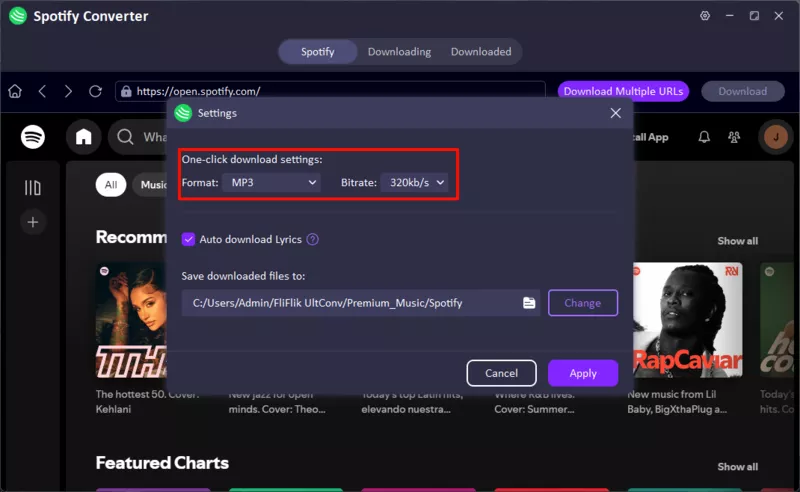
Open the Settings menu and select MP3 or FLAC as the output format. You can also set the audio quality to 320kbps for better sound quality.
-
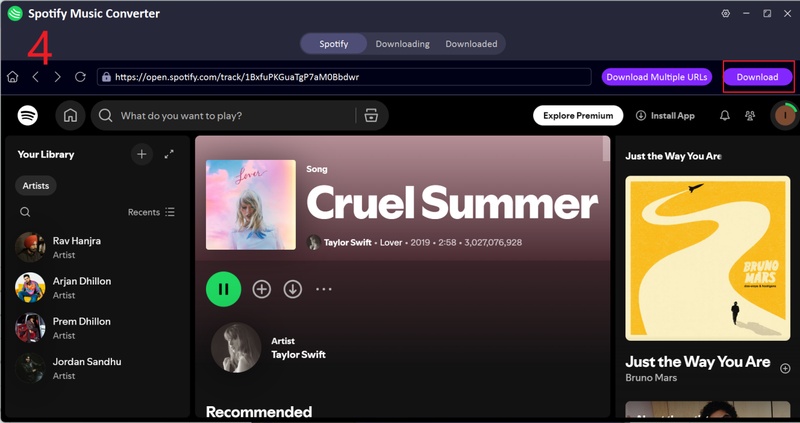
Find the Spotify song, album, or playlist you want to download. Then, click the Download button.
-
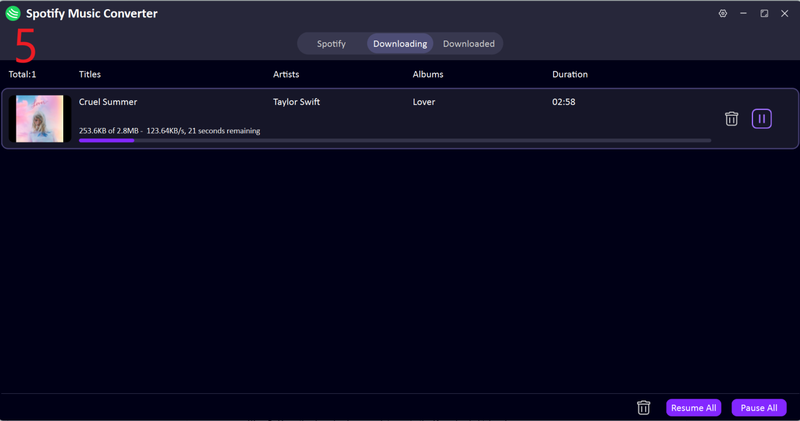
After converting, all the files will be available under the ” Downloaded ” tab. Play them on your device whenever you want.


Top 2: Cobalt.tools

Cobalt.tools is another simple web-based downloader that allows users to save videos and audio from multiple online platforms. Many users like it because the interface is clean and lightweight and does not feel overloaded with ads or pop-ups. It is mainly designed for quick downloads and basic media conversion directly from the browser. However, it is more focused on general media downloading rather than advanced music downloading features like lossless audio, metadata preservation, or large playlist support.
- Clean and simple interface
- No installation required
- Supports multiple websites
- Fast basic downloads
- Works directly in browser
- Limited advanced music features
- No batch playlist downloading
- Audio format options are limited
- Less stable for large downloads
- Not focused on lossless music downloads
Top 3: Qobuz-DL

Qobuz-DL is an open-source music downloader designed mainly for downloading music from Qobuz. It is popular among advanced users because it supports high-resolution and lossless audio downloads, making it a strong option for users who care deeply about music quality. Unlike simple browser downloaders, Qobuz-DL works through command-line tools, which can feel difficult for beginners. While it offers strong audio quality support, setup and usage are more technical compared to beginner-friendly tools like UltConv Music Downloader.
- Supports high-resolution and lossless audio
- Good for Qobuz music downloads
- Open-source and customizable
- Supports metadata saving
- Requires technical setup
- Command-line based interface
- Not beginner-friendly
- Mainly focused on Qobuz only
- No simple graphical interface
Top 4: Streamrip

Streamrip is another open-source music downloader that supports multiple music platforms like Qobuz, Tidal, Deezer, and SoundCloud. It is known for high-quality music downloading and is often used by users who want more control over downloading settings and audio formats. While Streamrip supports more platforms than some other open-source tools, it still requires installation and technical knowledge to configure properly. For casual users, the setup process may feel complicated compared to simpler all-in-one downloaders.
- Supports multiple streaming platforms
- High-quality audio downloads
- Supports FLAC and lossless formats
- Open-source project
- Playlist and album support
- Technical setup required
- Not beginner-friendly
- Command-line usage can be complex
- Updates and stability may vary
- No simple built-in GUI for easy downloading
Part 4: Comparison Table of 4 Best Lucida.to Alternatives
Free Lucida.to alternatives are often chosen based on how well they handle supported platforms, audio quality, speed, and batch downloading. Some tools are better for high-quality music extraction, while others focus on simplicity or quick web-based downloads. However, most free tools still struggle with stability, DRM handling, or advanced batch features compared to more complete downloaders. Below is a simple comparison of the top alternatives:
| Feature | FliFlik UltConv | Cobalt.tools | Qobuz-DL | Streamrip |
|---|---|---|---|---|
| Supported Platforms | 10,000+ sites (Spotify, Qobuz, Tidal, etc.) | Limited web platforms | Qobuz only | Qobuz, Tidal, Deezer, more |
| Supported Formats | MP3, FLAC, WAV, AAC, M4A, 100+ formats | MP3 (basic) | FLAC, MP3 | FLAC, MP3, AAC |
| Max Quality | High (up to 320kbps + lossless) | Medium | High (lossless) | High (lossless) |
| Batch Download | Yes (full playlists/albums) | No | Limited | Yes |
| DRM Content | DRM-free output support | No | Partial support | Partial support |
| Best For | Fast + beginner friendly | Easy but limited | Technical setup | Advanced users |
Final Words
Finding a reliable Lucida.to alternative is important if you want stable downloads, better speed, and consistent, high-quality audio without failed links or interruptions. While Lucida.to can still work for basic use, many users now prefer tools that support more platforms, faster processing, and smoother batch downloading for playlists and albums. If you want a more complete and hassle-free experience, FliFlik UltConv Music Downloader is a strong choice. It supports multiple music platforms, high-quality audio formats, and fast batch downloads, making it a more reliable solution for everyday music downloading needs. Try UltConv Music Downloader if you want a simpler, faster, and more stable way to save your favorite music offline.
 Secure Download
Secure Download
Secure Download
FAQs about Lucida. to
Q1. Is Lucida.to safe to use?
Lucida.to can work for downloads, but safety depends on the mirror site and usage conditions. Some users report concerns about reliability and pop-ups, so caution is recommended.
Q2. Is Lucida trustworthy?
It is partially trustworthy for basic downloads, but user experiences vary due to unstable performance and inconsistent availability.
Q3. Is Lucida actually lossless?
Lucida.to can provide lossless audio in some cases, but quality depends on the source platform and file availability, so results are not always guaranteed.
